FindWindow vs EnumWindows: Finding Windows in Win32
Find another program's window with FindWindow: class name vs title, partial matches via EnumWindows, the ANSI build trap, UIPI, and a C# LibraryImport version.
Revised November 2026. This tutorial first appeared in Korean in 2021. The original called a window handle "an integer" and printed it with
printf("%d", hwnd), which GCC flags with-Wformat; it also described the second parameter ofFindWindowExincorrectly. Its example target, Minesweeper, has not shipped with Windows since Windows 8, so that example and its screenshot are gone. All C++ code here was compiled for Windows with MinGW-w64 (GCC 16.2.0); none of it was run on this machine, which is a Mac. The C# version was built with the .NET 10 SDK, also without running it. We show no invented output; behavior is described from the Microsoft Learn documentation.
This article is for developers who need to check whether another program's window is open, or get the handle of a button inside it for automation. The short version: if you know the class name, call FindWindowW(className, NULL); if the title is fixed, FindWindowW(NULL, title); if you only know part of the title, enumerate with EnumWindows and compare yourself. What you can then do with the handle depends on the other process's privilege level — UIPI.
What FindWindow and FindWindowEx really do
HWND FindWindowW(LPCWSTR lpClassName, LPCWSTR lpWindowName);
HWND FindWindowExW(HWND hWndParent, HWND hWndChildAfter,
                   LPCWSTR lpszClass, LPCWSTR lpszWindow);
Some of the 2021 text holds up: NULL for either argument means "any", the comparison is case-insensitive, and there is no partial matching. On success you get an HWND; on failure, NULL. (The old text spelled the first parameter IpClassName; it is lpClassName, with a lowercase L for "long pointer".)
Three points needed correcting:
FindWindowsearches top-level windows only. Child windows such as buttons and edit boxes are never matched.- The second parameter of
FindWindowEx,hWndChildAfter, is not "the child window's handle". It is where the search starts: the search begins with the child that follows it in Z order, andNULLstarts at the first child. Passing the previous result back in lets you walk through several buttons of the same class.FindWindowExalso searches direct children only, never grandchildren. hWndParent == NULLmeans "children of the desktop", i.e. top-level windows. The old sample calledFindWindowEx(h1, ...)even whenh1wasNULL, so with the form closed it went looking for a top-level window titled "button". Check the parent before searching inside it.
A handle is also not just "a number the OS assigns". HWND is an opaque, pointer-sized value — 8 bytes in a 64-bit process. The documentation does guarantee that only the lower 32 bits are significant so that 32- and 64-bit processes can exchange handles, but %d is still the wrong format.
Compiling the 2021 code with MinGW
We compiled both original samples with x86_64-w64-mingw32-g++ -Wall. The first one (checking whether Minesweeper is running) compiled cleanly. The second one (printing the form and button handles) produced:
find2021b.cpp:10:31: warning: format '%d' expects argument of type 'int', but argument 2 has type 'HWND' {aka 'HWND__*'} [-Wformat=]
   10 |         printf("폼의 핸들값: %d\n버튼의 핸들값: %d\n", h1, h2);
find2021b.cpp:10:50: warning: format '%d' expects argument of type 'int', but argument 3 has type 'HWND' {aka 'HWND__*'} [-Wformat=]
Passing (void*)h1 to %p silences it. We dropped the handle values and the "Press any key to continue" line from the old output: handle values differ on every run, and that last line comes from Visual Studio's console host, not from the program.
The bigger bug hid in the sample that compiled without warnings. Look at the import table:
$ x86_64-w64-mingw32-objdump -p find2021a.exe | grep FindWindow
    00008420  <none>  010f  FindWindowA
MinGW does not define UNICODE, so FindWindow became the ANSI function FindWindowA. GCC, meanwhile, stores string literals as UTF-8. Searching the exe for the Korean title from the original sample, we found its UTF-8 bytes (ec a7 80 …, 13 bytes) and not its code page 949 bytes (c1 f6 b7 da …, 9 bytes). FindWindowA interprets the bytes it receives in the system's ANSI code page, so on a Korean system it searches for a different string and reports "not running" even while the window is open. The same applies to any non-ASCII title — accented Latin characters on code page 1252 included. In 2021 the project was built by Visual Studio as Unicode, which hid the problem.
We confirmed that -fexec-charset=CP949 puts the CP949 bytes into the exe, but that only moves the breakage to PCs with another code page. The real fix is FindWindowW with an L"..." literal; with -DUNICODE the import switched to FindWindowW and the exe contained the UTF-16 string.
Search by class name; use EnumWindows for partial matches
Titles change more often than you think. Notepad's title includes the file name, a different display language translates it, and a browser's title follows the active tab. The class name is the more stable key. You can read it with Spy++ (included with Visual Studio) or Inspect from the Windows SDK. Classic Notepad registered the class Notepad; apps get rewritten (Windows 11 shipped a new Notepad), so check the class on the version you target.
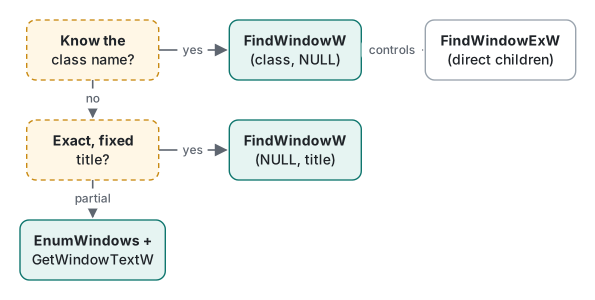
For a partial title match, FindWindow is useless: enumerate every top-level window with EnumWindows and compare. The program below shows all three techniques:
// find.cpp — FindWindowW / FindWindowExW / EnumWindows, Unicode build
#include <windows.h>
#include <cstdio>
#include <cwchar>
#include <string>

// case-insensitive "contains" for window titles
static bool ContainsNoCase(const wchar_t* text, const wchar_t* part)
{
    std::wstring t(text), p(part);
    CharLowerBuffW(t.data(), static_cast<DWORD>(t.size()));
    CharLowerBuffW(p.data(), static_cast<DWORD>(p.size()));
    return t.find(p) != std::wstring::npos;
}

struct Search { const wchar_t* part; int hits; };

static BOOL CALLBACK OnWindow(HWND hwnd, LPARAM lp)
{
    auto* s = reinterpret_cast<Search*>(lp);
    if (!IsWindowVisible(hwnd)) return TRUE;           // skip hidden helpers
    wchar_t title[256], cls[256];
    if (GetWindowTextW(hwnd, title, 256) == 0) return TRUE;
    GetClassNameW(hwnd, cls, 256);
    if (ContainsNoCase(title, s->part)) {
        DWORD pid = 0;
        GetWindowThreadProcessId(hwnd, &pid);
        wprintf(L"%p  pid=%lu  class=%ls  title=%ls\n", (void*)hwnd, pid, cls, title);
        s->hits++;
    }
    return TRUE;                                       // FALSE stops the enumeration
}

int wmain(int argc, wchar_t** argv)
{
    // 1) exact match by class name: stable across languages and documents
    HWND byClass = FindWindowW(L"Notepad", nullptr);
    wprintf(L"FindWindowW(L\"Notepad\", NULL) -> %p\n", (void*)byClass);

    // 2) all direct children of that window, one after another
    for (HWND child = nullptr;
         byClass && (child = FindWindowExW(byClass, child, nullptr, nullptr)); ) {
        wchar_t cls[256];
        GetClassNameW(child, cls, 256);
        wprintf(L"  child %p  class=%ls\n", (void*)child, cls);
    }

    // 3) partial, case-insensitive title match: FindWindow cannot do this
    Search s{ argc > 1 ? argv[1] : L"notepad", 0 };
    EnumWindows(OnWindow, reinterpret_cast<LPARAM>(&s));
    wprintf(L"%d window(s) contain \"%ls\"\n", s.hits, s.part);
    return 0;
}
$ x86_64-w64-mingw32-g++ -std=c++17 -Wall -Wextra -O2 -municode find.cpp -o find.exe -luser32
$ file find.exe
find.exe: PE32+ executable (console) x86-64, for MS Windows
$ x86_64-w64-mingw32-objdump -p find.exe | grep -E "FindWindow|EnumWindows|GetWindowText"
    0000e600  <none>  0108  EnumWindows
    0000e608  <none>  0111  FindWindowExW
    0000e610  <none>  0112  FindWindowW
    0000e620  <none>  01ee  GetWindowTextW
Zero warnings, and every import is a W function. We did not run it, so there is no output to show. Things to keep in mind:
EnumWindowshands you invisible top-level windows too, and programs create plenty of hidden helper windows, so filtering withIsWindowVisibleis the norm.- Returning
FALSEfrom the callback stops the enumeration — useful when one match is enough. GetWindowTextWreads the caption of a top-level window in another process, but according to Microsoft Learn it cannot read the text of a control in another process. For that you must sendWM_GETTEXTyourself, and then UIPI (next section) applies.- To match "Notepad" as well as "notepad", the code lowercases both strings with
CharLowerBuffW;FindWindowdoes case-insensitive comparison for you, but only on the whole string.
UIPI: you can find it, but you may not touch it
User Interface Privilege Isolation, introduced in Windows Vista, stops a process with a lower integrity level from driving the windows of a higher one. Normal programs run at medium integrity; programs started "as administrator" run at high integrity.
What matters is what is blocked and what is not. FindWindow, EnumWindows and GetWindowText on a top-level caption work across integrity levels, so you can get the handle of an elevated program's window. Sending it most messages with SendMessage or PostMessage, faking input with SendInput, or hooking it, is blocked. The SendMessage documentation on Microsoft Learn says that when UIPI blocks a message, GetLastError returns 5 (access denied).
So when "FindWindow returns a handle but the button click does nothing", first check whether the target runs elevated. The fix is to run your tool at the same level; if you wrote both programs, the receiver can let specific messages in with ChangeWindowMessageFilterEx. That is continued, with a diagram, in SendMessage vs PostMessage.
The same search from C# with LibraryImport
On .NET 10 with LibraryImport (net10.0-windows, AllowUnsafeBlocks on):
using System.Runtime.InteropServices;

string part = args.Length > 0 ? args[0] : "notepad";

nint byClass = Native.FindWindowW("Notepad", null);
Console.WriteLine($"FindWindowW(\"Notepad\", null) -> 0x{byClass:X}");

var hits = new List<(nint Hwnd, uint Pid, string Title)>();
Native.EnumWindows((hwnd, _) =>
{
    if (!Native.IsWindowVisible(hwnd)) return true;
    int len = Native.GetWindowTextLengthW(hwnd);
    if (len == 0) return true;
    var buf = new char[len + 1];
    int n = Native.GetWindowTextW(hwnd, buf, buf.Length);
    var title = new string(buf, 0, n);
    if (title.Contains(part, StringComparison.OrdinalIgnoreCase))
    {
        Native.GetWindowThreadProcessId(hwnd, out uint pid);
        hits.Add((hwnd, pid, title));
    }
    return true;                       // false stops the enumeration
}, 0);

foreach (var (h, pid, title) in hits)
    Console.WriteLine($"0x{h:X}  pid={pid}  {title}");

static partial class Native
{
    public delegate bool EnumWindowsProc(nint hwnd, nint lParam);

    [LibraryImport("user32.dll", StringMarshalling = StringMarshalling.Utf16)]
    public static partial nint FindWindowW(string? lpClassName, string? lpWindowName);

    [LibraryImport("user32.dll")]
    [return: MarshalAs(UnmanagedType.Bool)]
    public static partial bool EnumWindows(EnumWindowsProc callback, nint lParam);

    [LibraryImport("user32.dll")]
    [return: MarshalAs(UnmanagedType.Bool)]
    public static partial bool IsWindowVisible(nint hwnd);

    [LibraryImport("user32.dll")]
    public static partial int GetWindowTextLengthW(nint hwnd);

    [LibraryImport("user32.dll", StringMarshalling = StringMarshalling.Utf16)]
    public static partial int GetWindowTextW(nint hwnd, Span<char> text, int maxCount);

    [LibraryImport("user32.dll")]
    public static partial uint GetWindowThreadProcessId(nint hwnd, out uint processId);
}
dotnet build -c Release -r win-x64 -p:EnableWindowsTargeting=true built it without warnings into a PE32+ executable (console) x86-64. On the way there we hit these real diagnostics:
- The old-style
[DllImport("user32.dll", CharSet = CharSet.Unicode)]declaration, with SYSLIB1054 raised to a warning in.editorconfig, giveswarning SYSLIB1054: Mark the method 'FindWindow' with 'LibraryImportAttribute' instead of 'DllImportAttribute' …. At its default "info" severity it does not appear in build output. - Leaving out
StringMarshallinggives, for each string parameter,error SYSLIB1051: Marshalling string or char without explicit marshalling information is not supported.LibraryImportnever silently picks ANSI the wayDllImportdoes by default, so the ANSI trap above becomes a compile error in C#. - Our first buffer parameter was
[Out] char[], which failed witherror SYSLIB1051: Runtime marshalling must be disabled in this project … to enable marshalling this type. Changing it toSpan<char>fixed it; an array converts toSpan<char>implicitly.
The lambda passed to EnumWindows is marshalled as a delegate. In the generated source we could see Marshal.GetFunctionPointerForDelegate before the call and GC.KeepAlive after it. That is enough for an API that uses the callback only during the call, like EnumWindows. A callback that is called later — a window procedure, for example — needs its lifetime managed by you; CreateWindowEx and ShowWindow shows that case.
Which method, when
| Situation | Use |
|---|---|
| Your own window, or any window whose class you know | FindWindowW(L"Class", nullptr) |
| A fixed, exactly known title | FindWindowW(nullptr, L"Title") |
| Part of a title, any case, several hits | EnumWindows + GetWindowTextW |
| Buttons and edit boxes inside a window | Repeat FindWindowExW(parent, previous, L"Button", …); for deeper trees, EnumChildWindows |
| Preventing a second instance of your app | A named mutex (CreateMutexW) is more reliable than FindWindow |
| Controlling an elevated program | Run your tool elevated too (UIPI) |
Sending a click or text to the handle you found continues in SendMessage vs PostMessage.
Tested with MinGW-w64 x86_64-w64-mingw32-g++ (GCC) 16.2.0 and .NET SDK 10.0.403 (EnableWindowsTargeting=true) on macOS (Apple Silicon). Compiled for Windows; not run on this machine.
FAQ
Can FindWindow match part of a window title?
No. FindWindow ignores case, but the whole title must match. To find every window whose title contains a word, enumerate top-level windows with EnumWindows, read each title with GetWindowTextW and compare it yourself. Where possible, search by class name instead, because it does not change with the UI language or the open document.
FindWindow always returns NULL for a title with non-ASCII characters. Why?
Probably an ANSI build that calls FindWindowA. GCC stores string literals as UTF-8, while FindWindowA interprets the bytes in the system ANSI code page, so the title never matches. Use FindWindowW with an L"..." literal.
Can I find a window that belongs to a program running as administrator?
Yes. FindWindow and EnumWindows return handles regardless of integrity level. What UIPI blocks is acting on that window: most messages sent with SendMessage or PostMessage from a normal process are dropped. To control it, run your program at the same integrity level.