GetKeyState vs GetAsyncKeyState: What the Bits Mean
The high and low bits of GetKeyState and GetAsyncKeyState checked against the docs, queue vs physical state, and why WM_KEYDOWN beats polling.
Revised November 2026. This tutorial first appeared in Korean in 2021. Both C++ samples were recompiled for Windows with MinGW-w64 14.0.0 (GCC 16.2.0); they were not run on this machine, which is a Mac. Instead of output screenshots, this version relies on real compiler results and the behavior documented on Microsoft Learn. The 2021 table of GetAsyncKeyState return values had the meaning of the low bit backwards, and it described the low bit of GetKeyState as "pressed earlier", which is wrong: it is the toggle state. This version corrects the bits, explains which state each function reads, and shows what to use instead of a polling loop.
This article is for Win32 developers who need to know whether a key is down and are unsure whether to call GetKeyState or GetAsyncKeyState, or what & 0x8000 actually tests. The short answer: trust only the high bit (< 0 or & 0x8000). Inside a keyboard message handler, use GetKeyState; for the physical state at this instant, use GetAsyncKeyState. And in most programs, receiving events through WM_KEYDOWN or Raw Input is better than asking in a loop.
Two documented bits, and the 2021 table corrected
SHORT WINAPI GetAsyncKeyState(int vKey);
SHORT WINAPI GetKeyState(int nVirtKey);
Both functions return a 16-bit SHORT, and the documentation defines only two of its bits:
| Bit | GetAsyncKeyState | GetKeyState |
|---|---|---|
| High, 0x8000 | Key is down at the moment of the call | Key was down as of the last message this thread read |
| Low, 0x0001 | Key was pressed since the previous GetAsyncKeyState call (do not rely on it) | Key is toggled (for example Caps Lock is on) |
The 2021 table listed 0x8000 as "not pressed before, down now" and 0x8001 as "pressed before, down now". By the documentation it is the other way round. A set low bit means newly pressed since the last call, so the value you see at the first moment of a press is 0x8001, and a key that is simply being held, with no new press since your last call, gives 0x8000. A sentence elsewhere in the same 2021 article ("when first pressed, 0x8001") was actually right and contradicted the table.
More important: do not use that low bit. The Remarks section of GetAsyncKeyState on Microsoft Learn explains that it is kept only for compatibility with 16-bit Windows. Under preemptive multitasking, another application can call GetAsyncKeyState first and receive the "recently pressed" bit instead of yours. Testing only the high bit, as the 2021 sample code did with & 0x8000, was the right habit.
For GetKeyState, the 2021 article said a pressed key returns "a negative value (0xffffff80, 0xffffff81)". Those numbers are what a 16-bit value looks like after being widened to int and printed with %x. That part does not depend on Windows, so we checked it on the Mac with clang:
#include <cstdio>
#include <cstdint>
int main()
{
    const int16_t samples[] = {0x0000, 0x0001, (int16_t)0x8000, (int16_t)0x8001,
                               (int16_t)0xFF80, (int16_t)0xFF81};
    for (int16_t s : samples)
        std::printf("%6d  %%x=%-9x  down=%d  low=%d\n",
                    s, s, (s & 0x8000) != 0, s & 1);
}
     0  %x=0          down=0  low=0
     1  %x=1          down=0  low=1
-32768  %x=ffff8000   down=1  low=0
-32767  %x=ffff8001   down=1  low=1
  -128  %x=ffffff80   down=1  low=0
  -127  %x=ffffff81   down=1  low=1
(Apple clang 21.0.0, -std=c++20 -Wall -Wextra, no warnings.) Whether the value is 0xFF80 or 0x8000, a set high bit makes the SHORT negative, so < 0 and & 0x8000 always agree. The other bits carry no documented meaning, so never compare with == 0x8000. The 2021 claim that the low bit of GetKeyState "stays 1 if the key was pressed earlier" was also wrong. It is the toggle state, and it is meaningful for keys such as Caps Lock, Num Lock and Scroll Lock.
Queue state versus physical state
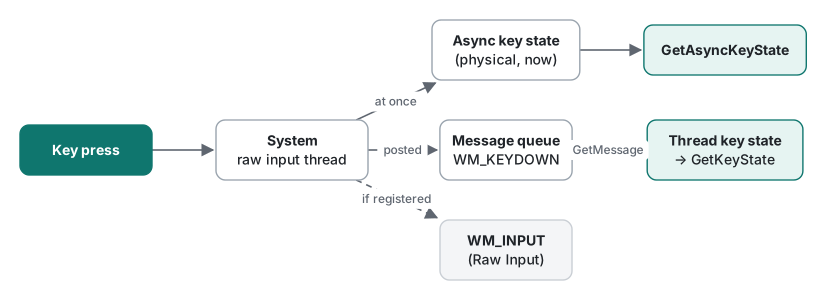
The real difference between the two functions is when the state they report was taken. The 2021 article said GetKeyState "depends on messages left in the queue". That points the right way; more precisely:
- GetAsyncKeyState reads the asynchronous key state, which the system updates as soon as hardware input arrives. It is the physical state at the moment you call.
- GetKeyState reads the calling thread's key state. That state advances only as the thread removes keyboard messages with
GetMessageorPeekMessage. The documentation puts it as: the status does not reflect the interrupt-level state of the hardware.
That is exactly why GetKeyState is often the better call. Suppose the user presses Ctrl+S and lets go quickly while your program is busy, so WM_KEYDOWN('S') is handled late. At that point GetAsyncKeyState(VK_CONTROL) says Ctrl is up, but GetKeyState(VK_CONTROL) reports the state as of the message being processed, so you correctly treat it as Ctrl+S. For modifier checks inside keyboard messages, GetKeyState is the right tool.
It also means the second 2021 sample, which moved an @ in a console window with GetKeyState, is not documented to work. A console program's thread owns no window and receives no keyboard messages, so nothing advances its thread key state. The 2021 article reported that it worked; we could not run it this time, so we will not claim either result. For console programs, the documented way to read keys is ReadConsoleInput, which returns key events.
Recompiling the 2021 samples, and what polling costs
Both 2021 samples, the GetAsyncKeyState version and the GetKeyState version, compiled with no errors or warnings under -Wall -Wextra. A quiet compiler says nothing about the design, though. The loop looked like this:
while (true) {
    gotoxy(x, y);
    putch('@');
    if (GetAsyncKeyState(VK_UP) & 0x8000) y--;
    // … DOWN, LEFT, RIGHT
    Sleep(50);
}
Problems with this approach:
- It misses short taps. It only asks "is the key down right now?" every 50 ms. A key pressed and released between two checks is never seen. Using the low bit to patch that brings back the problem above: other programs can steal it.
- It ignores focus.
GetAsyncKeyStateis system-wide, so arrow keys typed into a completely different window move the@. Watching the whole keyboard also looks like keylogging, and security software may treat it that way. - It wakes up for nothing. The loop runs 20 times a second with no input at all and still adds up to 50 ms of latency.
- It never checks bounds. When
xorygoes negative,SetConsoleCursorPositionfails and the return value is ignored.
In a game loop that renders every frame anyway, reading key state once per frame is common and reasonable. Even there, maintaining that state yourself from WM_KEYDOWN/WM_KEYUP or Raw Input events avoids problems 1 and 2.
The 2026 version: WM_KEYDOWN and Raw Input
// x86_64-w64-mingw32-g++ -municode -mwindows -Wall -Wextra keys2026.cpp -o keys2026.exe -luser32 -lgdi32
#include <windows.h>

static int g_x = 10, g_y = 10;

static LRESULT CALLBACK WndProc(HWND hwnd, UINT msg, WPARAM wp, LPARAM lp)
{
    switch (msg) {
    case WM_KEYDOWN: {
        bool repeat = (lp & (1L << 30)) != 0;               // bit 30: key was already down
        bool ctrl   = GetKeyState(VK_CONTROL) < 0;          // state as of THIS message
        int step = ctrl ? 10 : 1;
        if (repeat && wp == VK_SPACE) return 0;              // ignore auto-repeat for Space
        switch (wp) {
        case VK_UP:    g_y -= step; break;
        case VK_DOWN:  g_y += step; break;
        case VK_LEFT:  g_x -= step; break;
        case VK_RIGHT: g_x += step; break;
        default: return 0;
        }
        InvalidateRect(hwnd, nullptr, TRUE);
        return 0;
    }
    case WM_INPUT: {                                         // Raw Input: device-level keys
        RAWINPUT ri; UINT size = sizeof(ri);
        if (GetRawInputData((HRAWINPUT)lp, RID_INPUT, &ri, &size, sizeof(RAWINPUTHEADER)) != (UINT)-1
            && ri.header.dwType == RIM_TYPEKEYBOARD) {
            // ri.data.keyboard.VKey / MakeCode / Flags (RI_KEY_BREAK = released)
        }
        return DefWindowProcW(hwnd, msg, wp, lp);
    }
    case WM_PAINT: {
        PAINTSTRUCT ps;
        HDC dc = BeginPaint(hwnd, &ps);
        TextOutW(dc, g_x, g_y, L"@", 1);
        EndPaint(hwnd, &ps);
        return 0;
    }
    case WM_DESTROY:
        PostQuitMessage(0);
        return 0;
    }
    return DefWindowProcW(hwnd, msg, wp, lp);
}

int WINAPI wWinMain(HINSTANCE inst, HINSTANCE, PWSTR, int show)
{
    WNDCLASSW wc{};
    wc.lpfnWndProc = WndProc;
    wc.hInstance = inst;
    wc.hCursor = LoadCursorW(nullptr, (LPCWSTR)IDC_ARROW);
    wc.hbrBackground = (HBRUSH)(COLOR_WINDOW + 1);
    wc.lpszClassName = L"KeyDemo";
    RegisterClassW(&wc);
    HWND hwnd = CreateWindowExW(0, L"KeyDemo", L"Arrow keys (Ctrl = x10)", WS_OVERLAPPEDWINDOW,
                                CW_USEDEFAULT, CW_USEDEFAULT, 480, 320, nullptr, nullptr, inst, nullptr);

    RAWINPUTDEVICE rid{0x01, 0x06, 0, hwnd};               // usage page 1, usage 6 = keyboard
    RegisterRawInputDevices(&rid, 1, sizeof(rid));

    ShowWindow(hwnd, show);
    MSG m;
    while (GetMessageW(&m, nullptr, 0, 0) > 0) {            // sleeps until input arrives
        TranslateMessage(&m);
        DispatchMessageW(&m);
    }
    return (int)m.wParam;
}
It compiled with no warnings under -Wall -Wextra into a PE32+ executable (GUI) x86-64. It was not run. Because the entry point is wWinMain, MinGW needs -municode; leave it out and the linker really does stop with undefined reference to 'WinMain'.
- WM_KEYDOWN goes only to the window with keyboard focus. Bit 30 of
lParamis the previous key state, which tells you the message is an auto-repeat. If you want typed characters rather than keys, handleWM_CHAR, which already reflects the keyboard layout and the IME. - Raw Input delivers events straight from the keyboard device as
WM_INPUT. Use it to tell several keyboards apart or when a game needs scan codes. Receiving input while your window is in the background requires the explicitRIDEV_INPUTSINKflag, so that intent is visible in the code.
From C#, declare both functions with LibraryImport. We built this for net10.0-windows with -p:EnableWindowsTargeting=true -p:AnalysisMode=All; with AllowUnsafeBlocks and the assembly-level DefaultDllImportSearchPaths in place it produced zero warnings. (The SYSLIB1062 and CA5392 messages you get without them are quoted in the SetWindowText article.)
using System.Runtime.InteropServices;

[assembly: DefaultDllImportSearchPaths(DllImportSearchPath.System32)]

const int VK_SHIFT = 0x10, VK_CAPITAL = 0x14;

short async = Native.GetAsyncKeyState(VK_SHIFT);
short queued = Native.GetKeyState(VK_CAPITAL);
Console.WriteLine($"Shift down now : {async < 0}");          // high bit = sign bit
Console.WriteLine($"Caps Lock on   : {(queued & 1) != 0}");   // low bit = toggle (GetKeyState only)

static partial class Native
{
    [LibraryImport("user32.dll")]
    internal static partial short GetAsyncKeyState(int vKey);

    [LibraryImport("user32.dll")]
    internal static partial short GetKeyState(int nVirtKey);
}
One trap: declaring the return type as int instead of short also built with zero warnings under the same settings. The analyzers do not compare your signature with the Windows headers. The native function returns only 16 bits, and nothing guarantees the upper bits of an int are sign-extended, so a < 0 test on an int cannot be trusted. Match the header and use short.
Summary
- Trust one bit, the high bit: test with
< 0or& 0x8000. - The low bit of
GetAsyncKeyStateis often explained backwards, and the documentation says not to rely on it anyway. - The low bit of
GetKeyStateis the toggle state, not "was pressed earlier". - Inside keyboard messages, check modifiers with
GetKeyState; for the physical state right now,GetAsyncKeyState. - Prefer
WM_KEYDOWN/WM_CHARto polling, and Raw Input when you need device-level events.
Reading and writing window titles is covered in SetWindowText and GetWindowText, and finding the executable's folder in GetCurrentDirectory and GetModuleFileName.
FAQ
What is the difference between 0x8001 and 0x8000 from GetAsyncKeyState?
The high bit (0x8000) means the key is down at the moment of the call. The low bit (0x0001) means the key was pressed since the previous GetAsyncKeyState call. The 2021 version of this article had the two swapped. Microsoft says not to rely on the low bit at all, because another program's call can consume it, so test only & 0x8000 (or < 0).
When should I use GetKeyState instead of GetAsyncKeyState?
Use GetKeyState while handling a keyboard message such as WM_KEYDOWN, for example to see whether Ctrl or Shift was held: it reports the state as of that message. Use GetAsyncKeyState only when you need the physical state right now, independent of messages. Toggle state such as Caps Lock is only available from the low bit of GetKeyState.
Why is polling GetAsyncKeyState in a loop a poor design?
A 50 ms poll misses taps shorter than the interval, reacts to keys typed into other applications because it ignores focus, and wakes the CPU even when nothing happens. Windowed programs should handle WM_KEYDOWN; games and tools that need device-level input should use Raw Input (WM_INPUT).