GetWindowText Buffers, Unicode and Other-Process Text
SetWindowText and GetWindowText done right: sizing with GetWindowTextLength, an old sizeof bug, WM_GETTEXT for other apps' controls, and LibraryImport.
Revised November 2026. This tutorial first appeared in Korean in 2021. We recompiled both C++ samples for Windows with MinGW-w64 14.0.0 (GCC 16.2.0); they were not run on this machine, which is a Mac. So there are no screenshots of program output below, only real compiler diagnostics and behavior documented on Microsoft Learn. The 2021 samples contained a
sizeof(buffer)mistake that can overflow the buffer in a Unicode build and string literals that compile under one character-set setting but not the other. This version fixes the code and adds buffer sizing, reading text from other processes, and a C#LibraryImportdeclaration.
This article is for developers who need to set or read a window title or a control's text from Win32 code, in C++ or through P/Invoke from C#. The short version: for your own windows, ask GetWindowTextLengthW for the length, allocate one more wchar_t for the terminator, and call GetWindowTextW. For a control that belongs to another program, GetWindowText returns nothing by design, and you have to send WM_GETTEXT yourself.
The prototypes and what the return values mean
BOOL WINAPI SetWindowTextW(HWND hWnd, LPCWSTR lpString);
int  WINAPI GetWindowTextW(HWND hWnd, LPWSTR lpString, int nMaxCount);
int  WINAPI GetWindowTextLengthW(HWND hWnd);
SetWindowText and GetWindowText without a suffix are macros. They expand to the W (UTF-16) functions when UNICODE is defined and to the A (ANSI code page) functions otherwise. In new code, calling the W functions directly removes a whole class of confusion.
SetWindowTextWreturns nonzero on success and zero on failure;GetLastErrortells you why.GetWindowTextWreturns the number of characters copied, not counting the NUL.nMaxCountis the buffer size in characters, including the NUL. Longer text is truncated.- The 2021 article said the function returns 0 on failure. That is true, but it also returns 0 for an empty title. To tell the two apart, call
SetLastError(0)before the call and checkGetLastError()when you get 0.
Recompiling the 2021 samples
The 2021 console sample mixed a TCHAR buffer with a plain "notepad" literal. With the multibyte (ANSI) setting it compiled cleanly. With UNICODE defined, MinGW reported:
$ x86_64-w64-mingw32-g++ -Wall -Wextra -DUNICODE -D_UNICODE orig_console.cpp -luser32
orig_console.cpp:7:28: error: cannot convert 'const char*' to 'LPCWSTR' {aka 'const wchar_t*'}
orig_console.cpp:10:25: warning: format '%s' expects argument of type 'char*', but argument 2 has type 'TCHAR*' {aka 'wchar_t*'} [-Wformat=]
orig_console.cpp:11:25: error: cannot convert 'const char*' to 'LPCWSTR' {aka 'const wchar_t*'}
The window-procedure sample in the same article used L"notepad", so it was the mirror image: fine in a Unicode build, two cannot convert 'const wchar_t*' to 'LPCSTR' errors in an ANSI build. The two samples assumed different project settings. New Visual Studio projects default to Unicode, so the console sample does not compile as pasted.
The worse problem is one the compiler does not catch:
TCHAR buffer[256];
GetWindowText(hWnd, buffer, sizeof(buffer));   // 2021 code
sizeof gives bytes. In an ANSI build that is 256 and happens to be right. In a Unicode build TCHAR is two bytes, so the call announces room for 512 characters in a 256-character array. A title longer than 255 characters then writes past the end of a stack buffer. The argument must be a character count, ARRAYSIZE(buffer) (or _countof with MSVC), and asking for the length first, as below, is better still.
Literal encoding is a second trap. GCC stores non-ASCII characters in string literals as UTF-8 bytes. Passing such a literal to SetWindowTextA makes Windows interpret those bytes in the system ANSI code page (Windows-1252 on a typical Western install), and accented or Asian characters come out garbled. W functions with L"..." literals avoid the issue entirely.
Other fixes to the 2021 code:
- It never checked whether
FindWindowreturnedNULL, which it does when Notepad is not open. - It called
SetWindowTextinsideWM_PAINT. Paint messages arrive every time the window is uncovered, so it sentWM_SETTEXTto another program on every repaint. Code that changes state belongs in an event handler that runs once. - The 2021 screenshots showed Windows 8 Notepad. Windows 11 Notepad is a tabbed app and we could not check its behavior here, so the new sample targets a window it creates itself.
The 2026 version: ask for the length first
// x86_64-w64-mingw32-g++ -municode -Wall -Wextra text2026.cpp -o text2026.exe -luser32
#include <windows.h>
#include <cstdio>
#include <string>

std::wstring GetText(HWND hwnd)                       // own window or own control
{
    int len = GetWindowTextLengthW(hwnd);             // may overestimate, never underestimates
    if (len <= 0) return {};
    std::wstring s(len + 1, L'\0');                   // +1 for the terminating NUL
    int copied = GetWindowTextW(hwnd, s.data(), len + 1);
    s.resize(copied);                                 // keep only what was copied
    return s;
}

std::wstring GetRemoteText(HWND hwnd)                 // control in ANOTHER process
{
    DWORD_PTR len = 0;
    if (!SendMessageTimeoutW(hwnd, WM_GETTEXTLENGTH, 0, 0,
                             SMTO_ABORTIFHUNG, 1000, &len) || len == 0)
        return {};
    std::wstring s(len + 1, L'\0');
    DWORD_PTR copied = 0;
    if (!SendMessageTimeoutW(hwnd, WM_GETTEXT, len + 1, (LPARAM)s.data(),
                             SMTO_ABORTIFHUNG, 1000, &copied))
        return {};
    s.resize(copied);
    return s;
}

int wmain()
{
    HWND top = CreateWindowExW(0, L"STATIC", L"Before", WS_OVERLAPPEDWINDOW,
                               CW_USEDEFAULT, CW_USEDEFAULT, 300, 120,
                               nullptr, nullptr, GetModuleHandleW(nullptr), nullptr);
    HWND edit = CreateWindowExW(0, L"EDIT", L"", WS_CHILD | WS_VISIBLE,
                                0, 0, 280, 24, top, nullptr, nullptr, nullptr);
    if (!top || !edit) { std::printf("CreateWindowEx failed: %lu\n", GetLastError()); return 1; }

    std::wprintf(L"before: %ls\n", GetText(top).c_str());
    if (!SetWindowTextW(top, L"After — 日本語 한국어"))
        std::printf("SetWindowText failed: %lu\n", GetLastError());
    std::wprintf(L"after:  %zu UTF-16 units\n", GetText(top).size());

    SetWindowTextW(edit, std::wstring(1000, L'x').c_str());   // longer than 256
    std::wprintf(L"edit:   %zu chars\n", GetText(edit).size());

    HWND other = FindWindowW(L"Notepad", nullptr);            // may be nullptr
    if (other) std::wprintf(L"notepad: %ls\n", GetRemoteText(other).c_str());
    DestroyWindow(top);
    return 0;
}
It compiled with no warnings under -Wall -Wextra and produced a PE32+ executable (console) x86-64, for MS Windows. We could not run it on the Mac, so no output is shown. Because the entry point is wmain, MinGW needs -municode.
Microsoft Learn notes one quirk of GetWindowTextLengthW: with certain mixtures of ANSI and Unicode it can return a larger value than the real length, never a smaller one. That makes it safe for sizing, but you must trim the result to the count GetWindowTextW returns, which is what s.resize(copied) does. Also remember that std::wstring::size() counts UTF-16 code units: an emoji outside the Basic Multilingual Plane counts as two.
We also measured what the same file costs to ship (MinGW-w64 14.0.0, GCC 16.2.0, -O2):
| Build | Size | Extra DLLs to ship |
|---|---|---|
| Default (dynamic) | 333,405 bytes (59,392 stripped) | libstdc++-6.dll, libgcc_s_seh-1.dll |
-static |
3,015,335 bytes (257,536 stripped) | none |
The DLL list comes from objdump -p. Copy the default build to another PC on its own and it will not start because those two DLLs are missing, so -static is the easy choice for a single-file tool.
Other processes: what GetWindowText does and does not do
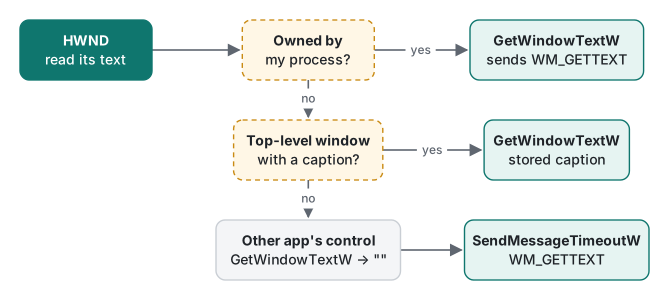
According to the GetWindowText page on Microsoft Learn, the behavior depends on who owns the window:
- Your own process: it sends
WM_GETTEXTand returns whatever the window procedure answers. - Another process, window has a caption: it does not send a message. It returns the caption text the system keeps, so a hung target cannot block your call.
- Another process, control without a caption: it returns an empty string. The documentation says plainly that GetWindowText cannot retrieve the text of a control in another application.
For case 3, send WM_GETTEXT yourself. A plain SendMessage blocks your thread for as long as the target is frozen, so use SendMessageTimeoutW with SMTO_ABORTIFHUNG and a timeout, as GetRemoteText does. WM_GETTEXT is one of the messages the system marshals across processes, so passing your buffer pointer is fine.
The 2021 statement that you cannot change the text of a control in another application matches the SetWindowText documentation and still holds. Top-level window titles are a different case, which is why the 2021 sample could rename Notepad. If the target runs elevated and your program does not, User Interface Privilege Isolation (UIPI) can block your messages as well.
Calling it from C# with LibraryImport
Since .NET 7, LibraryImport generates the marshalling code at compile time and is preferred over DllImport. We compiled this on the Mac for net10.0-windows with dotnet build -p:EnableWindowsTargeting=true (.NET SDK 10.0.403, runtime 10.0.14).
using System.Runtime.InteropServices;

[assembly: DefaultDllImportSearchPaths(DllImportSearchPath.System32)]

nint hwnd = Native.FindWindow("Notepad", null);
Console.WriteLine(hwnd == 0 ? "Notepad not found" : Native.GetText(hwnd));

static partial class Native
{
    [LibraryImport("user32.dll", EntryPoint = "FindWindowW", StringMarshalling = StringMarshalling.Utf16)]
    internal static partial nint FindWindow(string? className, string? windowName);

    [LibraryImport("user32.dll", EntryPoint = "SetWindowTextW", StringMarshalling = StringMarshalling.Utf16, SetLastError = true)]
    [return: MarshalAs(UnmanagedType.Bool)]
    internal static partial bool SetWindowText(nint hWnd, string text);

    [LibraryImport("user32.dll", EntryPoint = "GetWindowTextLengthW", SetLastError = true)]
    internal static partial int GetWindowTextLength(nint hWnd);

    [LibraryImport("user32.dll", EntryPoint = "GetWindowTextW", StringMarshalling = StringMarshalling.Utf16, SetLastError = true)]
    internal static partial int GetWindowText(nint hWnd, Span<char> buffer, int maxCount);

    internal static string GetText(nint hWnd)
    {
        int len = GetWindowTextLength(hWnd);
        if (len <= 0) return "";
        Span<char> buf = len < 256 ? stackalloc char[len + 1] : new char[len + 1];
        int copied = GetWindowText(hWnd, buf, buf.Length);   // +1 above = NUL
        return new string(buf[..copied]);
    }
}
The first attempts failed. These are the real diagnostics:
error SYSLIB1062: LibraryImportAttribute requires unsafe code. Project must be updated with '<AllowUnsafeBlocks>true</AllowUnsafeBlocks>'.
Program.cs(19,69): error SYSLIB1051: Runtime marshalling must be disabled in this project by applying the 'System.Runtime.CompilerServices.DisableRuntimeMarshallingAttribute' to the assembly to enable marshalling this type. The generated source will not handle marshalling of parameter 'buffer'.
- SYSLIB1062 went away after adding
<AllowUnsafeBlocks>true</AllowUnsafeBlocks>to the csproj. - SYSLIB1051 appears for a
Span<char>(and also achar[]) parameter when the generator does not know how wide acharshould be. AddingStringMarshalling = StringMarshalling.Utf16fixed it.
With every analyzer enabled (-p:AnalysisMode=All), the build then reported four CA5392 warnings, one per function: "didn't use DefaultDllImportSearchPaths attribute for P/Invokes". The rule guards against DLL hijacking from the application folder. The assembly-level DefaultDllImportSearchPaths(DllImportSearchPath.System32) shown above brought it to zero warnings. For comparison, an old-style declaration with [DllImport(..., CharSet = CharSet.Auto)] and a StringBuilder buffer produced CA2101, CA5392 and CA1838 ("Avoid 'StringBuilder' parameters for P/Invokes").
Running the build on the Mac anyway ends at the first call with System.DllNotFoundException: Unable to load shared library 'user32.dll'. A net10.0-windows project compiles anywhere, but you test it on Windows.
Checklist
- Size the buffer as
GetWindowTextLengthW + 1, counted in characters.sizeofcounts bytes and doubles in a Unicode build. - A return value of 0 means failure or an empty title;
GetLastErrortells them apart. - Another program's controls cannot be read with
GetWindowText; useSendMessageTimeoutWwithWM_GETTEXT. - Write new code against the
Wfunctions withL"..."literals; in C#, useLibraryImportwithStringMarshalling.Utf16.
The same recompile-and-verify treatment was applied to GetKeyState and GetAsyncKeyState and to GetCurrentDirectory and GetModuleFileName.
FAQ
How big should the buffer for GetWindowText be?
Call GetWindowTextLengthW first and allocate that many characters plus one for the terminating NUL. The nMaxCount argument is a character count, not a byte count. Passing sizeof(buffer), as many old samples do, reports twice the real capacity in a Unicode build and can overflow the buffer.
Why does GetWindowText return an empty string for a text box in another program?
When the window belongs to another process, GetWindowText does not send WM_GETTEXT; it returns the caption the system stores for top-level windows. A control has no such caption, so you get an empty string. Send WM_GETTEXTLENGTH and WM_GETTEXT yourself with SendMessageTimeoutW.
Should I use DllImport or LibraryImport in C#?
Since .NET 7, the source-generated LibraryImport is the recommended choice. Building on .NET 10 we hit error SYSLIB1062 until AllowUnsafeBlocks was enabled, and error SYSLIB1051 until the char buffer parameter had StringMarshalling.Utf16. After both fixes the build had zero warnings.