SendMessage vs PostMessage: Timeouts and WM_COPYDATA
Why SendMessage blocks and PostMessage does not, avoiding hangs with SendMessageTimeout, WM_COPYDATA between processes, and UIPI errors. MinGW and .NET 10 code.
Revised November 2026. This tutorial first appeared in Korean in 2021. It claimed that "wParam and lParam default to 0"; the Win32
SendMessagehas no default arguments — that is MFC'sCWnd::SendMessage. Its explanation of deadlocks also mixed up two different situations, so that part is rewritten below. The Visual Basic 6 test program and console screenshots are gone because that setup cannot be reproduced today. All C++ code here was compiled for Windows with MinGW-w64 (GCC 16.2.0); none of it was run on this machine, which is a Mac. The C# version was built with the .NET 10 SDK, also without running it. We show no invented output; behavior is described from the Microsoft Learn documentation.
This article is for developers who used SendMessage to click another program's button or pass it a string, and then hit one of these: "my own program froze", "nothing happens when the target runs as administrator", or "I switched to PostMessage and the data came out as garbage". The short version: to other processes, use SendMessageTimeout instead of SendMessage; use PostMessage for notifications that need no result; move data with WM_COPYDATA through the Send family; and if the target is elevated, suspect UIPI first.
The signature, and what the 2021 text got wrong
LRESULT SendMessageW(HWND hWnd, UINT Msg, WPARAM wParam, LPARAM lParam);
BOOL    PostMessageW(HWND hWnd, UINT Msg, WPARAM wParam, LPARAM lParam);
hWnd is the receiving window, Msg the message number, and wParam/lParam carry extra data whose meaning depends on the message; so does the return value. The 2021 text had all of that right.
Two things needed fixing. First, there are no default values for wParam and lParam: the Win32 SendMessage is a C function and you always pass all four arguments. The defaults of 0 belong to MFC's CWnd::SendMessage(UINT message, WPARAM wParam = 0, LPARAM lParam = 0) — the same confusion that put an "MFC" tag on the original post.
Second, how it actually runs. The SendMessage page on Microsoft Learn distinguishes two cases:
- If the calling thread created the window, the window procedure is called immediately, as a subroutine. No queue is involved.
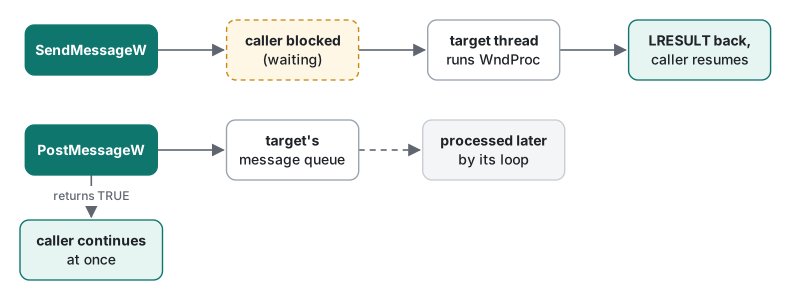
- If another thread (including one in another process) owns the window, its window procedure runs when that thread next retrieves messages (
GetMessage,PeekMessageand so on), and the sending thread is blocked until then. While it waits, it still processes nonqueued messages sent to it by other threads.
We checked the button-message table against winuser.h; every value was correct. Windows Vista added one more message, BM_SETDONTCLICK:
| Message | Value | Purpose |
|---|---|---|
BM_GETCHECK / BM_SETCHECK |
0x00F0 / 0x00F1 | Read or set the check state |
BM_GETSTATE / BM_SETSTATE |
0x00F2 / 0x00F3 | Read pushed/focus state; set the highlight state |
BM_SETSTYLE |
0x00F4 | Change the button style |
BM_CLICK |
0x00F5 | Behave as if the user clicked |
BM_GETIMAGE / BM_SETIMAGE |
0x00F6 / 0x00F7 | Bitmap or icon handle |
BM_SETDONTCLICK |
0x00F8 | Whether a radio button sends BN_CLICKED when it gets focus (Vista+) |
The 2021 BM_CLICK sample, and why things "freeze"
The original sample found a button captioned "button click" inside a window titled "form" and sent it BM_CLICK. MinGW compiles it without warnings, but the import table shows SendMessageA, FindWindowA and FindWindowExA. Without UNICODE this is an ANSI build, so the Korean captions are passed as UTF-8 bytes, which a Korean-language Windows system interprets as code page 949 — the windows are never found. FindWindow vs EnumWindows walks through that byte by byte.
The original observation — "SendMessage does not return until the message box is closed" — matches the documented behavior. A button that receives BM_CLICK sends WM_COMMAND (BN_CLICKED) to its parent; if the parent's handler calls MessageBox, that handler does not return until the box is closed, and the sender waits for that return. That alone is not a deadlock. It is just a long wait.
A deadlock needs two parties waiting for each other. The textbook case: a worker thread calls SendMessage to a window on the UI thread, while the UI thread is blocked in WaitForSingleObject waiting for that worker to finish (in C#, Task.Wait() or Thread.Join()). The UI thread never pumps messages, so SendMessage never returns, so the worker never finishes, so the UI thread never wakes up. WinForms' Control.Invoke also waits for the UI thread to run the call, so it deadlocks the same way.
The fixed sample uses the W functions and puts a ceiling on the wait:
// click.cpp — the 2021 BM_CLICK sample, fixed
#include <windows.h>
#include <cstdio>

int main()
{
    HWND form = FindWindowW(nullptr, L"폼");
    HWND button = form ? FindWindowExW(form, nullptr, nullptr, L"버튼 클릭") : nullptr;
    if (!button) { std::printf("button not found\n"); return 1; }

    // BM_CLICK runs the target's click handler synchronously. If that handler
    // opens a MessageBox, a plain SendMessage waits until someone closes it.
    DWORD_PTR r = 0;
    if (!SendMessageTimeoutW(button, BM_CLICK, 0, 0, SMTO_ABORTIFHUNG, 3000, &r))
        std::printf("no reply within 3 s (error %lu)\n", GetLastError());
    return 0;
}
Zero warnings with -Wall -Wextra; the imports are FindWindowW, FindWindowExW and SendMessageTimeoutW. The window titles are the original program's Korean captions ("form" and "button click"). We search for the button by caption rather than by class because the 2021 target was a Visual Basic 6 program, whose buttons are not the standard Button class. Also note the caveat on the BM_CLICK page of Microsoft Learn: if the button is in a dialog box that is not active, BM_CLICK might fail.
When to use SendMessageTimeout, and when PostMessage
SendMessageTimeout is SendMessage plus a time limit in milliseconds and a set of flags:
SMTO_ABORTIFHUNG: return at once, without waiting for the timeout, if the target appears to be hung.SMTO_ERRORONEXIT: return 0 if the target thread exits while you wait (Vista and later).- On failure or timeout it returns 0; if
GetLastErroris 1460 (ERROR_TIMEOUT), it timed out. - The
LRESULTcomes back through the last parameter (PDWORD_PTR lpdwResult), not as the return value.
PostMessage puts the message in the queue and returns TRUE right away. You get no result and no idea when it will be handled. That is why you must not post messages that carry pointers: the string on your stack may be gone by the time the target reads it, and in another process the address means nothing at all. According to Microsoft Learn, posting a system message below WM_USER whose parameters include a pointer (such as WM_SETTEXT) fails.
| Situation | Use |
|---|---|
| Your own window on the same thread, result needed | SendMessage |
| Another process, result needed | SendMessageTimeout + SMTO_ABORTIFHUNG |
| Notification only ("close", "repaint") | PostMessage |
| Strings or bytes to another process | WM_COPYDATA via SendMessageTimeout |
| Progress updates from a worker to the UI thread | PostMessage (never waits on the UI thread) |
Sending a string to another process with WM_COPYDATA
Every process has its own address space, so a pointer in lParam is useless to the receiver. WM_COPYDATA is the message for which the system copies the data into the target process for you. The receiver first:
// receiver.cpp — a small top-level window that accepts WM_COPYDATA
#include <windows.h>
#include <cstdio>

constexpr ULONG_PTR kCmdText = 1;   // our own "message id" inside WM_COPYDATA

static LRESULT CALLBACK WndProc(HWND hwnd, UINT msg, WPARAM wp, LPARAM lp)
{
    switch (msg) {
    case WM_COPYDATA: {
        auto* cds = reinterpret_cast<const COPYDATASTRUCT*>(lp);
        if (cds->dwData != kCmdText) return FALSE;
        // the data is valid only during this call: copy it before returning
        wprintf(L"got %lu bytes: %.*ls\n", cds->cbData,
                static_cast<int>(cds->cbData / sizeof(wchar_t)),
                static_cast<const wchar_t*>(cds->lpData));
        return TRUE;                 // becomes SendMessage's return value
    }
    case WM_DESTROY:
        PostQuitMessage(0);
        return 0;
    }
    return DefWindowProcW(hwnd, msg, wp, lp);
}

int wmain()
{
    WNDCLASSEXW wc{};
    wc.cbSize        = sizeof(wc);
    wc.lpfnWndProc   = WndProc;
    wc.hInstance     = GetModuleHandleW(nullptr);
    wc.lpszClassName = L"TLabReceiver";
    RegisterClassExW(&wc);
    HWND hwnd = CreateWindowExW(0, wc.lpszClassName, L"Receiver", WS_OVERLAPPEDWINDOW,
        CW_USEDEFAULT, CW_USEDEFAULT, 300, 200, nullptr, nullptr, wc.hInstance, nullptr);

    // If this process runs elevated, UIPI drops WM_COPYDATA from normal processes.
    // Allow just this one message for just this window.
    ChangeWindowMessageFilterEx(hwnd, WM_COPYDATA, MSGFLT_ALLOW, nullptr);

    ShowWindow(hwnd, SW_SHOWNORMAL);
    MSG m;
    while (GetMessageW(&m, nullptr, 0, 0) > 0) { TranslateMessage(&m); DispatchMessageW(&m); }
    return 0;
}
And the sender:
// sender.cpp — SendMessageTimeoutW + WM_COPYDATA, then PostMessageW
#include <windows.h>
#include <cstdio>
#include <cwchar>

int wmain()
{
    HWND target = FindWindowW(L"TLabReceiver", nullptr);
    if (!target) { wprintf(L"receiver not running\n"); return 1; }

    const wchar_t text[] = L"hello from sender";
    COPYDATASTRUCT cds{};
    cds.dwData = 1;
    cds.cbData = static_cast<DWORD>(wcslen(text) * sizeof(wchar_t));
    cds.lpData = const_cast<wchar_t*>(text);

    DWORD_PTR result = 0;
    LRESULT ok = SendMessageTimeoutW(target, WM_COPYDATA,
        0 /* sender HWND: a console app has none */, reinterpret_cast<LPARAM>(&cds),
        SMTO_ABORTIFHUNG | SMTO_ERRORONEXIT, 2000 /* ms */, &result);
    if (!ok) {
        DWORD e = GetLastError();      // 1460 = ERROR_TIMEOUT, 5 = blocked by UIPI
        wprintf(L"SendMessageTimeout failed, GetLastError=%lu\n", e);
        return 1;
    }
    wprintf(L"receiver returned %llu\n", static_cast<unsigned long long>(result));

    // PostMessage returns at once; never post a message whose lParam is a pointer
    // to your own memory (WM_COPYDATA, WM_SETTEXT ...): it may be gone by then.
    PostMessageW(target, WM_CLOSE, 0, 0);
    return 0;
}
$ x86_64-w64-mingw32-g++ -std=c++17 -Wall -Wextra -O2 -municode receiver.cpp -o receiver.exe -luser32
$ x86_64-w64-mingw32-g++ -std=c++17 -Wall -Wextra -O2 -municode sender.cpp -o sender.exe -luser32
$ file receiver.exe sender.exe
receiver.exe: PE32+ executable (console) x86-64, for MS Windows
sender.exe: PE32+ executable (console) x86-64, for MS Windows
Our first draft initialized the class with WNDCLASSEXW wc{ sizeof(wc) };, and -Wextra answered with eleven lines of warning: missing initializer for member 'tagWNDCLASSEXW::style' [-Wmissing-field-initializers], one per remaining member. The code was fine (the rest is zero-filled), but wc{} followed by a separate cbSize assignment silences it.
Microsoft Learn lists the rules for WM_COPYDATA: send it with the Send family only, never post it; the receiver must treat the data as read-only and valid only while it handles the message; return TRUE when it was processed. We add one more from practice: the receiver must not trust the sender. Any process on the same desktop can send WM_COPYDATA, so check dwData and cbData, and never treat the received string as a path or command to execute.
UIPI: messages to elevated windows are dropped
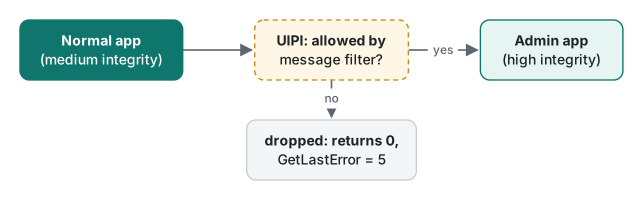
When the receiving program is started "as administrator", it runs at high integrity, and UIPI drops most messages that come from normal (medium-integrity) processes. SendMessage then returns 0 and GetLastError returns 5 (ERROR_ACCESS_DENIED). The opposite direction, high to medium, is not restricted.
If you wrote the receiver, you can do what the receiver above does: ChangeWindowMessageFilterEx(hwnd, WM_COPYDATA, MSGFLT_ALLOW, nullptr) lets that one message into that one window (Windows 7 and later). That is narrower, and safer, than the older process-wide ChangeWindowMessageFilter. But from that moment a lower-privileged process can push data into an elevated one, so the input validation above becomes essential. If you are driving someone else's program, there is only one fix: run your tool at the same level.
Sending WM_COPYDATA from C# with LibraryImport
The same sender on .NET 10 with LibraryImport (net10.0-windows, AllowUnsafeBlocks on):
using System.Runtime.InteropServices;

const uint WM_COPYDATA = 0x004A, WM_CLOSE = 0x0010;
const uint SMTO_ABORTIFHUNG = 0x0002, SMTO_ERRORONEXIT = 0x0020;

nint target = Native.FindWindowW("TLabReceiver", null);
if (target == 0) { Console.WriteLine("receiver not running"); return 1; }

string text = "hello from C#";
unsafe
{
    fixed (char* p = text)
    {
        var cds = new COPYDATASTRUCT
        {
            dwData = 1,
            cbData = (uint)(text.Length * sizeof(char)),
            lpData = (nint)p,
        };
        nint ok = Native.SendMessageTimeoutW(target, WM_COPYDATA, 0, (nint)(&cds),
            SMTO_ABORTIFHUNG | SMTO_ERRORONEXIT, 2000, out nuint result);
        if (ok == 0)
        {
            // 1460 = ERROR_TIMEOUT, 5 = ERROR_ACCESS_DENIED (UIPI)
            Console.WriteLine($"failed, error {Marshal.GetLastPInvokeError()}");
            return 1;
        }
        Console.WriteLine($"receiver returned {result}");
    }
}
Native.PostMessageW(target, WM_CLOSE, 0, 0);   // returns immediately
return 0;

[StructLayout(LayoutKind.Sequential)]
struct COPYDATASTRUCT
{
    public nuint dwData;   // ULONG_PTR
    public uint cbData;    // DWORD
    public nint lpData;    // PVOID
}

static partial class Native
{
    [LibraryImport("user32.dll", StringMarshalling = StringMarshalling.Utf16)]
    public static partial nint FindWindowW(string? lpClassName, string? lpWindowName);

    [LibraryImport("user32.dll", SetLastError = true)]
    public static partial nint SendMessageTimeoutW(nint hwnd, uint msg, nint wParam,
        nint lParam, uint flags, uint timeoutMs, out nuint result);

    [LibraryImport("user32.dll", SetLastError = true)]
    [return: MarshalAs(UnmanagedType.Bool)]
    public static partial bool PostMessageW(nint hwnd, uint msg, nint wParam, nint lParam);
}
dotnet build -c Release -r win-x64 -p:EnableWindowsTargeting=true built it without warnings (not run). What we verified along the way:
- Removing
[return: MarshalAs(UnmanagedType.Bool)]fromPostMessageWgiveserror SYSLIB1051: Marshalling bool without explicit marshalling information is not supported. A Win32BOOLis a 4-byte integer, so you must say how to map it. - With
SetLastError = true, read the error withMarshal.GetLastPInvokeError(). The generated code callsMarshal.GetLastSystemError()right after the native call and stores it withSetLastPInvokeError, so nothing in between can overwrite it. dwDatainCOPYDATASTRUCTis aULONG_PTR, 8 bytes in a 64-bit process. Declare it asuintand every later field shifts, so the receiver reads the wrong size and address;nuintkeeps the layout right.- A string's address is valid only while it is pinned by
fixed.SendMessageTimeoutWis synchronous and completes inside thefixedblock, which is safe — and for the same reason you can never use this pattern withPostMessage.
In a WinForms or WPF app, receive WM_COPYDATA by overriding WndProc (WinForms) or with HwndSource.AddHook (WPF). The basics of creating a window are in CreateWindowEx and ShowWindow, and finding handles is in FindWindow vs EnumWindows.
Tested with MinGW-w64 x86_64-w64-mingw32-g++ (GCC) 16.2.0 and .NET SDK 10.0.403 (EnableWindowsTargeting=true) on macOS (Apple Silicon). Compiled for Windows; not run on this machine.
FAQ
What is the difference between SendMessage and PostMessage?
SendMessage waits until the receiving window procedure has processed the message and returns its LRESULT. PostMessage only puts the message in the receiving thread's queue and returns immediately. Use SendMessage (preferably SendMessageTimeout) when you need the result or pass a pointer, and PostMessage for fire-and-forget notifications.
Why does my program freeze when I SendMessage to another application?
SendMessage blocks until the target processes the message. If the target is hung, or its handler is showing a message box, your thread waits too. Send to other processes with SendMessageTimeout, SMTO_ABORTIFHUNG and a time limit. On timeout it returns 0 and GetLastError returns 1460 (ERROR_TIMEOUT).
SendMessage returns 0 and GetLastError is 5. What happened?
UIPI (User Interface Privilege Isolation) blocked the message. Most messages from a normal process to a window of a process running as administrator (high integrity) are dropped. Run your program at the same level, or, if you wrote the receiver, allow just the messages you need with ChangeWindowMessageFilterEx.