WinForms OK/Cancel Buttons: AcceptButton, DialogResult
OK and Cancel buttons for a WinForms dialog on .NET 10: AcceptButton and CancelButton, how DialogResult travels, and keeping the dialog open on bad input.
Revised November 2026. This tutorial first appeared in Korean in 2021. We recompiled its sample as a .NET 10 WinForms app (
net10.0-windows) and added a dialog with input validation. WinForms is Windows-only, so the code was compiled with .NET 10 for Windows; not run on this machine (an Apple Silicon Mac). There is no program output here; the behavior described comes from Microsoft Learn and from the open-source WinForms code (Form.csin dotnet/winforms). We also corrected one thing the 2021 sample got wrong:Console.WriteLineshows nothing in a WinForms app.
This article is for anyone building a small WinForms dialog — "enter your name", "pick a folder" — who wants Enter to confirm, Esc to cancel, and invalid input to keep the dialog open. In short: give the OK button DialogResult = OK, set the form's AcceptButton and CancelButton, and the keyboard works. For validation, set e.Cancel = true in FormClosing; WinForms then resets DialogResult to None for you.
AcceptButton, CancelButton and Button.DialogResult
The three steps from the 2021 version still hold:
- Set the OK button's
DialogResultproperty toOKand the Cancel button's toCancel. - Find out which button was pressed from the return value of
ShowDialog, or from the form'sDialogResultproperty after it closes. - Connect Enter to the form's
AcceptButtonand Esc to itsCancelButton.
Two facts are worth adding.
CancelButtonsets the button'sDialogResulttoCancelfor you. This is the setter in the WinForms source (Form.cs):
set
{
    Properties.AddOrRemoveValue(s_propCancelButton, value);

    if (value is not null && value.DialogResult == DialogResult.None)
    {
        value.DialogResult = DialogResult.Cancel;
    }
}
The AcceptButton setter, by contrast, only updates which button is drawn as the default; it never touches DialogResult. So set DialogResult = OK on the OK button yourself. Forget it, and Enter raises the button's Click event but the dialog stays open.
- A button's
DialogResultcloses the form only if the form was opened withShowDialog. The Microsoft Learn page forButton.DialogResultsays that when the parent form is displayed withShowDialog, clicking the button closes it without any event handler. In a modeless form opened withShow, the same button does not close anything. The difference between the two is covered in modal and modeless forms.
The 2021 sample on .NET 10
We pasted the 2021 C# sample unchanged into a method of Form1 and built it. No errors and no warnings. The code still had three problems (abbreviated with …):
// create the form
Form1 f = new Form1 ();
// show the form
if (f.ShowDialog ( this ) == DialogResult.OK)
{
    Console.WriteLine ("OK button was pressed.");
}
// check the DialogResult property
if (f.DialogResult == DialogResult.OK) { /* … */ }
else if (f.DialogResult == DialogResult.Cancel) { /* … */ }
f.Dispose();
Console.WriteLineshows nothing. The WinForms template builds aWinExe, which has no console attached. UseDebug.WriteLinefor the Visual Studio Output window, or a label orMessageBoxfor the user.Form1opens anotherForm1. The name was reused for brevity, but a real app has a separate dialog class (seeNameDialogbelow).- The same check runs twice. The return value and the
DialogResultproperty hold the same value. Reading the property afterwards works, because a form shown withShowDialogis only hidden when it closes, not disposed, but the return value alone is enough. Leave disposal tousing.
How DialogResult travels
From the moment the user presses Enter until ShowDialog returns, this is the sequence:
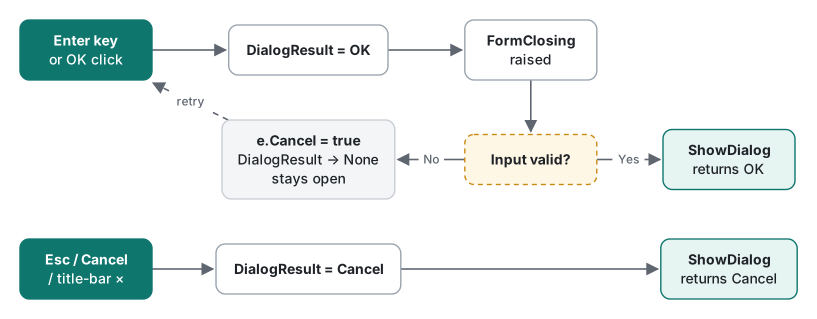
- Enter →
AcceptButton(the OK button) is clicked → the button'sDialogResult(OK) is copied to the form'sDialogResult. - The modal loop notices that
DialogResultis no longerNone, starts closing, and raisesFormClosing. - If no handler sets
e.Cancel, the form is hidden andShowDialogreturnsOK. - If a handler sets
e.Cancel = true, WinForms resetsDialogResulttoNone. The dialog stays open and the caller keeps waiting.
Step 4 is visible in Form.CheckCloseDialog in dotnet/winforms: if (e.Cancel) followed by _dialogResult = DialogResult.None;. Esc, the Cancel button and the title-bar close button (×) all end in Cancel; the Microsoft Learn page for Form.DialogResult explains that clicking the close button of a modal dialog hides the form and sets DialogResult to Cancel. Assigning this.DialogResult = DialogResult.OK; in code takes the same path as a button click.
Keep the dialog open on invalid input: FormClosing and e.Cancel
Here is a dialog that refuses to close when OK is pressed with an empty name, and shows an error icon instead. It compiled for net10.0-windows with zero warnings:
public sealed class NameDialog : Form
{
    readonly TextBox _name = new() { Left = 12, Top = 12, Width = 260 };
    readonly Button _ok = new() { Text = "OK", Left = 116, Top = 48, DialogResult = DialogResult.OK };
    readonly Button _cancel = new() { Text = "Cancel", Left = 197, Top = 48, CausesValidation = false };
    readonly ErrorProvider _error = new();

    public string UserName => _name.Text.Trim();

    public NameDialog()
    {
        Text = "Your name";
        ClientSize = new Size(284, 84);
        FormBorderStyle = FormBorderStyle.FixedDialog;
        MinimizeBox = MaximizeBox = false;
        ShowInTaskbar = false;
        StartPosition = FormStartPosition.CenterParent;
        Controls.AddRange([_name, _ok, _cancel]);
        AcceptButton = _ok;      // Enter
        CancelButton = _cancel;  // Esc; also sets _cancel.DialogResult = Cancel
    }

    protected override void OnFormClosing(FormClosingEventArgs e)
    {
        if (DialogResult == DialogResult.OK && UserName.Length == 0)
        {
            e.Cancel = true;                       // WinForms resets DialogResult to None
            _error.SetError(_name, "Enter a name.");
            _name.Focus();
        }
        base.OnFormClosing(e);
    }
}
And the caller:
void AskName()
{
    using var dlg = new NameDialog();
    if (dlg.ShowDialog(this) == DialogResult.OK)
        Text = $"Hello, {dlg.UserName}";
    else
        Debug.WriteLine($"cancelled: {dlg.DialogResult}");
}
The design choices, briefly:
- The check includes
DialogResult == DialogResult.OK. Without it, Cancel and the close button (×) would also hit the validation, and the user could never leave the dialog. - Always call
base.OnFormClosing(e). Skip it and anyFormClosinghandlers attached from outside never run. - The Cancel button has
CausesValidation = false. If you add aValidatingcheck to the text box, this stops it from firing — and trapping the user — when focus moves to Cancel. - The alternative: leave the OK button's
DialogResultatNoneand, in itsClickhandler, assignthis.DialogResult = DialogResult.OK;only when validation passes. That keeps the check in one obvious place. TheOnFormClosingversion has a different strength: every route that closes the dialog with OK — Enter, the button, an assignment in code — goes through the same check.
FormClosing also fires for a Windows shutdown (CloseReason.WindowsShutDown) and for Application.Exit. Blocking those would get in the way of sign-out, which is another reason to limit the check to DialogResult == OK. The same trap appears in the "hide instead of close" section of showing only one instance of a form.
Summary
| Goal | Setting |
|---|---|
| Enter confirms | AcceptButton = okButton + okButton.DialogResult = OK |
| Esc cancels | CancelButton = cancelButton (its DialogResult becomes Cancel automatically) |
| Read the result | using var dlg …; if (dlg.ShowDialog(this) == DialogResult.OK) |
| Stay open on bad input | In OnFormClosing: DialogResult == OK && invalid → e.Cancel = true |
| Skip validation on Cancel | cancelButton.CausesValidation = false |
| Debug output | Debug.WriteLine, not Console.WriteLine |
The 2021 post also had a VB.NET version; it calls the same API, so this edition keeps C# only. The original post had no images, so none were removed.
Environment: .NET SDK 10.0.403, Microsoft.WindowsDesktop.App.Ref 10.0.14, C# 14, macOS on an Apple Silicon Mac. WinForms code was compiled with dotnet build -p:EnableWindowsTargeting=true and not run.
FAQ
If I set CancelButton, do I also have to set the button's DialogResult to Cancel?
No. In dotnet/winforms, the CancelButton setter in Form.cs changes the button's DialogResult to Cancel when it is None. AcceptButton is different: it only maps the Enter key to that button and does not touch DialogResult, so the OK button needs DialogResult = OK set explicitly.
How do I keep the dialog open when the input is invalid?
In FormClosing (or an OnFormClosing override), set e.Cancel = true when DialogResult is OK and the input is invalid. When closing is cancelled, WinForms resets DialogResult to None, so the dialog stays open and ShowDialog does not return. Alternatively, leave the OK button's DialogResult at None and set this.DialogResult = DialogResult.OK in its Click handler only when validation passes.
Why does Console.WriteLine from the 2021 sample print nothing?
A WinForms app is built as WinExe, which has no console window, so Console.WriteLine output goes nowhere. Use System.Diagnostics.Debug.WriteLine for the Visual Studio Output window while debugging, or a label or MessageBox for anything the user should see.