WinForms Single Instance: One Form, One App (Mutex)
One copy of a WinForms form, and no second app instance via a named Mutex on .NET 10: Global\ vs Local\, bringing the window forward, real macOS runs.
Revised November 2026. This tutorial first appeared in Korean in 2021. We recompiled its samples on .NET 10. The parts that use WinForms and Win32 are Windows-only: they were compiled with .NET 10 for Windows; not run on this machine (an Apple Silicon Mac). The Mutex check, on the other hand, is cross-platform, so we ran a console version as two real processes on macOS and show that output unedited — but note that named mutexes on macOS follow different scope rules than on Windows. The 2021 C# sample (
this.Forms.Form2) did not compile and has been replaced.
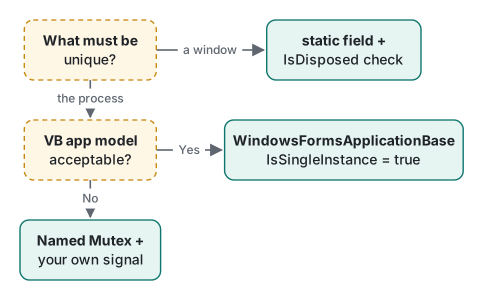
This article is for WinForms developers who want to stop "every click opens the same window again" and "starting the app twice gives me two apps". The 2021 version only covered the first problem, one form. Many readers who land here are actually looking for the second, one process, so both are covered now. The answer in one line: for a form, a static field plus an IsDisposed check; for a process, a named Mutex (or VB's WindowsFormsApplicationBase).
Why the 2021 C# sample did not compile
The 2021 post introduced VB.NET's My.Forms.Form2.Show() and offered this.Forms.Form2.Show() as the C# equivalent. Pasted into a .NET 10 WinForms project, it fails:
Program.cs(20,33): error CS1002: ; expected
Program.cs(20,33): error CS1010: Newline in constant
Program.cs(20,33): error CS1012: Too many characters in character literal
Program.cs(20,51): error CS1002: ; expected
Program.cs(23,57): error CS1002: ; expected
…
Each line ended with a VB-style comment (' followed by a note), which C# reads as a character literal. With the comment changed to //, the real error remains:
Program.cs(20,14): error CS1061: 'Form1' does not contain a definition for 'Forms' and no accessible extension method 'Forms' accepting a first argument of type 'Form1' could be found (are you missing a using directive or an assembly reference?)
My.Forms (default form instances) is generated by the Visual Basic compiler; C# has nothing like it. In C# you write it yourself, which is what the second half of the 2021 post did with a static property.
One form: a static instance and IsDisposed
The 2021 static-property code compiled with one nullable warning:
Forms.cs(7,26): warning CS8618: Non-nullable field '_instance' must contain a non-null value when exiting constructor. Consider adding the 'required' modifier or declaring the field as nullable.
Declaring the field as Form2? fixes it. Today we would fold "show it" into the same method, which leaves less room for mistakes (zero warnings):
public sealed class ToolWindow : Form
{
    static ToolWindow? s_current;

    public static ToolWindow ShowSingle(IWin32Window? owner = null)
    {
        if (s_current is null || s_current.IsDisposed)
        {
            s_current = new ToolWindow();
            s_current.Show(owner);
        }
        else
        {
            if (s_current.WindowState == FormWindowState.Minimized)
                s_current.WindowState = FormWindowState.Normal;
            s_current.Activate();
        }
        return s_current;
    }

    ToolWindow() { Text = "Tool"; }
}
- The
IsDisposedcheck is the heart of it. A form opened withShowis disposed when it closes, and callingShowon a disposed instance throwsObjectDisposedException, just as the 2021 text said. - The 2021 text warned that the property was "not thread-safe". WinForms forms must be created and used on the UI thread anyway, so the right fix is to call it only from the UI thread, not to add a
lock. - Making
TextBox1public through its Modifiers property, as the 2021 post suggested, works, but exposing just the values you need as properties breaks less often when the form's layout changes.
The "hide instead of close" trap
The last technique in 2021 was a static readonly instance whose closing is always cancelled and replaced with Hide():
protected override void OnFormClosing(FormClosingEventArgs e)
{
    e.Cancel = true;
    this.Hide();
}
It compiles with no warnings, but it has three problems:
- The app may refuse to exit. The Microsoft Learn page for
Application.Exitexplains thatExitraisesFormClosingon every open form and returns without doing anything if any handler cancels. While this form exists,Application.Exit()is ignored, and Windows shutdown or sign-out (CloseReason.WindowsShutDown) is blocked too. base.OnFormClosing(e)is never called, soFormClosinghandlers attached from outside never run.- The form is created when the
static readonlyfield is initialized, i.e. the first time the type is touched. If that happens beforeApplicationConfiguration.Initialize()(which sets the high-DPI mode) or on a non-UI thread, you get subtle bugs. Why the DPI mode must be set before the first window exists is explained in modal and modeless forms.
The fixed version hides only when the user closes the window:
protected override void OnFormClosing(FormClosingEventArgs e)
{
    if (e.CloseReason == CloseReason.UserClosing)
    {
        e.Cancel = true;
        Hide();
    }
    base.OnFormClosing(e);
}
Another use of e.Cancel in FormClosing, input validation, is in OK and Cancel buttons.
One app: a named Mutex, and bringing the window forward
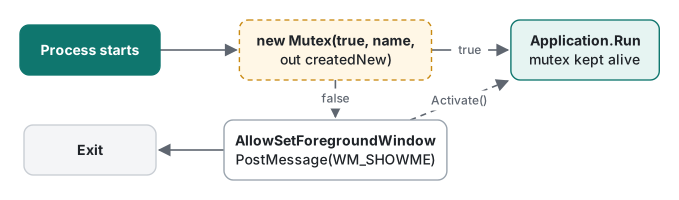
To allow one process, use a named Mutex. The first process creates it (createdNew == true); a second one opens the existing mutex and gets false.
static partial class Program
{
    const string MutexName = @"Local\TLab.SingleDemo.{6F1C2A43-8E0B-4D7A-9C55-2B7F0E9A1D10}";
    internal static readonly int WM_SHOWME = RegisterWindowMessage("TLab.SingleDemo.ShowMe");

    [STAThread]
    static void Main()
    {
        using var mutex = new Mutex(initiallyOwned: true, MutexName, out bool createdNew);
        if (!createdNew)
        {
            AllowSetForegroundWindow(ASFW_ANY);                  // let the first instance take focus
            PostMessage(HWND_BROADCAST, WM_SHOWME, 0, 0);
            return;
        }

        ApplicationConfiguration.Initialize();
        Application.Run(new MainForm());
        // 'using' keeps the mutex alive until Run returns
    }

    static readonly nint HWND_BROADCAST = 0xffff;
    const int ASFW_ANY = -1;

    [LibraryImport("user32.dll", EntryPoint = "RegisterWindowMessageW", StringMarshalling = StringMarshalling.Utf16)]
    private static partial int RegisterWindowMessage(string name);

    [LibraryImport("user32.dll")]
    [return: MarshalAs(UnmanagedType.Bool)]
    private static partial bool PostMessage(nint hWnd, int msg, nint wParam, nint lParam);

    [LibraryImport("user32.dll")]
    [return: MarshalAs(UnmanagedType.Bool)]
    private static partial bool AllowSetForegroundWindow(int processId);
}

public class MainForm : Form
{
    protected override void WndProc(ref Message m)
    {
        if (m.Msg == Program.WM_SHOWME)
        {
            if (WindowState == FormWindowState.Minimized) WindowState = FormWindowState.Normal;
            Activate();
            return;
        }
        base.WndProc(ref m);
    }
}
This compiled for net10.0-windows with zero warnings (LibraryImport needs <AllowUnsafeBlocks>true</AllowUnsafeBlocks>). We did not run it, so the following is based on documentation:
- Name scope. Per the Microsoft Learn page "Kernel object namespaces",
Local\(also the default with no prefix) is per logon session andGlobal\is shared by all sessions. With two users signed in at once (fast user switching, Remote Desktop),Local\gives each of them one instance;Global\allows one for the whole machine. Put a GUID in the name so it cannot collide with another app. - Bringing the window forward. The Microsoft Learn page for
SetForegroundWindowrestricts which processes may change the foreground window. If the first process, sitting in the background, tries to bring itself forward, you may only get a flashing taskbar button. So the second process — just launched by the user and therefore in the foreground — callsAllowSetForegroundWindowand then posts the message.HWND_BROADCASTreaches every top-level window, so the message name must be unique too. - Keep the mutex alive.
using varholds the reference until the end ofMain. A well-known bug is a Release build collecting the local early and releasing the mutex. We tried to reproduce that on macOS with repeatedGC.Collect()calls (default settings and withDOTNET_TieredCompilation=0), and the second process kept gettingcreatedNew=False, so it did not reproduce there. Either way,usingorGC.KeepAlive(mutex)makes the intent explicit.
Running two real processes on macOS
Mutex itself is cross-platform, so we ran a console version without the WinForms parts on macOS (Release build, .NET 10.0.14):
var sw = Stopwatch.StartNew();
var mutex = new Mutex(initiallyOwned: true, name, out bool createdNew);
double ms = sw.Elapsed.TotalMilliseconds;
Console.WriteLine($"{tag} {DateTime.Now:HH:mm:ss.fff} name={name} createdNew={createdNew} ({ms:F2} ms)");
if (!createdNew) { Console.WriteLine($"{tag} another instance is running -> exit"); return; }
Thread.Sleep(holdMs);
mutex.ReleaseMutex();
mutex.Dispose();
The first process held the mutex for 2 seconds, a second one started 0.7 seconds later, and a third started after the first had exited:
[pid 63731] 17:18:56.883 name=Local\TLab.MutexDemo createdNew=True (1.59 ms)
[pid 63739] 17:18:57.586 name=Local\TLab.MutexDemo createdNew=False (1.48 ms)
[pid 63739] another instance is running -> exit
[pid 63731] 17:18:59.088 exit
-- after first exited:
[pid 63751] 17:18:59.126 name=Local\TLab.MutexDemo createdNew=True (1.84 ms)
So far this matches what you would expect on Windows. The scope did not. We started the second process in a new Unix session (setsid) and compared:
| Name | Same terminal session | Second process in a new session |
|---|---|---|
Local\TLab.S |
createdNew=False | createdNew=True (cannot see each other) |
TLab.S (no prefix) |
— | createdNew=True |
Global\TLab.S |
— | createdNew=False |
Local\TLab.X, then Global\TLab.X |
createdNew=True (different mutexes) | — |
On macOS, .NET implemented the named mutexes as files under $TMPDIR/.dotnet/shm/: a Local\ name landed in a session<session id> folder, a Global\ name in a global folder. In other words, on macOS Local\ means the process's Unix session — usually one terminal window — not a logon session, so starting the app from two terminal windows gives you two instances. And since $TMPDIR is per user, even Global\ is effectively per user. After we killed the first process with kill -9, the next one got createdNew=True; no stale file blocked it.
.NET 10 also has NamedWaitHandleOptions for named wait handles. Its defaults printed as CurrentUserOnly=True, CurrentSessionOnly=True, and opening the mutex with CurrentSessionOnly = false made the second process see the first across sessions:
[pid 64747] options(CurrentUserOnly=true, CurrentSessionOnly=false) createdNew=True
[pid 64749] options(CurrentUserOnly=true, CurrentSessionOnly=false) createdNew=False
One new Mutex(...) call in a fresh process took 1.28 to 2.49 ms across 20 runs, including first-call JIT. That is not a start-up cost worth worrying about.
The alternative: WindowsFormsApplicationBase
A C# app can use Microsoft.VisualBasic.ApplicationServices.WindowsFormsApplicationBase too. Microsoft.VisualBasic.Forms.dll ships with the Windows Desktop runtime, so no extra package is needed (zero warnings on net10.0-windows):
using Microsoft.VisualBasic.ApplicationServices;

sealed class SingleInstanceApp : WindowsFormsApplicationBase
{
    public SingleInstanceApp()
    {
        IsSingleInstance = true;
        EnableVisualStyles = true;
        HighDpiMode = HighDpiMode.PerMonitorV2;
    }

    protected override void OnCreateMainForm() => MainForm = new MainForm();

    protected override void OnStartupNextInstance(StartupNextInstanceEventArgs e)
    {
        e.BringToForeground = true;                 // default true
        base.OnStartupNextInstance(e);
        // e.CommandLine holds the second launch's arguments
    }
}
// In Main: new SingleInstanceApp().Run(args);
Its strength is that it forwards the second launch's command-line arguments to the first instance and brings it forward — exactly what you want when double-clicking files should open them in the existing window. In dotnet/winforms, SingleInstanceHelpers.vb shows that on .NET this is built on a named pipe with PipeOptions.CurrentUserOnly, and the arguments are serialized with DataContractSerializer. The scope is therefore "per user", and unlike a Mutex you cannot choose between Global\ and Local\. If you need to control the scope, use the Mutex.
| Goal | Approach |
|---|---|
| One window inside the app | Static field + IsDisposed check + Activate() |
| Hide on close | e.Cancel + Hide() only for CloseReason.UserClosing; call base |
| One process per session (user) | Mutex named Local\ + GUID |
| One process per machine | Mutex named Global\ + GUID |
| Pass the second launch's arguments | WindowsFormsApplicationBase + StartupNextInstance |
Environment: .NET SDK 10.0.403 / runtime 10.0.14, Microsoft.WindowsDesktop.App.Ref 10.0.14, C# 14, macOS on an Apple Silicon Mac. WinForms and Win32 code was compiled with dotnet build -p:EnableWindowsTargeting=true and not run; only the Mutex console version was run, on macOS. The 2021 post had no images.
FAQ
Can C# use My.Forms.Form2.Show() like VB.NET?
No. My.Forms is a Visual Basic feature. The C# sample in our 2021 version, this.Forms.Form2.Show(), did not compile on .NET 10: the VB-style comment produced CS1002, CS1010 and CS1012, and with the comment fixed it still failed with CS1061 ('Form1' does not contain a definition for 'Forms'). In C# you keep the instance in a static field and recreate it when IsDisposed is true.
Should the Mutex name start with Global\ or Local\?
According to the Microsoft Learn page 'Kernel object namespaces', Local\ (or no prefix) is per logon session and Global\ is shared by all sessions. Use Local\ to allow one instance per signed-in user session, Global\ for one instance across all sessions, including Remote Desktop. On macOS we measured something different: Local\ and unprefixed names were not visible from a different terminal session, while Global\ was.
How do I bring the running window to the front when the user starts the app again?
The second process calls AllowSetForegroundWindow, posts a message registered with RegisterWindowMessage via PostMessage(HWND_BROADCAST, ...), and exits. The first process handles that message in WndProc, restores itself if minimized and calls Activate(). Windows restricts which processes may call SetForegroundWindow (Microsoft Learn, 'SetForegroundWindow'), so the point is that the second process, which is in the foreground, hands that right over.