WinForms ShowDialog vs Show: Modal vs Modeless
ShowDialog or Show for a WinForms form on .NET 10: DialogResult, owner forms, who disposes what, the high-DPI default and ShowDialogAsync.
Revised November 2026. This tutorial first appeared in Korean in 2021. We recompiled its C# samples as a WinForms app on .NET 10 (
net10.0-windows). WinForms is Windows-only, so everything here was compiled with .NET 10 for Windows; not run on this machine (an Apple Silicon Mac). That means there is no program output in this article. What we did verify is the compiler result (warnings and error codes), the code the project template generates, and a compile difference between .NET 9 and .NET 10. Run-time behavior is described from the Microsoft Learn pages named in the text. The two Visual Studio 2019 screenshots from 2021 were removed; the reason is at the end.
This article is for WinForms developers who open a second form — a settings window, an input dialog, a tool palette — and are not sure whether to call ShowDialog or Show. The rule of thumb: if the next line of code needs the user's answer, call ShowDialog(this) and dispose the form with using. If the user should work in both windows at once, call Show(this) and get results back through an event.
Modal vs modeless: the 2021 samples on .NET 10
The C# samples from 2021 compiled unchanged with zero warnings. Only the comments are shortened here:
// Form2 instance
Form2 f = new Form2();
// open as a modal form, owner = this
f.ShowDialog(this);
// destroy the object when the window closes
f.Dispose();
// Form2 instance
Form2 f = new Form2();
// open as a modeless form
f.Show();
The two calls differ in three ways:
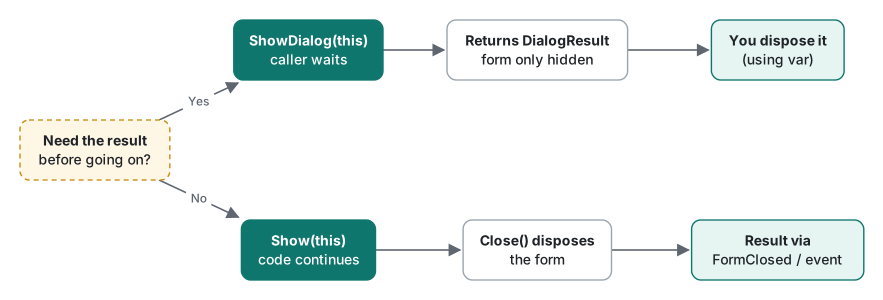
- Does the caller wait?
ShowDialogdoes not return until the form closes. Meanwhile the other windows on the same thread, such as the main form, ignore input.Showdisplays the window and returns at once, so the next line runs immediately. - Is there a result?
ShowDialogreturns aDialogResult.Showreturnsvoid. - Who disposes it? The Microsoft Learn page for
Form.ShowDialogexplains that when a modal form is closed with the close button or by settingDialogResult,Closeis not called; the form is only hidden. You have to dispose it. TheForm.Closepage lists the same exception: a form shown withShowDialogis not disposed byClose. So the 2021 rule "dispose after ShowDialog, not needed after Show" was correct.
One sentence in the 2021 text needs a qualifier: "while a modal form is open, nothing else can be accessed." More precisely, windows on the same UI thread are blocked. Other programs, and windows created on another UI thread, keep working.
The 2026 way: using, owners, no duplicates
This is how we would write it today. The code compiled for net10.0-windows with zero warnings:
void OpenModal()
{
    using var dlg = new Form2();
    DialogResult result = dlg.ShowDialog(this);   // blocks here; owner disabled
    Text = $"closed with {result}";
}                                                 // disposed here

Form2? _tool;
void OpenModeless()
{
    if (_tool is { IsDisposed: false }) { _tool.Activate(); return; }
    _tool = new Form2();
    _tool.FormClosed += (_, _) => _tool = null;
    _tool.Show(this);                              // owned: stays above, minimizes with owner
}
using vardisposes the dialog even if an exception is thrown. The 2021 version skippedDisposeif anything insideShowDialogthrew.- The 2021 modeless sample called
f.Show()with no owner. The new form then drops behind the main form on the first click, and every click of the button opens yet another copy. The usual tool-window behavior isShow(this)with an owner, andActivate()if the window is already open. Keeping a form to a single copy is covered in detail in showing only one instance of a form. - A modeless form cannot hand back a value the way
ShowDialogdoes, so pass results throughFormClosedor an event of your own. Declaring events is covered in C# events.
Wiring DialogResult to OK and Cancel buttons, and keeping a dialog open when the input is invalid, continues in OK and Cancel buttons.
The .NET 10 template and its high-DPI default
The 2021 tutorial started from Visual Studio 2019's "Windows Forms App (.NET Framework)" template. On .NET 10 you can run dotnet new winforms; this is the Program.cs it generated:
[STAThread]
static void Main()
{
    // To customize application configuration such as set high DPI settings or default font,
    // see https://aka.ms/applicationconfiguration.
    ApplicationConfiguration.Initialize();
    Application.Run(new Form1());
}
ApplicationConfiguration.Initialize() is written by a source generator at build time. Building with EmitCompilerGeneratedFiles=true exposes the generated file:
public static void Initialize()
{
    global::System.Windows.Forms.Application.EnableVisualStyles();
    global::System.Windows.Forms.Application.SetCompatibleTextRenderingDefault(false);
    global::System.Windows.Forms.Application.SetHighDpiMode(HighDpiMode.SystemAware);
}
The default was SystemAware: the app renders for the scale of the primary monitor at start-up, and when a window moves to a monitor with a different scale, Windows stretches it as a bitmap, which can look blurry. One line in the project file changes the generated code:
<PropertyGroup>
  <ApplicationHighDpiMode>PerMonitorV2</ApplicationHighDpiMode>
</PropertyGroup>
global::System.Windows.Forms.Application.SetHighDpiMode(HighDpiMode.PerMonitorV2);
The Microsoft Learn article "High DPI support in Windows Forms" recommends PerMonitorV2 for mixed-scale setups. Dialogs often end up on a different monitor from their owner, so this is worth checking in any app that opens extra forms. The Application.SetHighDpiMode page also notes that the mode must be set before the first window is created: no code may new a form (for example in a static field initializer) before Initialize() runs.
Async and ShowDialog: the 2021-era pitfalls
Around 2021, "run the slow work asynchronously, then show a dialog" led to three common mistakes. All three still apply.
- Calling
ShowDialoginsideTask.Run. The form is created on a thread-pool (MTA) thread. WinForms assumes an STA UI thread — the[STAThread]onMain— and controls may only be touched from the thread that created them. Passing a UI-thread form as the owner becomes a cross-thread call, and OLE features such as the clipboard or drag and drop fail with an exception about the thread not being STA. - Blocking the UI thread with
.Resultor.Wait(). The UI thread is stuck, so the continuation afterawait, which needs the UI thread, can never run: a deadlock. - The fix is an
asyncevent handler that callsShowDialogafterawait. Thanks to the WinForms synchronization context, code afterawaitruns on the UI thread again, so showing a form there is fine.
async void OpenAfterLoadAsync()
{
    string data = await Task.Run(() => "loaded");  // back on UI thread after await
    using var dlg = new Form2 { Text = data };
    dlg.ShowDialog(this);
}
.NET 9 added Form.ShowDialogAsync. The XML documentation in the reference pack says it returns a Task<DialogResult> that completes when the form is closed or disposed. We built the same method against both versions, and the results differed:
async Task OpenModalAsync()
{
    using var dlg = new Form2();
    DialogResult r = await dlg.ShowDialogAsync(this);
    Text = r.ToString();
}
# net9.0-windows (Microsoft.WindowsDesktop.App.Ref 9.0.22)
Program.cs(69,32): error WFO5002: 'System.Windows.Forms.Form.ShowDialogAsync(System.Windows.Forms.IWin32Window)' is for evaluation purposes only and is subject to change or removal in future updates. Suppress this diagnostic to proceed.

# net10.0-windows (Microsoft.WindowsDesktop.App.Ref 10.0.14)
Build succeeded. 0 Warning(s) 0 Error(s)
On .NET 9 the API was experimental and the build stopped with an error, not a warning. On .NET 10 it compiled with no diagnostics. We did not run it, so its run-time behavior is only as good as the documentation.
Summary
| Situation | Use |
|---|---|
| Need the answer before continuing | using var dlg = …; dlg.ShowDialog(this) |
| Tool window used alongside the main form | Show(this), Activate() if already open |
| Getting results from a modeless form | FormClosed or your own event |
| Dialog after async work | ShowDialog after await in an async handler (or ShowDialogAsync on .NET 10) |
| Several monitors with different scaling | <ApplicationHighDpiMode>PerMonitorV2</ApplicationHighDpiMode> |
We deleted the two Visual Studio 2019 "Create a new project" screenshots from the 2021 post. Their red highlight boxes and file names match the images in Microsoft's own tutorial, so we could not confirm they were our own captures (copyright risk), and they show a .NET Framework template that no longer applies. Installing the tools is covered in installing Visual Studio. The 2021 post also had VB.NET versions; they call the same API, so this edition keeps C# only.
Environment: .NET SDK 10.0.403, Microsoft.WindowsDesktop.App.Ref 10.0.14 (9.0.22 for the comparison), C# 14, macOS on an Apple Silicon Mac. WinForms code was compiled with dotnet build -p:EnableWindowsTargeting=true and not run.
FAQ
Do I have to dispose a form opened with ShowDialog?
Yes. The Microsoft Learn page for Form.ShowDialog explains that a modal form is not closed when the user clicks the close button or when DialogResult is set; it is only hidden so it can be shown again. You must call Dispose yourself, and using var dlg = new Form2(); is the simplest way. A modeless form opened with Show is disposed when it closes.
What is the difference between Show(this) and Show()?
Show(this) makes the calling form the owner. An owned form always stays above its owner and is minimized or closed together with it. With plain Show() the second form can disappear behind the main form as soon as the user clicks the main form.
Can I use Form.ShowDialogAsync on .NET 10?
On net10.0-windows (reference pack 10.0.14) Form.ShowDialogAsync compiled with no diagnostics. The same code built for net9.0-windows failed with error WFO5002 (for evaluation purposes only). If you must target .NET 9 you have to suppress that diagnostic; on .NET 10 it is an ordinary API.