C# Access Modifiers and this: Two-Assembly Test
All six C# access levels plus file (C# 11), compiled across two assemblies with real error codes: defaults, the protected internal myth, and this.
Revised November 2026. This tutorial first appeared in Korean in 2021. We recompiled its examples on .NET 10.0.14 (C# 14) and fixed three things. First, the 2021 table described
protected internalwrongly: it is "same assembly or derived class", not "protected, but only inside the assembly". Second, C# has six access levels, not five:private protectedarrived in C# 7.2, and C# 11 added the type-onlyfilemodifier. Third, the old error listings contained a personal user-folder path, so they were removed and replaced with fresh compiler output.
This article is for developers who know public and private but keep mixing up protected internal and private protected, and for anyone who wants a complete list of what this does in C#. The short answer: a member with no modifier is private, a top-level class with no modifier is internal, and you widen access only when code outside really needs it. Tables of access levels are easy to misremember, so this time we built two projects, a class library and a console app that references it, and asked the compiler about every combination.
The 2021 examples, recompiled
The original article opened with a field that has no access modifier, accessed from outside the class:
class A {
    int B;
    int C;
}
// in Main
A a = new A();
a.B = 1;
Program.cs(12,15): error CS0122: 'A.B' is inaccessible due to its protection level
Program.cs(3,13): warning CS0169: The field 'A.B' is never used
A member without a modifier is private, so it is invisible outside the class. The original explanation was right. Changing it to public int B; makes the error go away.
The protected example, which came from the Microsoft documentation (then MSDN, now Microsoft Learn), still behaves the same way:
class X { protected int x = 123; }
class Y : X {
    static void Main() {
        X xa = new X();
        Y yb = new Y();
        xa.x = 10;   // error
        yb.x = 10;   // OK
    }
}
Program.cs(15,16): error CS1540: Cannot access protected member 'X.x' via a qualifier of type 'X'; the qualifier must be of type 'Y' (or derived from it)
The detail that trips people up: Y derives from X, yet xa.x is still rejected. protected lets a derived class reach inherited members through itself (or its own subtypes). It does not let it look inside some other X object.
Six access levels and file: tested across two assemblies
In a class library (AccLib) we declared a Base class with one field per access level, then accessed each field from a derived class and a non-derived class in the same assembly, and from a derived class and top-level code in a console app that references the library.
namespace AccLib;
public class Base
{
    public int Pub = 1;
    protected internal int ProtInt = 2;
    internal int Int = 3;
    protected int Prot = 4;
    private protected int PrivProt = 5;
    private int Priv = 6;
    int NoModifier = 7;   // default: private
}
Here is what the compiler said. ✓ means it compiled; every other cell is the actual error code.
| Modifier | Same class | Same assembly, derived | Same assembly, not derived | Other assembly, derived | Other assembly, not derived |
|---|---|---|---|---|---|
public |
✓ | ✓ | ✓ | ✓ | ✓ |
protected internal |
✓ | ✓ | ✓ | ✓ | CS0122 |
internal |
✓ | ✓ | ✓ | CS0103 | CS1061 |
protected |
✓ | ✓ | CS0122 | ✓ | CS0122 |
private protected (C# 7.2) |
✓ | ✓ | CS0122 | CS0103 | CS1061 |
private |
✓ | CS0122 | CS0122 | CS0103 | CS1061 |
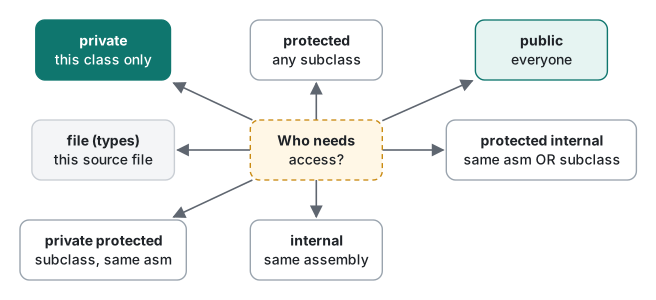
The row to correct from 2021 is protected internal. The old table said it was "protected, but only within the same assembly". The fourth column shows that a derived class in a different assembly can use it. It really is protected or internal. The AND combination, "derived classes inside my assembly only", is what private protected is for.
Note also that accessing an internal, private protected or private member from another assembly does not produce CS0122 ("inaccessible due to its protection level"). You get CS0103 or CS1061, the "this name does not exist" errors. From another assembly those members are treated as not there at all, which can send you hunting for a typo that does not exist:
Program.cs(16,13): error CS0103: The name 'Int' does not exist in the current context
Program.cs(5,7): error CS0122: 'Base.ProtInt' is inaccessible due to its protection level
If a unit-test project needs to see your internal members, add [assembly: InternalsVisibleTo("YourTests")] to the library instead of widening the members. We checked that the console app could read b.Int once the attribute named it.
file-local types (C# 11)
file applies to types, not members. It limits the type to the source file it is declared in. It was introduced mainly so that helper classes emitted by source generators cannot collide by name.
// Helper.cs
file static class Helper { public static int Twice(int x) => x * 2; }
static class UsesHelper { public static int Run() => Helper.Twice(21); }   // same file: OK, returns 42
Calling Helper.Twice(21) from Program.cs fails with error CS0103 (The name 'Helper' does not exist in the current context). Putting file on a member (file int z;) gives error CS0106 (The modifier 'file' is not valid for this item), and using a file-local type in a public method signature gives error CS9051.
We also checked the version claims. With LangVersion 7.1, private protected fails with CS8302 (… 7.2 or greater). With LangVersion 10, file class fails with CS8936 (Feature 'file types' … 11.0 or greater).
When you write nothing: default access levels
We read the defaults back with reflection:
class Top           : internal
Top.field           : private
Top.Method()        : private
Top.Nested          : private
Top() ctor          : public
IShape.Area()       : public
struct S.field      : private
abstract Abs() ctor : protected
- A type declared directly in a namespace: internal
- Members and nested types of a class or struct: private
- Interface members: public
- The default constructor the compiler generates: usually public, protected for an abstract class
The error you hit most often because of these defaults is CS0050. If a public method returns a class with no modifier (so it is internal), code in other assemblies could never name the return type, so the compiler refuses:
error CS0050: Inconsistent accessibility: return type 'Hidden' is less accessible than method 'Api.Get()'
this: three ways to refer to the current object
1. When a field and a parameter share a name
We reran the original num = num example. In 2021 the article showed only the output; today's compiler tells you about the bug before you run anything:
class A {
    private int num;
    public A(int num) { num = num; }
    public void Show() => Console.WriteLine("num: " + num);
}
warning CS0649: Field 'A.num' is never assigned to, and will always have its default value 0
warning CS1717: Assignment made to same variable; did you mean to assign something else?
num: 0
With this.num = num; the program prints num: 50. this.num is "the field num of this object", while a bare num resolves to the nearest scope, which is the parameter. If you do not suppress these two warnings, this bug never reaches run time.
2. Constructor chaining with : this(...)
One constructor can call another in the same class first, so the initialization code lives in one place:
class Point {
    public int X { get; } public int Y { get; }
    public Point() : this(0, 0) { Console.WriteLine("Point()"); }
    public Point(int xy) : this(xy, xy) { Console.WriteLine("Point(int)"); }
    public Point(int x, int y) { X = x; Y = y; Console.WriteLine($"Point(int, int) {x},{y}"); }
}
Point(int, int) 0,0
Point()
Point(int, int) 3,3
Point(int)
The constructor named in : this(...) runs first, then the calling constructor's own body. The complete order, including base classes, field initializers and static constructors, is measured in constructors and finalizers.
3. The this parameter of extension methods, and C# 14 extension blocks
Mark the first parameter of a static method in a static class with this, and the method can be called as if it were an instance method of that type. C# 14 (shipped with .NET 10) adds extension blocks, which also allow extension properties:
static class StringExt {
    public static int WordCount(this string s) =>
        s.Split(' ', StringSplitOptions.RemoveEmptyEntries).Length;
    extension(string s) {
        public bool IsBlank => string.IsNullOrWhiteSpace(s);   // C# 14 extension property
    }
}
// "hello world".WordCount() -> 2, "hello world".IsBlank -> False
With LangVersion 13 the extension block does not even get a "feature not available" message; it fails to parse (CS1022, CS1513). It is C# 14 only.
this also declares indexers (public string this[int i] { get; set; }) and lets an object pass itself to another object (new Node(childName) { Parent = this }). We compiled and ran both.
Rules we actually use
| Situation | Modifier |
|---|---|
| Starting point | private for members; internal for types |
| API exposed outside the library | public |
| Helper used only inside the project | internal |
| Member meant to be used or overridden by subclasses | protected |
| Only for subclasses inside my assembly | private protected |
| Internal members a test project must see | internal + InternalsVisibleTo (do not widen to protected internal) |
| A type used in one file only | file class |
The class basics themselves (fields, properties, required) are in C# classes.
Tested with .NET SDK 10.0.403 / runtime 10.0.14, C# 14 (the net10.0 default), macOS on an Apple Silicon Mac.
FAQ
Does protected internal mean protected, but only inside the assembly?
No. protected internal means same assembly OR derived class, so a derived class in another assembly can use the member. The AND version, derived classes inside the same assembly only, is private protected, added in C# 7.2. We compiled both cases across two assemblies to confirm.
What is the default access level in C#?
Members and nested types of classes and structs default to private. A top-level class declared directly in a namespace defaults to internal. Interface members default to public. That is why a public method returning a class with no modifier fails with error CS0050 (inconsistent accessibility).
What happens if I write num = num instead of this.num = num?
The parameter is assigned to itself and the field never changes. Today's compiler reports warning CS1717 (Assignment made to same variable) and CS0649, and the program prints num: 0.