C# Classes on .NET 10: Primary Ctors, required, init
C# classes re-tested on .NET 10: fields vs properties, the C# 12 primary constructor trap (CS9124), C# 11 required members, and measured object sizes.
Revised November 2026. This tutorial first appeared in Korean in 2021. We recompiled its example on .NET 10.0.14 (C# 14). It still runs and prints the same output, but a new project now reports three CS8618 warnings, and the "Press any key to continue" line in the old output came from Visual Studio, not from the program. This version adds what C# has gained since then (primary constructors,
required,init), with real compiler messages and a measurement of how many bytes an object actually takes.
This article is for developers who are new to C# classes, and for those who learned them a while ago and are now reading code like class Counter(string label) or public required string Email { get; init; }. The short version: a class is a blueprint and an object is what new builds from it. A variable of a class type holds a reference to the object, not the object itself. Almost every newer feature covered here answers one question: how do you make sure an object is filled in correctly when it is created?
Objects and classes: state and behavior
When you model something in code, you split it into state and behavior. For a phone, the color and battery level are state; placing and ending a call are behavior. In C#, state lives in fields and properties and behavior lives in methods. A class defines that bundle. Each concrete thing created from the class is an object, also called an instance. One cookie cutter, many cookies.
Keeping only the parts the program needs is called abstraction. A dog in a pet-shop app might need a name, a gender, an owner name and the ability to bark. Its weight history or vaccination dates can wait until a feature needs them.
The 2021 article used a circular "object = state + behavior" diagram taken from third-party material. It has been removed and replaced with the diagrams below, drawn for this article.
Running the 2021 example on .NET 10
We pasted the original Dog example, namespace and using lines included, into a new console project (dotnet new console, net10.0). Here are the parts that matter:
class Dog {
    public string name;
    public string gender;
    public string ownernames;
    public void Bark() {
        Console.WriteLine("{0} : Woof!", name);
    }
}
// Main
Dog dog = new Dog();
dog.name = "Kan";
dog.gender = "male";
dog.ownernames = "Min";
dog.Bark();
Console.WriteLine("Name: {0}, Gender: {1}, Owner: {2}", dog.name, dog.gender, dog.ownernames);
Kan : Woof!
Name: Kan, Gender: male, Owner: Min
The output matches 2021 (we translated the strings). The build, however, now prints three warnings:
Program.cs(7,23): warning CS8618: Non-nullable field 'name' must contain a non-null value when exiting constructor. Consider adding the 'required' modifier or declaring the field as nullable.
Since .NET 6 the console template turns on <Nullable>enable</Nullable>. The compiler is pointing out that you declared string (meaning "never null") and then never assigned it. There are three fixes: give it a default (= ""), allow null (string?), or, as the message suggests, mark it required, which we cover below.
new Dog() means "build an object from the Dog blueprint and call its Dog() constructor". Since C# 9 you can write Dog dog = new(); when the type is on the left. With LangVersion 8 the compiler rejects it with error CS8400: Feature 'target-typed object creation' is not available in C# 8.0. Constructors themselves are covered in constructors and finalizers.
A variable holds a reference, not the object
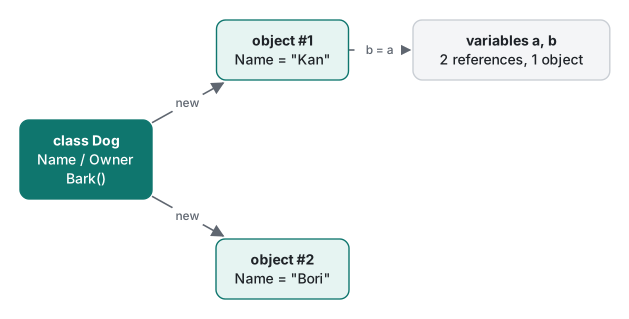
Classes are reference types. Assigning one variable to another does not copy the object; it adds a second reference to the same object.
var a = new Dog { Name = "Kan", Owner = "Min" };
var b = a;
b.Name = "Bori";
Console.WriteLine($"a.Name={a.Name} same={ReferenceEquals(a, b)}");
a.Name=Bori same=True
We changed b and a changed too, because there is only one object. If you want the value itself to be copied on assignment, that is what a struct is for.
Fields vs properties at a glance
The 2021 example exposed public fields. In current C# code, data visible outside the class is almost always a property:
class Dog
{
    public string Name = "";            // field: the variable itself
    public string? Owner { get; set; }  // property: goes through get/set accessors
    public void Bark() => Console.WriteLine($"{Name}: Woof!");
}
Calling code looks the same (dog.Name, dog.Owner), but a property lets you add validation later without breaking callers, can be made init-only, and is what data binding and serializers look at. A good default: private fields for internal state, properties for anything public. Auto-properties, read-only properties and the rest are covered in property basics and advanced properties. Keywords such as public and private are explained in access modifiers and this.
New since 2021: primary constructors, required, init
Primary constructors (C# 12)
You put the parameters right after the class name and can use them anywhere in the class body:
class Counter(string label)
{
    private int count;
    public void Add() => count++;
    public override string ToString() => $"{label}={count}";
}
// var c = new Counter("clicks"); c.Add(); c.Add(); Console.WriteLine(c);
clicks=2
Two misunderstandings come up often. First, label is not a property. Unlike a record, a class gets no public member for it, so reading c.label fails:
error CS1061: 'Counter' does not contain a definition for 'label' and no accessible extension method 'label' accepting a first argument of type 'Counter' could be found
Second, if you use the parameter to initialize a property and also use the parameter inside a method, you end up with two copies of the value. The compiler warns about it. We checked what that means in practice:
class Dog(string name)
{
    public string Name { get; set; } = name;
    public void Bark() => Console.WriteLine($"{name}: Woof! (Name={Name})");
}
// var d = new Dog("Kan"); d.Name = "Bori"; d.Bark();
warning CS9124: Parameter 'string name' is captured into the state of the enclosing type and its value is also used to initialize a field, property, or event.
Kan: Woof! (Name=Bori)
We renamed the dog to "Bori", yet Bark() still says "Kan". The captured parameter and the property's backing field are stored separately, and as the measurement below shows, the object also grows by 8 bytes. The rule is simple: once you have a property, use the property inside your methods.
required members (C# 11) and init (C# 9)
required forces callers to set a member when they create the object, without writing a constructor:
class User
{
    public required int Id { get; init; }
    public required string Email { get; init; }
    public string Nick { get; set; } = "(none)";
}
var u = new User { Id = 7, Email = "a@example.com" };   // prints: 7 a@example.com (none)
Leaving out Email, or changing an init property after creation, stops the build:
error CS9035: Required member 'User.Email' must be set in the object initializer or attribute constructor.
error CS8852: Init-only property or indexer 'User.Id' can only be assigned in an object initializer, or on 'this' or 'base' in an instance constructor or an 'init' accessor.
The { Id = 7, Email = ... } part is an object initializer. It assigns properties right after the constructor finishes, and it combines with primary constructors too: new Pet("Kan") { Owner = "Min" }, where Pet(string name) has a required string Owner { get; init; }.
Checking every "added in C# N" claim
To make sure the version numbers in this article are right, we rebuilt the samples with a lower -p:LangVersion:
| Feature | LangVersion tried | Actual error |
|---|---|---|
| Primary constructors on classes | 11 | CS9058: Feature 'primary constructors' is not available in C# 11.0. Please use language version 12.0 or greater. |
| required members | 10 | CS8936: Feature 'required members' … 11.0 or greater. |
| init accessors | 8 | CS8400: Feature 'init-only setters' … 9.0 or greater. |
Target-typed new() |
8 | CS8400: Feature 'target-typed object creation' … 9.0 or greater. |
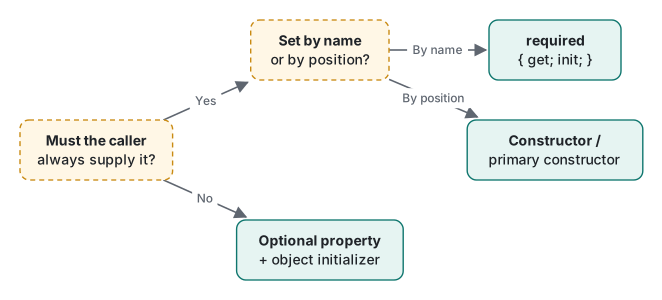
Which one should you pick for a given value? This is the rule of thumb we use:
Measured: how many bytes is one object?
A class instance carries a header in addition to its fields. We created one million instances of each class, kept them in an array, and divided the increase in GC.GetAllocatedBytesForCurrentThread() by the count. Release build, .NET 10.0.14, Apple Silicon Mac; all three runs gave identical numbers.
| Class | Bytes per object |
|---|---|
new object() |
24 B |
Empty class class Empty { } |
24 B |
One int field |
24 B |
The 2021 Dog (three string fields) |
40 B |
Counter(string label) plus int count |
32 B |
Dog(string name) with a Name property, name also used in a method (CS9124) |
32 B |
Dog(string name) with only the Name property |
24 B |
On 64-bit .NET the object header plus the type pointer take 16 bytes, and the minimum object size is 24 bytes, so an empty class and a one-int class cost the same. Each reference field adds 8 bytes. The class that triggered CS9124 holds the same string reference twice and grew from 24 to 32 bytes. One object does not matter; an app that keeps hundreds of thousands of them in memory should not ignore that warning.
Which tool for which job
| Situation | Use |
|---|---|
| Internal state | private field |
| A value exposed to callers | Property ({ get; set; } or { get; init; }) |
| Must be set; reads best by name | required + init |
| Must be set; few values, obvious order | Constructor or primary constructor |
| Optional value | Property with a default, set in an object initializer |
| Expose a primary constructor parameter | Declare a property and use the property in methods |
Next in this series: public, private and the other access levels plus the this keyword in access modifiers and this, and the order in which objects are built and cleaned up in constructors and finalizers. Methods themselves (overloading, ref, params) are in C# methods.
Tested with .NET SDK 10.0.403 / runtime 10.0.14, C# 14 (the net10.0 default), macOS on an Apple Silicon Mac.
FAQ
Does a C# 12 primary constructor parameter become a property?
No. In class Counter(string label), label is a parameter visible only inside the class. Reading c.label from outside gives error CS1061. Unlike a record, a class does not get public properties automatically, so declare one yourself: public string Label { get; } = label;
Should I use required members or a constructor?
Both force the caller to supply a value. Use a required init property (C# 11) when setting values by name reads better, and a constructor or primary constructor when there are few values with an obvious order. Forgetting a required member stops the build with error CS9035.
Why does the old tutorial code produce CS8618 warnings?
New projects have had Nullable enabled since .NET 6, so every uninitialized non-nullable string field triggers warning CS8618. Give the field a default (= ""), make it string?, or mark it required.