C# Arrays on .NET 10: Jagged vs 2D, Span, Resize Cost
C# arrays re-tested on .NET 10: collection expressions, ^1 and ranges, Span, plus measured jagged vs 2D traversal speed and the real cost of Array.Resize.
Revised November 2026. This tutorial first appeared in Korean in 2021. We recompiled every example on .NET 10.0.14 (C# 14). The two-dimensional array example did not compile because the variable was declared as
int[](errors CS0029 and CS0022), and the text usedstudent[2][1]andnew type(rows, cols), neither of which is valid for a 2D array. Below are the fixed examples with their real output, the array syntax C# has gained since 2021, and two measurements: jagged vs multidimensional traversal speed, and whatArray.Resizereally costs.
This article is for developers who are new to C# arrays, and for those who learned arrays a few versions ago and now meet code like int[] a = [1, 2, 3]; or a[^1]. The short version: an array is an object holding a fixed number of values of one type, and its length never changes after creation. If the count changes, use List<T>. For 2D data, a jagged int[][] or a flat int[] was faster than the more readable int[,] in our measurements, and loop order mattered even more than the choice of type.
Why arrays, and how to declare them
Say you track how many books each of six students read this month. One variable per student falls apart quickly:
int reading_1 = 4;
int reading_2 = 9;
int reading_3 = 1;
// … thirty students, thirty lines
An array gives you one name and an index. Indexes always start at 0, so the last index of a six-element array is 5.
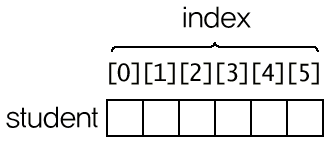
There are several ways to declare and initialize one. All five lines below compile on .NET 10 and produce the same array. The last one is new since the original article.
int[] a = new int[6] { 4, 9, 1, 0, 21, 12 };   // explicit length
int[] b = new int[] { 4, 9, 1, 0, 21, 12 };    // length from the initializer
int[] c = { 4, 9, 1, 0, 21, 12 };              // only in a declaration
var   d = new[] { 4, 9, 1, 0, 21, 12 };        // inferred as int[]
int[] e = [4, 9, 1, 0, 21, 12];                // C# 12 collection expression
The original article showed a fragment like new int[30] {4, 9, 1, 0, 21, 12, ...}. The dots were only shorthand, but it is worth knowing that when you state the length, the number of initial values must match it exactly. With six values the compiler says:
Program.cs(1,29): error CS0847: An array initializer of length '30' is expected
new int[6] without an initializer fills every element with the default value: 0 for int, false for bool, null for reference types such as string. An index outside the array is not caught by the compiler; it fails at run time:
Unhandled exception. System.IndexOutOfRangeException: Index was outside the bounds of the array.
Running the 2021 examples on .NET 10
The loop that prints every element still works unchanged. The "Press any key to continue" line at the end of the original output came from Visual Studio's console host; dotnet run does not print it.
int[] reading = new int[6] { 4, 9, 1, 0, 21, 12 };
for (int i = 0; i < reading.Length; i++)
    Console.WriteLine("reading[" + i + "]={0}", reading[i]);
reading[0]=4
reading[1]=9
reading[2]=1
reading[3]=0
reading[4]=21
reading[5]=12
The System.Array example also gave the same result as in 2021. We only translated its labels:
Properties: Rank=1, Length=6
Clear: 0 0 0 0 0 12
Resize: 0 0 0 0 0 12 0 0 0
IndexOf: 5
The original table listed indexOf; the real method is Array.IndexOf with a capital I, and it returns -1 when the value is not found. Here is the table again with what we checked:
| Member | What it does | Checked on .NET 10 |
|---|---|---|
Rank |
Number of dimensions | 1 for int[], 2 for int[,], 1 for int[][] |
Length |
Total number of elements | 18 for int[3, 6] |
Array.Clear(arr, start, count) |
Resets to default values | The example cleared the first 5 |
Array.ForEach(arr, action) |
Runs an action per element | Array.ForEach(reading, v => Console.Write($"{v} ")); is enough |
Array.Resize(ref arr, n) |
Changes the size | Allocates a new array and copies (measured below) |
Array.IndexOf(arr, value) |
First matching index | -1 if missing |
The 2021 code wrote Array.ForEach<int>(reading, new Action<int>(ShowValue)). Today you can drop both the type argument and new Action<int> and pass a method group or a lambda. See lambda expressions for details.
Two-dimensional arrays: why the original example failed
The original 2D example declared int[] reading = new int[3, 6]{…}. The right side is two-dimensional and the variable is one-dimensional, which produced two errors:
Program.cs(8,29): error CS0029: Cannot implicitly convert type 'int[*,*]' to 'int[]'
Program.cs(13,78): error CS0022: Wrong number of indices inside []; expected 1
Declaring the variable as int[,] fixes it:
int[,] reading = new int[3, 6] {
    { 4, 9, 1, 0, 21, 12 }, { 1, 4, 6, 0, 9, 5 }, { 4, 4, 2, 4, 0, 0 }
};
for (int i = 0; i < reading.GetLength(0); i++)
    for (int j = 0; j < reading.GetLength(1); j++)
        Console.WriteLine("reading[" + i + ", " + j + "] = {0}", reading[i, j]);
reading[0, 0] = 4
reading[0, 1] = 9
…
reading[2, 4] = 0
reading[2, 5] = 0
Two statements in the original text also needed correcting:
- The creation syntax is
new int[rows, cols]with square brackets, notnew type(rows, cols). - An element of a 2D array is
student[2, 1], notstudent[2][1]. Writing[2][1]giveserror CS0022: Wrong number of indices inside []; expected 2. And because the first index is the row,[2, 1]is row 3, column 2, not "column 3, row 2" as the original said.GetLength(0)is the row count (3) andGetLength(1)the column count (6).
The [i][j] syntax belongs to jagged arrays, int[][]: arrays whose elements are arrays. The two look similar in code but are laid out differently in memory.
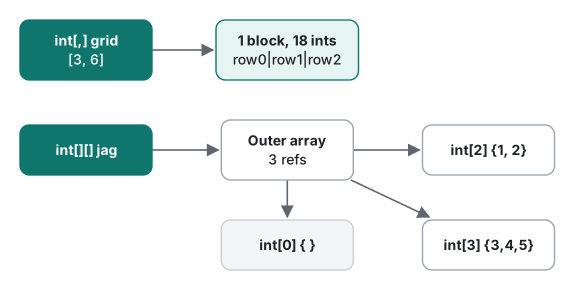
int[,] grid = new int[3, 6];
int[][] jag = [[1, 2], [3, 4, 5], []];
Console.WriteLine($"grid Rank={grid.Rank} Length={grid.Length} GetLength(0)={grid.GetLength(0)} GetLength(1)={grid.GetLength(1)}");
Console.WriteLine($"jag Rank={jag.Rank} Length={jag.Length} jag[1].Length={jag[1].Length}");
grid Rank=2 Length=18 GetLength(0)=3 GetLength(1)=6
jag Rank=1 Length=3 jag[1].Length=3
Note that Length of a jagged array is just the length of the outer array, which is the number of rows.
Since C# 12: collection expressions, indices, ranges and Span
These are the array-related features C# gained after the original article was written for C# 9. Each was compiled and run:
int[] reading = [4, 9, 1, 0, 21, 12];   // collection expression (C# 12)
int[] more = [..reading, 7, 8];         // spread
Console.WriteLine(string.Join(" ", more));
Console.WriteLine($"last={reading[^1]} second-last={reading[^2]}");   // ^ counts from the end (C# 8)

int[] mid = reading[1..4];              // range: copies into a new array
mid[0] = 99;
Console.WriteLine($"after mid[0]=99 -> reading[1]={reading[1]}");

Span<int> view = reading.AsSpan(1, 3);  // span: a view, no copy
view[0] = 99;
Console.WriteLine($"after view[0]=99 -> reading[1]={reading[1]}");
4 9 1 0 21 12 7 8
last=12 second-last=21
after mid[0]=99 -> reading[1]=9
after view[0]=99 -> reading[1]=99
The key difference: a range on an array makes a copy, while AsSpan is a window onto the original. When you pass part of a large array to a method, take a Span<T> or ReadOnlySpan<T> and nothing is copied.
Some combinations do not work:
var x = [1, 2, 3];                // error CS9176: There is no target type for the collection expression.
int[,] g = [[1, 2], [3, 4]];      // error CS9174: Cannot initialize type 'int[*,*]' with a collection expression because the type is not constructible.
var bad = grid[^1, 0];            // error CS0029: Cannot implicitly convert type 'System.Index' to 'int'
In practice, collection expressions, ^, .. and AsSpan are for single-dimensional (and jagged) arrays. Multidimensional arrays keep the old syntax.
Arrays are reference types, and Resize allocates
Assigning an array variable to another variable copies the reference, not the elements: both point to the same array. The original article described the ref in Array.Resize(ref reading, …) as "the address of the array". More precisely, ref passes the variable itself, so the method can store a new array in it:
int[] before = reading;
Array.Resize(ref reading, reading.Length + 3);
Console.WriteLine($"same object? {ReferenceEquals(before, reading)}  before.Length={before.Length} reading.Length={reading.Length}");
same object? False before.Length=6 reading.Length=9
Resize allocates a nine-element array, copies the values, and points reading at it. before still holds the old six-element array. So calling Resize(+1) for every new element copies the whole array every time. We measured it: Release build, Stopwatch for time, GC.GetAllocatedBytesForCurrentThread() for allocations, three runs.
| Filling 100,000 elements | Run 1 | Run 2 | Run 3 | Allocated |
|---|---|---|---|---|
Array.Resize(ref arr, arr.Length + 1) |
1,097.8 ms | 1,178.2 ms | 1,184.1 ms | 18.63 GiB |
List<int>.Add, then ToArray() |
0.17 ms | 0.12 ms | 0.40 ms | 1.38 MB |
Over a second and about 18.6 GiB of allocation for 100,000 ints. That matches the arithmetic: arrays of length 1, 2, 3, … 100,000 add up to 4 bytes × (1 + 2 + … + N) ≈ 20 GB. If you do not know the count in advance, collect into a List<T> and call ToArray() at the end.
Jagged vs multidimensional traversal speed (measured)
We stored the same values three ways (int[,], int[][], and a flat int[] indexed as i * C + j) and timed summing every element. Each variant is a [MethodImpl(NoInlining)] method. The matrix is 4,000 × 4,000 ints (64 MB), summed 12 times per run (192 million reads), with one warm-up run and three measured runs.
static long SumMd(int[,] a) { long s = 0;
    for (int i = 0; i < a.GetLength(0); i++)
        for (int j = 0; j < a.GetLength(1); j++) s += a[i, j];
    return s; }
static long SumJag(int[][] a) { long s = 0;
    for (int i = 0; i < a.Length; i++) { var row = a[i];
        for (int j = 0; j < row.Length; j++) s += row[j]; }
    return s; }
static long SumFlat(int[] a) { long s = 0;
    for (int i = 0; i < a.Length; i++) s += a[i];
    return s; }
// column-first: SumMd with the i and j loops swapped. Span: foreach (var v in (ReadOnlySpan<int>)flat)
| Layout | Run 1 | Run 2 | Run 3 |
|---|---|---|---|
int[,] row-first [i, j] |
153 ms | 153 ms | 155 ms |
int[,] column-first |
755 ms | 743 ms | 742 ms |
int[][] jagged |
126 ms | 124 ms | 124 ms |
int[] flat |
123 ms | 123 ms | 124 ms |
ReadOnlySpan<int> foreach |
124 ms | 123 ms | 124 ms |
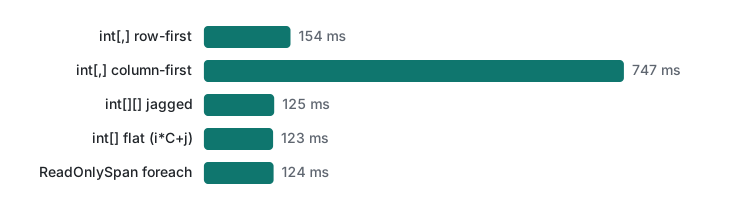
Jagged and flat arrays were about 20% faster than int[,]. The int[,] indexer has to bounds-check both dimensions, while a jagged row pulled into the local row lets the JIT drop the bounds check in the inner loop. The much bigger factor was loop order. A int[,] is stored row by row, so walking it column by column misses the cache on almost every read and was about five times slower. With a 1,000 × 1,000 matrix (4 MB) the same column-first loop took 167–201 ms against 155–160 ms row-first, a small gap, because the whole matrix nearly fits in the CPU cache. A benchmark on a small array can hide the problem you will hit with real data.
Which one to use
| Situation | Use |
|---|---|
| A fixed set of values | int[] a = [ … ]; (C# 12) |
| The count changes | List<T>, then ToArray() if you need an array |
| Pass part of a large array | AsSpan(start, length) / ReadOnlySpan<T> (no copy) |
| Keep a separate slice | Range a[1..4] (a copy) |
| Rows of different lengths | int[][] jagged array |
| Fixed-size matrix, readability first | int[,], always loop row by row |
| Fixed-size matrix, speed first | Flat int[] with i * cols + j, or int[][] |
What actually gets copied when you pass an array to a method is covered in the ref and params sections of C# methods. For filtering and sorting arrays, see LINQ basics.
Tested with .NET SDK 10.0.403 / runtime 10.0.14, C# 14 (the net10.0 default), macOS on an Apple Silicon Mac.
FAQ
Should I use int[,] or int[][]?
If rows have different lengths, only int[][] (a jagged array) works. Even with equal rows, jagged or flat arrays were faster in our test: summing a 4,000 x 4,000 matrix took 154 ms with int[,] row by row, 125 ms with int[][] and 123 ms with a flat int[] (.NET 10, Release, Apple Silicon Mac). The advantage of int[,] is the readable grid[i, j] syntax.
Can I grow an array with Array.Resize?
Array.Resize allocates a new array and copies everything. Calling Resize(+1) for each new element took about 1.1 seconds and allocated 18.6 GiB to fill 100,000 elements, while List<int>.Add followed by ToArray() took under 0.4 ms. If the size changes often, collect into a List<T> and convert at the end.
Why does var x = [1, 2, 3]; not compile?
A C# 12 collection expression needs a target type. With var you get error CS9176 (There is no target type for the collection expression). Write int[] x = [1, 2, 3]; instead. Multidimensional arrays such as int[,] cannot be initialized with a collection expression at all (error CS9174).