C# Properties in Depth: the field Keyword and required
The C# 14 field keyword on .NET 10 and its CS9258 upgrade trap, required + init, cached properties, INotifyPropertyChanged, and a field vs property benchmark.
Revised November 2026. This article first appeared in Korean in 2021. We recompiled its samples with .NET 10.0.14 (C# 14) and Apple clang 21. The C++ sample failed with 8 errors (
Privatecapitalized, missing;after the class, aGetBumtypo,coutwithoutstd::), and two of the three C# samples did not compile either (CS1514, CS1002, CS1597 and CS1729). The text also said auto-properties arrived with ".NET Framework 3.0"; they are a C# 3 feature that shipped with .NET Framework 3.5. A personal name in one sample has been removed.
This is part two. Part one, C# property basics, covers get/set, auto-properties, init, expression-bodied properties and setter validation. This article is for developers who already use those and want the parts that matter in 2026 code reviews: the C# 14 field keyword (and the upgrade trap where existing code changes behavior with only a warning), required with init, computed vs cached properties, the INotifyPropertyChanged pattern, when a property should be a method, and a measurement of whether properties are slower than fields.
Fixing the 2021 samples
The 2021 text opened by comparing C++ getter/setter functions with C# properties. The comparison is still useful, but the C++ code did not compile:
orig.cpp:2:5: error: unknown type name 'Private'
orig.cpp:9:2: error: expected ';' after class
orig.cpp:13:5: error: use of undeclared identifier 'cout'
orig.cpp:13:24: error: no member named 'GetBum' in 'TestClass'
8 errors generated.
The fixed version prints 10:
#include <iostream>
class TestClass {
private:
    int num = 0;
public:
    void SetNum(int n) { num = n; }
    int GetNum() const { return num; }
};
int main() {
    TestClass t;
    t.SetNum(10);
    std::cout << t.GetNum() << std::endl;
}
The first C# sample had a stray semicolon after the property name, public int Number;, which gives error CS1514: { expected. Without it, the sample prints 10. The auto-property sample compiled and ran unchanged.
The last sample, "initializing properties without a constructor", had two syntax errors (error CS1002: ; expected after return num1 + num2, and error CS1597: Semicolon after method or accessor block is not valid for the };). Fixing those exposes the real problem:
Program.cs(19,32): error CS1729: 'TestClass' does not contain a constructor that takes 2 arguments
Program.cs(19,42): error CS0103: The name 'num1' does not exist in the current context
The feature the text described is the object initializer, written with braces, not parentheses. Two smaller corrections: value is not a "reserved variable" but the setter's implicit parameter, and a property is not a kind of variable but a pair of methods. The corrected sample:
var t = new TestClass { Num1 = 10, Name = "sample" };
t.Num2 = 20;
Console.WriteLine(t.Sum);   // 30

class TestClass
{
    public int Num1 { get; set; }
    public int Num2 { get; set; }
    public string Name { get; set; } = "";
    public int Sum => Num1 + Num2;   // read-only, computed on each read
}
All C# samples in this article ran as a single Program.cs with top-level statements. In a real file the statements must come before the class declarations (error CS8803 otherwise).
The C# 14 field keyword, compiled on .NET 10
For years, adding one line of validation to an auto-property meant giving up the auto-property and declaring the backing field yourself. In C# 14, the contextual keyword field inside an accessor refers to the compiler-generated backing field, so you can keep get; automatic and write only the setter:
var u = new User { Email = "  Dev@Example.com ", Name = "dev" };
Console.WriteLine($"[{u.Email}]");
try { u.Email = "no-at-sign"; } catch (ArgumentException e) { Console.WriteLine(e.Message); }

public class User
{
    public required string Name { get; init; }
    public required string Email
    {
        get;
        set
        {
            var v = value.Trim().ToLowerInvariant();
            if (!v.Contains('@')) throw new ArgumentException($"Invalid email: {v}", nameof(value));
            field = v;
        }
    }
}
[dev@example.com]
Invalid email: no-at-sign (Parameter 'value')
On .NET SDK 10.0.403 with a plain net10.0 project (C# 14 by default), this compiled and ran with no extra settings. With -p:LangVersion=13, field is just an identifier and the build fails with error CS0103: The name 'field' does not exist in the current context.
The upgrade trap: code that already had a member called field
Before C# 14, field was a legal name, so older code may have a private field called exactly that. We ran the same file as C# 13 and as C# 14:
var c = new Counter();
c.Value = 5;
Console.WriteLine($"Value={c.Value}, Dump()={c.Dump()}");

public class Counter
{
    private int field;                                   // written years ago
    public int Value { get => field; set => field = value; }
    public int Dump() => this.field;
}
-- LangVersion 13 --
Value=5, Dump()=5
-- LangVersion 14 (net10.0 default) --
Program.cs(7,17): warning CS0649: Field 'Counter.field' is never assigned to, and will always have its default value 0
Program.cs(8,31): warning CS9258: In language version 14.0, the 'field' keyword binds to a synthesized backing field for the property. To avoid generating a synthesized backing field, and to refer to the existing member, use 'this.field' or '@field' instead.
Value=5, Dump()=0
There is no error. The property now writes to a new hidden field, and Dump(), which reads the old one, returns 0. When you retarget a project to net10.0, search the build log for CS9258 and change the accessor to this.field or @field if the old member was meant. Adding <WarningsAsErrors>CS9258</WarningsAsErrors> to the project turns it into a hard stop.
One more warning to expect: public string Name { get; set => field = value.Trim(); } with no initializer produces warning CS9264 (non-nullable property must contain a non-null value). Add = ""; or mark it required.
required + init: set once, and set for sure
init, from part one, guarantees a value can be set only during construction, but nothing forces anyone to set it. required (C# 11) adds that check at compile time:
var c = new Config();                 // Url missing
var d = new Config { Url = "x" };
d.Url = "y";                          // after construction

public class Config
{
    public required string Url { get; init; }
}
error CS9035: Required member 'Config.Url' must be set in the object initializer or attribute constructor.
error CS8852: Init-only property or indexer 'Config.Url' can only be assigned in an object initializer, or on 'this' or 'base' in an instance constructor or an 'init' accessor.
required plus init reads as "must be set, exactly once". If you also want a constructor that fills the value, mark that constructor with [SetsRequiredMembers]; otherwise callers of the constructor still get CS9035:
var a = new AppConfig("https://example.com");   // no initializer needed

public class AppConfig
{
    public required string BaseUrl { get; init; }
    public int TimeoutSeconds { get; init; } = 30;

    [SetsRequiredMembers]
    public AppConfig(string baseUrl) => BaseUrl = baseUrl;
    public AppConfig() { }
}
The attribute is a promise to the compiler, not a check. If the constructor forgets a member, nothing will catch it.
Computed vs cached properties
A property such as public long Total => prices.Sum(); is always up to date, but it pays the full cost on every read. We compared it with a cache that is cleared wherever the data changes:
class Cart
{
    private readonly List<int> prices = [];
    private long? cachedTotal;
    public void Add(int price) { prices.Add(price); cachedTotal = null; }   // invalidate on change
    public long TotalComputed => prices.Sum(p => (long)p);
    public long TotalCached => cachedTotal ??= prices.Sum(p => (long)p);
}
Reading the total of a 1,000-item cart 100,000 times (Release, one warm-up, three timed runs):
| Property | Run 1 | Run 2 | Run 3 |
|---|---|---|---|
TotalComputed |
220.2 ms | 219.4 ms | 225.3 ms |
TotalCached |
0.1 ms | 0.1 ms | 0.1 ms |
That is about 2.2 µs per computed read. For a value shown once on a screen, the computed property is fine. If it is read inside loops or refreshed by data binding, cache it. The price of a cache is a new class of bug: miss one invalidation point and the property returns a stale value. Exposing the list publicly (public List<int> Prices) lets callers bypass Add, so keeping the collection private is part of the deal.
INotifyPropertyChanged with the field keyword
WPF, .NET MAUI and Avalonia refresh the UI when an object raises PropertyChanged. That pattern used to need an explicit backing field per property; with field and a small helper it shrinks:
public class ProfileViewModel : INotifyPropertyChanged
{
    public event PropertyChangedEventHandler? PropertyChanged;

    public string FirstName
    {
        get;
        set { if (SetField(ref field, value)) OnPropertyChanged(nameof(FullName)); }
    } = "";

    public string LastName
    {
        get;
        set { if (SetField(ref field, value)) OnPropertyChanged(nameof(FullName)); }
    } = "";

    public string FullName => $"{FirstName} {LastName}".Trim();   // computed, no field

    private bool SetField<T>(ref T storage, T value, [CallerMemberName] string? name = null)
    {
        if (EqualityComparer<T>.Default.Equals(storage, value)) return false;
        storage = value;
        OnPropertyChanged(name);
        return true;
    }

    private void OnPropertyChanged(string? name) =>
        PropertyChanged?.Invoke(this, new PropertyChangedEventArgs(name));
}
Subscribing and setting FirstName twice to the same value, then LastName:
changed: FirstName
changed: FullName
changed: LastName
changed: FullName
Ada Lovelace
ref field passes the hidden field to the helper, [CallerMemberName] removes the property-name strings, and an unchanged value raises nothing, which avoids pointless UI refreshes. A computed property such as FullName has to be announced whenever one of its inputs changes, or the UI will not follow. How the event itself works is covered in C# delegates and events.
Property or method?
A property can contain any code, but callers expect it to cost and behave like reading a field. The decision we use, in line with the .NET design guidelines:
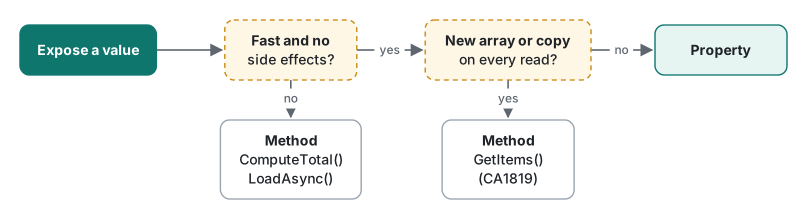
| When | Use |
|---|---|
Returns stored state or a cheap derivation (A + B) |
Property |
| Touches a database, file or network, or is noticeably slow | Method (LoadAsync(), ComputeTotal()) |
| Returns a new array or copy on each call | Method (GetItems(), analyzer rule CA1819) |
| Returns a different value on each read of the same object | Method (like Guid.NewGuid()) |
| Has side effects that depend on call order | Method |
There are no async properties: an accessor cannot be async. If a value has to be awaited, that alone tells you it is a method.
Benchmark: is an auto-property slower than a field?
"A property is a method call, so it must be slower than a field." We measured it: 200 million reads or writes over an array of 1,000 objects, each variant in its own [MethodImpl(NoInlining)] method, one warm-up and three timed runs with Stopwatch, Apple Silicon Mac.
class WithField { public int X; }
class WithAuto { public int X { get; set; } }
class WithValidated { public int X { get; set { ArgumentOutOfRangeException.ThrowIfNegative(value); field = value; } } }

[MethodImpl(MethodImplOptions.NoInlining)]
static long ReadAuto(WithAuto[] xs) { long s = 0; for (int r = 0; r < Reps; r++) foreach (var x in xs) s += x.X; return s; }
// ReadField, ReadValidated and the Write… methods have the same shape
| 200 million operations | Run 1 | Run 2 | Run 3 |
|---|---|---|---|
| Release: public field read | 126.6 ms | 129.1 ms | 128.1 ms |
| Release: auto-property read | 127.3 ms | 128.1 ms | 128.2 ms |
Release: field-keyword property read |
129.4 ms | 129.1 ms | 129.1 ms |
| Release: public field write | 74.8 ms | 74.4 ms | 74.7 ms |
| Release: auto-property write | 74.4 ms | 75.8 ms | 74.2 ms |
| Release: setter with range check | 109.6 ms | 108.9 ms | 108.7 ms |
| Debug: public field read | 301.6 ms | 293.5 ms | 292.9 ms |
| Debug: auto-property read | 625.1 ms | 606.0 ms | 670.2 ms |

In Release, the field and the auto-property were the same. The JIT inlines trivial accessors into the same machine code as a field access. Only two cases differed. In a Debug build, accessors are not inlined and the property read was about 2.1 times slower, which is why Debug timings should never drive a design decision. A setter with a real check raised write time from 74.6 ms to 109.1 ms: 35 ms over 200 million writes, under 0.2 ns each, which is no reason to skip validation.
For transparency: in the first execution of this benchmark, two runs of the field-keyword read came out at 147.7 ms and 142.0 ms. Two later executions gave 128–131 ms, in line with the other variants. The generated getter is identical to an auto-property's, so we treat that as tiered-compilation noise and report the stable execution above.
Tested with .NET SDK 10.0.403 / runtime 10.0.14, C# 14 (the net10.0 default), Apple clang 21, macOS on an Apple Silicon Mac.
FAQ
Can I use the C# 14 field keyword on .NET 10 without extra settings?
Yes. A net10.0 project defaults to C# 14, so it compiles as is. With LangVersion 13, field is an ordinary identifier and you get error CS0103. If a class already has a member named field, C# 14 binds field inside accessors to a new synthesized backing field instead, and only warning CS9258 tells you, so check your build log when you upgrade.
Is an auto-property slower than a public field?
Not in a Release build. Reading 200 million times took 127.9 ms on average for both a public field and an auto-property on .NET 10. In a Debug build the property read took 633.8 ms against 296.0 ms for the field, because the JIT does not inline getters in Debug.
I get CS9035 when I combine required with a constructor. What do I do?
If a constructor sets every required member, mark it with [SetsRequiredMembers]. Then new AppConfig("https://example.com") compiles without an object initializer. The attribute is a promise to the compiler, not a check, so make sure the constructor really sets them all.