C# Property Basics: get/set, Auto-Properties, init
C# properties on .NET 10: get/set and value, auto-properties, init (C# 9), the => vs { get; } = trap, and setter validation, with real output and errors.
Revised November 2026. This tutorial first appeared in Korean in 2021. We recompiled every example on .NET 10.0.14 (C# 14). The original sample still runs, but it now triggers warning CS8618 (non-nullable field), its setter silently ignored bad input, and its message said "3 characters or more" while the code rejected only names longer than 3. Those are fixed below, and we added the syntax the 2021 text did not cover (auto-property initializers,
init, expression-bodied members), each checked against the compiler version that introduced it.
This is the basics half of a two-part guide, written for developers who are deciding whether a class member should be a public field or something else. The short answer: anything you expose should be a property, and if the value has rules, check them in the setter and throw when they are broken. The second part, C# properties in depth, covers the C# 14 field keyword, required, INotifyPropertyChanged, computed vs cached properties, and a field-vs-property speed measurement. This article does not repeat those.
The problem with public fields
When you write a class, a public field is the quickest way to share data:
public class Student { public int Age; }
It is also the quickest way to let any code anywhere set Age = -1. When the program misbehaves later, nothing tells you who wrote the bad value. The classic fix from C++ and Java is a private field with a pair of accessor methods:
class MyClass
{
    private int field;
    public int GetField() { return field; }
    public void SetField(int field) { this.field = field; }
}
It works, but every field now costs two methods, and calling code turns into obj.SetField(obj.GetField() + 1). A C# property keeps the private field and the two methods, but gives them one name, so callers write obj.Field += 1 as if it were a field.
get, set and value: the 2021 sample on .NET 10
A property has a get accessor that returns the value and a set accessor that receives a new one. Inside the setter, the incoming value is called value. It is not a variable you declare; it is an implicit parameter the compiler gives every setter. You may write only one accessor: get alone makes the property read-only, set alone makes it write-only (rarely useful in practice).
Here is the 2021 example with English strings, minus the unused using lines:
class Student
{
    private string name;
    private int age;

    public string Name
    {
        get { return name; }
        set
        {
            if (value.Length > 3)
                Console.WriteLine("Names cannot be longer than 3 characters.");
            else
                name = value;
        }
    }
    public int Age
    {
        get { return age; }
        set { age = value; }
    }
}

class Program
{
    static void Main()
    {
        Student student = new Student();
        student.Age = 13;
        student.Name = "Alexander";
        student.Name = "Kim";
        Console.WriteLine("My name is " + student.Name + " and I am " + student.Age + " years old.");
    }
}
Program.cs(3,20): warning CS8618: Non-nullable field 'name' must contain a non-null value when exiting constructor. Consider adding the 'required' modifier or declaring the field as nullable.
Names cannot be longer than 3 characters.
My name is Kim and I am 13 years old.
Three things are worth noting:
- CS8618 is new. Project templates since .NET 6 enable nullable reference types, so a
stringfield with no initial value gets a warning.private string name = "";removes it. - The message and the condition disagreed. The 2021 Korean message said "3 characters or more", but
> 3accepts exactly three. We fixed the wording. - The failure is silent. The caller has no way to know that
"Alexander"was rejected. We replace this with an exception below.
The original output also ended with "Press any key to continue". That line came from the Visual Studio console host; dotnet run does not print it.
A property is two methods
The 2021 article said that "a property is a method, not a variable". That is accurate, and reflection shows it. Listing the public instance methods of Student prints the accessors the compiler generated:
foreach (var m in typeof(Student).GetMethods(
    BindingFlags.Public | BindingFlags.Instance | BindingFlags.DeclaredOnly))
    Console.WriteLine(m.Name);
get_Name
set_Name
get_Age
set_Age
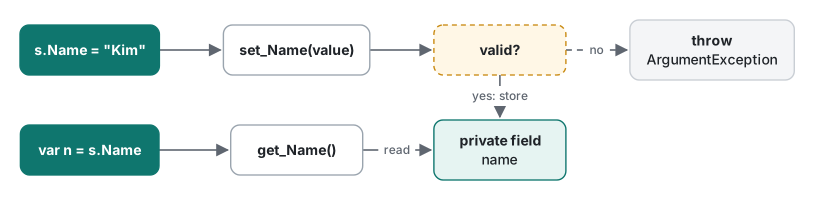
Because a property is a method call, two things that work on fields fail on properties:
Bump(ref t.Count);    // Count is a property
r.Size.Width = 5;     // Size is a property that returns a struct
error CS0206: A non ref-returning property or indexer may not be used as an out or ref value
error CS1612: Cannot modify the return value of 'Rect.Size' because it is not a variable
CS0206 means a property has no storage location to pass by reference. CS1612 is the compiler protecting you: get_Size() returns a copy of the struct, so changing the copy would do nothing. Copy it into a local, change it, and assign it back: var s = r.Size; s.Width = 5; r.Size = s;.
Auto-properties and initializers
The remaining samples ran as a single
Program.cswith top-level statements. The article shows classes next to the code that uses them, but in a real file the statements must come before the class declarations, otherwise you geterror CS8803: Top-level statements must precede namespace and type declarations.
If the setter has no rules, you do not need to write the field yourself. { get; set; } asks the compiler to generate a hidden backing field. We verified when each form arrived by compiling it with -p:LangVersion set one version lower:
class Tank
{
    public int Count { get; set; }                    // auto-property (C# 3)
    public int Level { get; } = 1;                    // get-only with initializer (C# 6)
    public string Label { get; private set; } = "";   // read-only from outside
}
| Syntax | Introduced | Error one version lower |
|---|---|---|
{ get; set; } |
C# 3 | CS8023 (C# 2) |
{ get; } = 1 |
C# 6 | CS8026 (C# 5) |
int X => 1 (expression-bodied) |
C# 6 | CS8026 (C# 5) |
get => x; set => x = value; |
C# 7.0 | CS8059 (C# 6) |
{ get; init; } |
C# 9 | CS8400 (C# 8) |
The 2021 companion article tied auto-properties to ".NET Framework 3.0". The feature is actually a C# 3 language feature, which shipped with .NET Framework 3.5; the compiler confirms the C# 3 boundary. A get-only auto-property can be set only in a constructor or an initializer:
error CS0200: Property or indexer 'Tank.Level' cannot be assigned to -- it is read only
init: writable only while constructing
init (C# 9) is an accessor that works in an object initializer but turns read-only afterwards. It gives you immutable objects without a long constructor parameter list:
var p = new Point { X = 1, Y = 2 };
Console.WriteLine(p);   // (1, 2)
p.X = 10;               // error

class Point
{
    public int X { get; init; }
    public int Y { get; init; }
    public override string ToString() => $"({X}, {Y})";
}
error CS8852: Init-only property or indexer 'Point.X' can only be assigned in an object initializer, or on 'this' or 'base' in an instance constructor or an 'init' accessor.
init lets you set a value once, but it does not force anyone to set it. Forcing that is the job of required, covered with its error codes in part two.
=> is not { get; } =
Expression-bodied syntax (=>) shortens a getter to one line. Two lines that look almost the same behave very differently:
var cc = new Counter();
_ = cc.A; _ = cc.A; _ = cc.B; _ = cc.B;
Console.WriteLine($"calls={Counter.Calls}");

class Counter
{
    public static int Calls;
    static int Next() => ++Calls;
    public int A { get; } = Next();   // runs once, at construction, and stores the result
    public int B => Next();           // runs on every read
}
calls=3
A called Next() once when the object was built. B called it on each of its two reads. In real code, public DateTime Created { get; } = DateTime.Now; records the creation time, while public DateTime Created => DateTime.Now; returns the current time on every read. It is a one-character difference that code reviews often miss. Whether a computed value should be cached is a separate question, measured in part two.
Validating in the setter
We reworked the 2021 sample in three ways: the name limit is now 10 characters, invalid input throws, and age rejects negative numbers. The throw helpers ArgumentNullException.ThrowIfNull (.NET 6) and ArgumentOutOfRangeException.ThrowIfNegative (.NET 8) keep each check to one line. The important detail is that the constructor assigns to the properties, not the fields, so construction goes through the same checks.
var s = new Student("Kim", 13);
try { s.Name = "Maximilian Alexander"; } catch (ArgumentException e) { Console.WriteLine(e.Message); }
try { s.Age = -1; } catch (ArgumentOutOfRangeException e) { Console.WriteLine(e.Message); }
Console.WriteLine($"after: {s.Name}, {s.Age}");

class Student
{
    private string name = "";
    private int age;

    public Student(string name, int age) { Name = name; Age = age; }

    public string Name
    {
        get => name;
        set
        {
            ArgumentNullException.ThrowIfNull(value);
            if (value.Length > 10)
                throw new ArgumentException("Name must be 10 characters or fewer.", nameof(value));
            name = value;
        }
    }

    public int Age
    {
        get => age;
        set
        {
            ArgumentOutOfRangeException.ThrowIfNegative(value);
            age = value;
        }
    }
}
Name must be 10 characters or fewer. (Parameter 'value')
value ('-1') must be a non-negative value. (Parameter 'value')
Actual value was -1.
after: Kim, 13
Each bad assignment now surfaces as an exception, and the object keeps its valid state. One more trap: string.Length counts UTF-16 code units, not characters. "Kim".Length is 3, but "👍".Length printed 2. If "number of characters" has to match what a user sees, use StringInfo.LengthInTextElements.
The same validation can be written without the private field by using the C# 14 field keyword, shown in part two.
Which form to use
| Situation | Write |
|---|---|
| A value with no rules | public int Count { get; set; } |
| Set once, never changed | { get; init; }, or { get; } plus a constructor |
| Read-only outside, writable inside | { get; private set; } |
| Derived from other values on each read | public int Sum => A + B; |
| Fixed at construction | public DateTime Created { get; } = DateTime.Now; |
| Has range or format rules | Check in the setter and throw |
Since properties are methods underneath, the rules for parameters, ref and overloads in C# methods apply to them too, and what an exception thrown from a setter costs is measured in C# exception handling.
Tested with .NET SDK 10.0.403 / runtime 10.0.14, C# 14 (the net10.0 default), macOS on an Apple Silicon Mac.
FAQ
What is the difference between an auto-property and a public field?
An auto-property makes the compiler generate a private field plus get_X/set_X methods. You can later add validation to the setter without breaking callers or binary compatibility, and data binding and most serializers work with properties. Speed is not a reason to prefer fields: in a Release build, 200 million reads took 127.9 ms for both (.NET 10).
Is public int A { get; } = Next(); the same as public int B => Next();?
No. { get; } = runs the initializer once, when the object is created, and stores the result. => runs the expression on every read. Reading A twice and B twice called Next() three times: once for A, twice for B.
Should a setter ignore an invalid value or throw?
Throw. If the setter only prints a message and ignores the value, the caller cannot tell that the assignment failed. Since .NET 8, helpers such as ArgumentOutOfRangeException.ThrowIfNegative make the check a single line.