HTTP Basics: Read Every Line of curl -v
HTTP lecture 1, run for real: a local python http.server, curl -v read line by line, methods, status codes, headers, curl exit codes and request timing.
Series: HTTP lecture 1/6 (beginner). For new developers who use APIs every day but have never looked at the raw messages. By the end you will start a web server in one command, read every line of curl -v, and know what a method, a status code and a header actually are.
When an app "can't reach the server", a new teammate usually has nothing to look at except a spinner. This lecture gives you the one tool that ends the guessing: curl -v against a server you control, so you can see the request that left your machine and the exact answer that came back. Everything below was run on an Apple Silicon Mac (M1 Pro, macOS 26.6) with curl 8.7.1 and Python 3.9.6; the server ran on 127.0.0.1 and file paths are shortened to ~/demo/.
You do not need to know any server language. If you can open a terminal and type cd, you can follow every step.
What happens when you request a URL
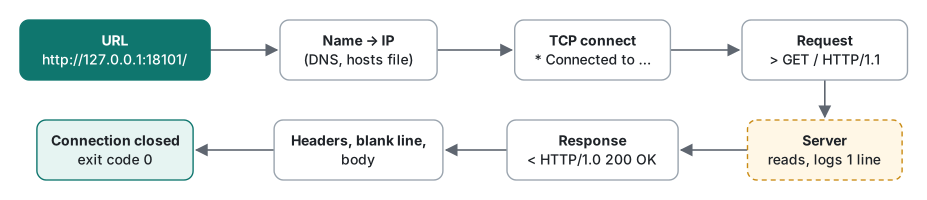
HTTP (HyperText Transfer Protocol) is a request/response protocol. A client (browser, app, curl) opens a connection to a server, sends a request made of text lines, and the server answers with a response made of text lines plus a body. Then the connection is closed or reused for the next request.
A URL such as http://127.0.0.1:18101/data.json has four parts you will use all the time:
- scheme
http(orhttps, which is the same HTTP inside an encrypted TLS connection; lecture 5), - host
127.0.0.1, which is "this computer" (also called loopback), - port
18101; if you leave it out,httpmeans 80 andhttpsmeans 443, - path
/data.json, plus an optional query string after?.
Your first server in 5 minutes
Make a folder with two files and start Python's built-in file server. Any free port works; we used 18101.
mkdir -p ~/demo && cd ~/demo
printf '<!doctype html>\n<html><head><meta charset="utf-8"><title>Hello</title></head>\n<body><h1>Hello, HTTP</h1></body></html>\n' > index.html
echo '{"name":"demo","ok":true}' > data.json
python3 -m http.server 18101 --bind 127.0.0.1
--bind 127.0.0.1 matters: without it the server listens on every network interface, so other machines on the same Wi-Fi could read your folder. Leave this terminal open (the server prints its log here) and open a second terminal for curl. Stop the server later with Ctrl+C.
Reading curl -v line by line
curl -sv http://127.0.0.1:18101/
-v (verbose) prints the conversation; -s (silent) hides the progress meter that otherwise gets mixed into the output when you pipe it. This is the real output:
*   Trying 127.0.0.1:18101...
* Connected to 127.0.0.1 (127.0.0.1) port 18101
> GET / HTTP/1.1
> Host: 127.0.0.1:18101
> User-Agent: curl/8.7.1
> Accept: */*
>
* Request completely sent off
* HTTP 1.0, assume close after body
< HTTP/1.0 200 OK
< Server: SimpleHTTP/0.6 Python/3.9.6
< Date: Thu, 12 Nov 2026 14:33:47 GMT
< Content-type: text/html
< Content-Length: 119
< Last-Modified: Thu, 12 Nov 2026 14:28:18 GMT
<
{ [119 bytes data]
* Closing connection
<!doctype html>
<html><head><meta charset="utf-8"><title>Hello</title></head>
<body><h1>Hello, HTTP</h1></body></html>
Three prefixes, three meanings:
*is curl talking to you: which address it tries, when the TCP connection is up, and when it closes.>is the request curl sent. The first line is the request line: methodGET, path/, protocol versionHTTP/1.1. Then come request headers, oneName: valueper line.Hostis required in HTTP/1.1, because one IP address can serve many sites. The empty>line ends the headers. A GET has no body, so the request is finished. These 4 lines plus the line endings are exactly 78 bytes.<is the response. The status lineHTTP/1.0 200 OKgives the version, the status code 200 and a human-readable reason. Then the response headers, an empty line, and the body (119 bytes, which matchesContent-Length: 119).
Notice the version mismatch: curl asked in HTTP/1.1, the Python server answered in HTTP/1.0, and curl noted HTTP 1.0, assume close after body. A server may answer with a lower version, and in HTTP/1.0 the connection closes after every response. You will meet this again in lecture 6 (keep-alive).
The server terminal printed one line per request. This is its log for four requests (GET, HEAD, a missing file, a POST):
127.0.0.1 - - [12/Nov/2026 14:33:47] "GET / HTTP/1.1" 200 -
127.0.0.1 - - [12/Nov/2026 14:33:48] "HEAD /data.json HTTP/1.1" 200 -
127.0.0.1 - - [12/Nov/2026 14:33:48] code 404, message File not found
127.0.0.1 - - [12/Nov/2026 14:33:48] "GET /nope.html HTTP/1.1" 404 -
127.0.0.1 - - [12/Nov/2026 14:33:48] code 501, message Unsupported method ('POST')
127.0.0.1 - - [12/Nov/2026 14:33:48] "POST / HTTP/1.1" 501 -
Client IP, time, the request line in quotes, the status code. This is the same shape as an Apache or nginx access log, and reading both sides together is the fastest way to debug. (We ran the server with TZ=UTC so the log time matches the Date header, which is always GMT.)
Methods: what you are asking the server to do
The method is the verb in the request line.
| Method | Meaning | Has a body? | Safe to repeat? |
|---|---|---|---|
| GET | read a resource | no | yes |
| HEAD | like GET, but headers only | no | yes |
| POST | submit data, create something | yes | no |
| PUT | replace a resource | yes | yes (idempotent) |
| PATCH | change part of a resource | yes | not guaranteed |
| DELETE | remove a resource | usually no | yes (idempotent) |
"Idempotent" means sending the same request twice has the same effect as sending it once. That is why apps retry GET freely but must be careful with POST (a retried POST can create two orders).
Our toy server only implements GET and HEAD. curl -I sends HEAD:
$ curl -sI http://127.0.0.1:18101/data.json
HTTP/1.0 200 OK
Server: SimpleHTTP/0.6 Python/3.9.6
Date: Thu, 12 Nov 2026 14:28:25 GMT
Content-type: application/json
Content-Length: 26
Last-Modified: Thu, 12 Nov 2026 14:28:18 GMT
And a POST (-d sends a body and switches the method to POST automatically):
$ curl -si -d 'a=1' http://127.0.0.1:18101/ | head -1
HTTP/1.0 501 Unsupported method ('POST')
501 means "the server does not implement this method", which is honest: http.server is a file server. Lecture 2 builds a small php -S router that accepts POST.
Status codes and headers in one screen
The status code's first digit is its class: 2xx success, 3xx go somewhere else, 4xx the client asked for something wrong, 5xx the server failed. Lecture 2 runs each one. For now, read the 404 our server returned for a missing file:
$ curl -si http://127.0.0.1:18101/nope.html | head -6
HTTP/1.0 404 File not found
Server: SimpleHTTP/0.6 Python/3.9.6
Date: Thu, 12 Nov 2026 14:28:25 GMT
Connection: close
Content-Type: text/html;charset=utf-8
Content-Length: 469
The reason phrase is free text ("File not found" instead of the usual "Not Found"); programs must only look at the number.
The headers you will read most often:
Content-Type: what the body is (text/html,application/json). Python guessed it from the file extension. Notice the 200 page hadtext/htmlwithout a charset, while the error page saidcharset=utf-8; lecture 3 shows what goes wrong when the charset is missing or wrong.Content-Length: body size in bytes.Date,Last-Modified: always in GMT.Last-Modifiedis the file's modification time and is used for caching (lecture 4).Server: software name. Production servers often hide the version.Location: where to go next, used with 3xx.
Request a folder without the trailing slash and you see Location in action:
$ curl -si http://127.0.0.1:18101/docs | head -5
HTTP/1.0 301 Moved Permanently
Server: SimpleHTTP/0.6 Python/3.9.6
Date: Thu, 12 Nov 2026 14:28:42 GMT
Location: /docs/
Content-Length: 0
curl does not follow it unless you add -L. With -L, -w '%{http_code} %{num_redirects} %{url_effective}' printed 200 1 http://127.0.0.1:18101/docs/.
Typing HTTP by hand
HTTP/1.x is plain text, so you can type it without curl. nc (netcat) ships with macOS:
$ printf 'GET /data.json HTTP/1.1\r\nHost: 127.0.0.1\r\n\r\n' | nc -w 2 127.0.0.1 18101
HTTP/1.0 200 OK
Server: SimpleHTTP/0.6 Python/3.9.6
Date: Thu, 12 Nov 2026 14:28:42 GMT
Content-type: application/json
Content-Length: 26
Last-Modified: Thu, 12 Nov 2026 14:28:18 GMT

{"name":"demo","ok":true}
Line endings must be \r\n, and an empty line ends the headers. Two surprises from the same server:
$ printf 'GET /data.json\r\n\r\n' | nc -w 2 127.0.0.1 18101
{"name":"demo","ok":true}
No status line and no headers at all. A request line without a version is treated as HTTP/0.9 (from 1991), where the response was just the body. The log line was "GET /data.json" 200 -. And a request that is not HTTP:
$ printf 'HELLO\r\n\r\n' | nc -w 2 127.0.0.1 18101 | grep -E "Error code|Message"
        <p>Error code: 400</p>
        <p>Message: Bad request syntax ('HELLO').</p>
Common mistakes and curl exit codes
curl's exit code (echo $? right after it) tells you which layer failed. These are real runs:
$ curl -sS http://127.0.0.1:18149/
curl: (7) Failed to connect to 127.0.0.1 port 18149 after 0 ms: Couldn't connect to server
$ curl -sS "http://127.0.0.1:18101/my file.txt"
curl: (3) URL rejected: Malformed input to a URL function
$ curl -sS htp://127.0.0.1:18101/
curl: (1) Protocol "htp" not supported
$ curl -fsS http://127.0.0.1:18101/nope.html
curl: (22) The requested URL returned error: 404
$ curl -s http://127.0.0.1:18101/nope.html -o /dev/null; echo "exit=$?"
exit=0
Mistake: "curl succeeded, so the API works." What actually happens: the last line, a 404 with exit code 0. To curl, an HTTP error page is a successful download. Fix: in scripts use curl -fsS (fail on 4xx/5xx with exit 22, stay quiet but still print errors), or print the code with -w '%{http_code}' and check it.
Mistake: spaces in URLs. curl 8.7.1 refused the space with exit 3. Encode it as %20 (that request returned spaced and was logged as GET /my%20file.txt), or let curl encode query values: curl -G --data-urlencode 'q=café & tea' … sent GET /data.json?q=caf%c3%a9+%26+tea.
Mistake: localhost and 127.0.0.1 are the same, right? Almost. localhost resolved to both ::1 (IPv6) and 127.0.0.1. curl tried IPv6 first:
*   Trying [::1]:18101...
* connect to ::1 port 18101 from ::1 port 53480 failed: Connection refused
*   Trying 127.0.0.1:18101...
Our server was bound to 127.0.0.1 only, so the first attempt failed and curl fell back. It still worked, but a client that does not fall back would report "connection refused" even though the server is up. Fix: use the same address on both sides.
| Exit | Meaning | Typical cause |
|---|---|---|
| 0 | transfer done | also for 404/500 unless you use -f |
| 1 | unsupported protocol | typo in the scheme |
| 3 | bad URL | space or bad port in the URL |
| 6 | could not resolve host | DNS typo (not run here) |
| 7 | could not connect | server not running, wrong port, wrong IP version |
| 22 | HTTP error with -f |
4xx or 5xx |
| 28 | timeout | --max-time reached (lecture 2) |
| 47 | too many redirects | redirect loop (lecture 2) |
Which curl option answers which question
| Question | Command |
|---|---|
| What exactly was sent and received? | curl -sv URL |
| Only the status and headers? | curl -sI URL (HEAD) or curl -si URL (GET with headers) |
| Only the status code, for a script? | curl -s -o /dev/null -w '%{http_code}\n' URL |
| Fail the script on 4xx/5xx? | curl -fsS URL |
| Follow redirects? | curl -L URL |
| Send form data? | curl -d 'a=1&b=2' URL |
| Where does the time go? | curl -s -o /dev/null -w '%{time_connect} %{time_starttransfer} %{time_total}\n' URL |
Measured: how long does one request take?
-w prints timers measured by curl itself. For each URL we ran 31 sequential requests against the local Python server and dropped the first as warm-up. Medians, Apple M1 Pro:
| Request | Header bytes | Body bytes | Connected | First byte | Total |
|---|---|---|---|---|---|
/ (index.html) |
185 | 119 | 0.273 ms | 0.733 ms | 0.777 ms |
/data.json |
191 | 26 | 0.276 ms | 0.749 ms | 0.788 ms |
/big.bin (1 MiB, seeded random bytes) |
204 | 1,048,576 | 0.269 ms | 0.730 ms | 1.304 ms |
/ via localhost |
185 | 119 | 0.331 ms | 0.875 ms |
Locally, sending 1 MiB added only about half a millisecond. The localhost row was about 0.1 ms slower because of the failed IPv6 attempt.
The real internet is different. Five requests to https://example.com/ (a tiny page: 291 header bytes, 577 body bytes) gave these cumulative medians:
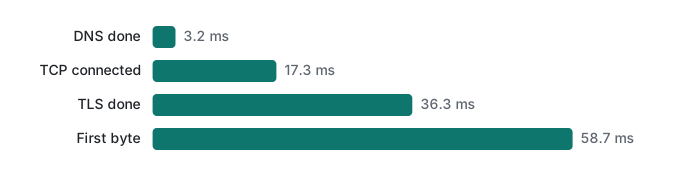
About 59 ms in total, of which the server's actual answer is the smallest part: most of the time is the round trips for TCP and TLS. That is why later lectures care about reusing connections and avoiding redirects. Your numbers will differ with your network; the shape usually does not.
Honest limits and version notes
- HTTP/1.1 is now defined by RFC 9110 (semantics, methods, status codes) and RFC 9112 (the message format), both from June 2022; they replaced RFC 7230–7235. HTTP/2 is RFC 9113 and HTTP/3 is RFC 9114. PATCH comes from RFC 5789.
python3 -m http.server(checked on 3.9.6) answers in HTTP/1.0 and only implements GET and HEAD. It is a development tool; the Python docs warn not to use it in production. Newer Python versions may print slightly different logs and headers; we did not check them.- The HTTP/0.9 answer is what this Python version did; many modern servers reject such requests instead.
- Timing on 127.0.0.1 measures your machine, not a network. The example.com numbers are 5 samples from one network on one evening.
- We did not run a browser. Browsers send many more headers (Accept-Language, cookies, Sec-Fetch-*) than curl's three.
Exercises
1. Without starting a server, what exit code does curl -sS http://127.0.0.1:18149/ return, and what does that tell you?
2. Write one command that prints only the status code of http://127.0.0.1:18101/nope.html, and one that makes a shell script stop on it.
3. In the curl -sv output above, which line proves that the server spoke a different HTTP version than curl?
Answers
1. Exit code 7, Failed to connect … Couldn't connect to server. Nothing is listening on that port (or it listens on another address, such as only ::1). It is a connection problem, not an HTTP problem: no request was ever sent.
2. curl -s -o /dev/null -w '%{http_code}\n' http://127.0.0.1:18101/nope.html prints 404. For scripts: curl -fsS http://127.0.0.1:18101/nope.html || exit 1; curl exits with 22 and prints The requested URL returned error: 404.
3. < HTTP/1.0 200 OK (the status line) and curl's note * HTTP 1.0, assume close after body. The request line was > GET / HTTP/1.1.
Next
- Next: HTTP lecture 2/6: status codes and redirects
- Later: headers, cookies and sessions, caching with ETag and Cache-Control, HTTPS, TLS and certificates, keep-alive and compression
- A PHP server you can POST to: PHP functions, forms and the built-in server
- Piping curl output into grep and friends: shell pipes, redirection and text tools
- All lecture series: programming learning roadmap
FAQ
What do the >, < and * prefixes in curl -v output mean?
Lines starting with > are what curl sent (the request), lines starting with < are what the server sent back (status line and headers), and lines starting with * are curl's own notes about connecting, such as Trying 127.0.0.1:18101 and Connected to. The body is printed without a prefix.
Why does python -m http.server answer 501 to my POST request?
Its handler only implements GET and HEAD. A POST or DELETE got HTTP/1.0 501 Unsupported method ('POST') and a log line code 501. It is a file server for development, not an API server; use php -S or a framework when you need to accept POST.
Does curl fail when the server returns 404?
No. Without options curl exits with code 0 for a 404, because the HTTP exchange itself worked. Add -f (--fail) and curl exits with code 22 and prints The requested URL returned error: 404, which is what you want in scripts.