HTTP Performance: Keep-Alive, gzip, HTTP/2 and CORS
Keep-alive vs new connections, gzip levels and HTTP/1.1 vs HTTP/2 measured with curl, Python and php -S, plus a CORS preflight showing what the server sees.
Series: HTTP lecture 6/6 (advanced). For developers who know requests, caching and TLS, and now need to make a site or API fast and callable from other origins. By the end you will measure connection reuse, choose when and how much to compress, tell what HTTP/2 changes and what it does not, and set up a CORS preflight response knowing exactly what it protects.
This lecture is for the developer whose page loads "fine on office Wi-Fi but slowly on phones", whose batch script takes minutes to call one API a few hundred times, or whose front-end colleague reports "blocked by CORS policy" in the browser console. All three are decided by a handful of transport-level choices that we measure here. Everything was run on an Apple Silicon Mac (M1 Pro) with curl 8.7.1 (HTTP/2 via nghttp2, no HTTP/3), Python 3.9.6, PHP 8.5.6 (php -S) and zlib 1.2.12, on 127.0.0.1, plus a few read-only requests to example.com and to this site. Browser behaviour is described but not run.
Keep-alive: one connection, many requests
In HTTP/1.1 a connection stays open after a response unless one side says Connection: close. That is keep-alive (persistent connections), and it lets the next request skip the TCP connect and the TLS handshake. curl shows it in -v. Against the keep-alive server from lecture 5 (tls_server.py without a certificate, on port 18171):
$ curl -sv -o /dev/null -o /dev/null http://127.0.0.1:18171/a http://127.0.0.1:18171/b
*   Trying 127.0.0.1:18171...
* Connected to 127.0.0.1 (127.0.0.1) port 18171
> GET /a HTTP/1.1
< HTTP/1.1 200 OK
* Connection #0 to host 127.0.0.1 left intact
* Re-using existing connection with host 127.0.0.1
> GET /b HTTP/1.1
< HTTP/1.1 200 OK
Add -H 'Connection: close' and the second request opens a new connection instead:
* Connection 0 seems to be dead
* Closing connection
*   Trying 127.0.0.1:18171...
* Connected to 127.0.0.1 (127.0.0.1) port 18171
> GET /b HTTP/1.1
Not every server keeps connections. PHP's built-in server answered every request with Connection: close and logged Accepted / Closing for each one in lectures 4 and 6, so it cannot show the benefit.
Measured: reused vs new connections
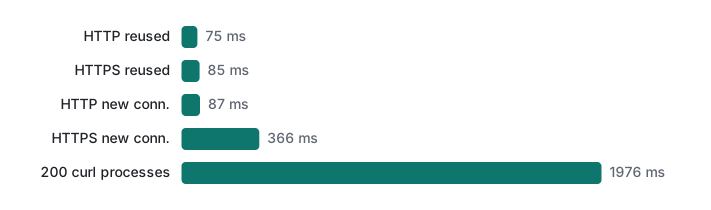
Loopback, 200 requests in one curl process (URL glob r[1-200]), round 1 of 3, all against the same Python server, total time including one curl start:
| Mode | New connections | Total |
|---|---|---|
| plain HTTP, reused | 1 | 75 ms |
plain HTTP, Connection: close |
200 | 87 ms |
| HTTPS, reused | 1 | 85 ms |
HTTPS, Connection: close |
200 | 366 ms |
| plain HTTP, 200 separate curl processes (shell loop) | 200 | 1,976 ms |
The other rounds agreed (HTTP 83/68 vs 86/80 ms; HTTPS 81/77 vs 361/356 ms; separate processes 1,980 and 2,060 ms vs 79 and 74 ms for one process). On loopback a TCP connect costs almost nothing; the TLS handshake costs about 1.4 ms of CPU; starting a process costs about 10 ms.
Over the internet, five requests to example.com in one curl process:
| Mode | Request 1 | Requests 2–5 | Total |
|---|---|---|---|
| reused (HTTP/2) | 104 ms | 22, 23, 21, 18 ms | 0.19 s |
Connection: close (HTTP/1.1) |
95 ms | 120, 81, 76, 79 ms | 0.45 s |
Every new connection paid DNS, TCP and TLS again: about 37 ms from our network by the medians in lecture 5 (2.6 + 13.5 + 20.7 ms), more on a phone.
Common mistake: a shell loop of curl, and -o that only covers one URL
What people do: call an API 200 times with for i in …; do curl …; done. What happens: each iteration starts a new process, which cannot reuse anything: 1,976 ms against 75 ms on loopback, and over the internet each call also pays a full TLS handshake. Fix: pass many URLs to one curl (a glob such as r[1-200], --config with a URL list, or --parallel), or use one HTTP client object in your program.
A related trap surfaced while measuring. We wrote curl -s -o /dev/null -w … URL URL URL URL URL and the terminal filled with HTML: -o applies to one URL only, so the other four bodies went to standard output. Give one -o per URL, or use --output-dir with -O. (A glob URL is a single argument, so one -o covers all of it.)
Compression: gzip measured
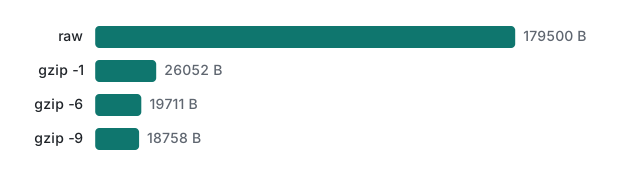
Compression shrinks text before it travels. The client says what it can decode with Accept-Encoding: gzip, br, …; the server answers with Content-Encoding: gzip and should add Vary: Accept-Encoding so caches keep the two versions apart. We compressed three inputs with Python's gzip module, 50 repetitions each, median times:
import gzip, random, time, statistics
random.seed(7)
data = {
    "products.json (179,500 B)": open("products.json", "rb").read(),
    "tiny JSON": b'{"ok":true,"id":42}',
    "random bytes (like JPEG)": random.randbytes(100_000),
}
REP = 50
for name, raw in data.items():
    print(f"{name}: raw={len(raw)}")
    for lvl in (1, 6, 9):
        ts = []
        for _ in range(REP):
            t = time.perf_counter(); out = gzip.compress(raw, compresslevel=lvl, mtime=0); ts.append(time.perf_counter() - t)
        td = []
        for _ in range(REP):
            t = time.perf_counter(); gzip.decompress(out); td.append(time.perf_counter() - t)
        print(f"  level {lvl}: {len(out):>7} B ({len(out)/len(raw)*100:5.1f}%)  "
              f"compress {statistics.median(ts)*1000:.3f} ms  decompress {statistics.median(td)*1000:.3f} ms")
products.json (179,500 B): raw=179500
  level 1:   26052 B ( 14.5%)  compress 0.505 ms  decompress 0.176 ms
  level 6:   19711 B ( 11.0%)  compress 1.401 ms  decompress 0.139 ms
  level 9:   18758 B ( 10.5%)  compress 7.087 ms  decompress 0.142 ms
tiny JSON: raw=19
  level 1:      39 B (205.3%)  compress 0.008 ms  decompress 0.011 ms
  …
random bytes (like JPEG): raw=100000
  level 1:  100053 B (100.1%)  compress 1.624 ms  decompress 0.040 ms
  …
Three lessons. Level 9 took five times as long as level 6 for 5% fewer bytes. Decompression is cheap at every level. And compression adds bytes to tiny responses (19 → 39) and to data that is already compressed (random bytes stand in for JPEG, PNG, MP4 and ZIP), so servers usually skip responses under about 1 KB and binary media types. A second run gave the same sizes and times within 0.07 ms.
This site's home page, two requests: 8,912 bytes without --compressed, 3,450 bytes with it.
gzip on the wire with php -S, and the raw-bytes trap
Here is a small API that compresses when asked and also answers CORS (next section). Save as api.php next to products.json and run php -S 127.0.0.1:18170 api.php:
<?php
// php -S 127.0.0.1:18170 api.php
$path   = parse_url($_SERVER['REQUEST_URI'], PHP_URL_PATH);
$method = $_SERVER['REQUEST_METHOD'];
$origin = $_SERVER['HTTP_ORIGIN'] ?? null;
$allowed = ['https://app.example'];

if ($path !== '/api/products') { http_response_code(404); exit; }

// CORS: only for allowed origins, and tell caches the answer depends on Origin
header('Vary: Origin, Accept-Encoding');
if ($origin !== null && in_array($origin, $allowed, true)) {
    header("Access-Control-Allow-Origin: $origin");
}
if ($method === 'OPTIONS') {                      // preflight
    header('Access-Control-Allow-Methods: GET, POST, PUT');
    header('Access-Control-Allow-Headers: Content-Type, Authorization');
    header('Access-Control-Max-Age: 600');
    http_response_code(204);
    exit;
}
error_log("$method $path origin=" . ($origin ?? '-'));   // the server DID run

$body = file_get_contents(__DIR__ . '/products.json');
header('Content-Type: application/json');
if (str_contains($_SERVER['HTTP_ACCEPT_ENCODING'] ?? '', 'gzip')) {
    $body = gzencode($body, 6);
    header('Content-Encoding: gzip');
}
header('Content-Length: ' . strlen($body));
echo $body;
$ curl -s -o /dev/null -w 'plain:      %{http_code} %{size_download} B\n' http://127.0.0.1:18170/api/products
plain:      200 179500 B
$ curl -s --compressed -o /dev/null -w 'compressed: %{http_code} %{size_download} B on the wire\n' http://127.0.0.1:18170/api/products
compressed: 200 19730 B on the wire
$ curl -s --compressed http://127.0.0.1:18170/api/products | wc -c
  179500
$ curl -s -H 'Accept-Encoding: gzip' http://127.0.0.1:18170/api/products | head -c 20 | xxd
00000000: 1f8b 0800 0000 0000 0013 addd ddae 75bd  ..............u.
00000010: 719e e97d                                q..}
The last command is the trap: setting the header by hand tells the server you can decode gzip, but curl does not decode it for you, so you get raw gzip (it starts with the magic bytes 1f 8b). Use --compressed, which sends the header and decodes. HTTP libraries in apps have the same split between "ask for gzip" and "decode gzip".
Is it faster? Twenty requests each, medians:
| Link | Plain (179,500 B) | gzip (19,730 B) |
|---|---|---|
| loopback | 0.71 ms | 2.24 ms |
curl --limit-rate 1M |
124.88 ms (83–164) | 2.30 ms |
On loopback, compression made the request slower: 1.5 ms of CPU for bytes that cost nothing to move. On a slow link it wins by far. Honest caveat: curl's rate limiter let the 19.7 KB response through in one burst, so the gzip row at 1 MB/s is optimistic; at a true 1 MB/s it would take about 19 ms. The limiter is imprecise for the plain body too: the same 179,500 bytes took a median of 173 ms in lecture 4's setup. Static files are best compressed once at deploy time, not on every request.
HTTP/1.1, HTTP/2 and HTTP/3
HTTP/2 keeps the meaning of HTTP (methods, status codes, headers) and changes the transport: binary frames, many requests multiplexed over one connection at the same time, and compressed headers (HPACK). It is negotiated inside the TLS handshake via ALPN, which we saw in lecture 5 (ALPN: server accepted h2). One request each to example.com:
--http1.1 -> HTTP/1.1 header_bytes=347 total=0.097737
--http2 -> HTTP/2 header_bytes=291 total=0.069453
The same response headers took 56 fewer bytes in HTTP/2 form; one sample each says nothing about speed. What curl does when the server only speaks HTTP/1.1:
$ curl -sv --http2 http://127.0.0.1:18162/      # plain HTTP: curl asks to upgrade
> GET / HTTP/1.1
> Connection: Upgrade, HTTP2-Settings
> Upgrade: h2c
> HTTP2-Settings: AAMAAABkAAQAoAAAAAIAAAAA
< HTTP/1.1 200 OK
$ curl -sS --http2-prior-knowledge http://127.0.0.1:18162/
curl: (16) Remote peer returned unexpected data while we expected SETTINGS frame.  Perhaps, peer does not support HTTP/2 properly.
$ curl -sS --http3 https://example.com/ -o /dev/null
curl: option --http3: the installed libcurl version doesn't support this
The Python server ignored the upgrade and answered in HTTP/1.1, which is allowed. --http2-prior-knowledge skips the negotiation and fails with exit 16. HTTP/3 runs over QUIC on UDP; both example.com and this site advertise it with alt-svc: h3=":443", but this curl build cannot use it, so we did not test it.
What HTTP/2 changes in practice (browser behaviour, not run here): browsers opened up to six HTTP/1.1 connections per host and queued the rest, which is why sites once split assets across domains and bundled everything. With HTTP/2 one connection carries everything, so domain sharding hurts and bundling matters less. It does not remove TCP head-of-line blocking: one lost packet stalls all streams on that connection, which is what HTTP/3 fixes.
CORS preflight with php -S
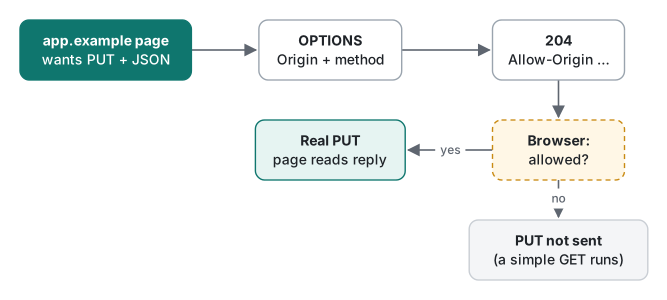
A browser page on https://app.example that calls https://api.example with PUT or a JSON Content-Type first sends a preflight: an OPTIONS request asking permission. curl can send the same request by hand:
$ curl -si -X OPTIONS -H 'Origin: https://app.example' \
    -H 'Access-Control-Request-Method: PUT' \
    -H 'Access-Control-Request-Headers: content-type' http://127.0.0.1:18170/api/products
HTTP/1.1 204 No Content
Host: 127.0.0.1:18170
Date: Thu, 12 Nov 2026 14:31:48 GMT
Connection: close
X-Powered-By: PHP/8.5.6
Vary: Origin, Accept-Encoding
Access-Control-Allow-Origin: https://app.example
Access-Control-Allow-Methods: GET, POST, PUT
Access-Control-Allow-Headers: Content-Type, Authorization
Access-Control-Max-Age: 600
Content-type: text/html; charset=UTF-8
The browser compares these headers with what it wants to send, caches the answer for up to Max-Age seconds, and only then sends the real PUT. Now a request from an origin that is not allowed:
$ curl -si -H 'Origin: https://evil.example' http://127.0.0.1:18170/api/products | head -8
HTTP/1.1 200 OK
…
Vary: Origin, Accept-Encoding
Content-Type: application/json
Content-Length: 179500
And the server's log:
[Thu Nov 12 14:31:48 2026] GET /api/products origin=https://evil.example
The request ran and the full body was sent. The only difference is the missing Access-Control-Allow-Origin, which makes a browser hide the response from the page's JavaScript. curl, scripts and apps do not care. That is the most important thing to know about CORS.
Common CORS mistakes:
Access-Control-Allow-Origin: *together with cookies orAuthorization: browsers refuse credentials with a wildcard. Echo one allowed origin instead.- Echoing any
Originback: this allows every site to read logged-in responses. Use an allowlist as above. - Varying the answer by
OriginwithoutVary: Origin: a CDN may serve one origin's headers to another. - Expecting the preflight to stop
POSTs from forms: simple requests (form posts) are not preflighted. Use CSRF tokens; see PHP security: XSS, CSRF and sessions.
Decision table
| Situation | Do this | Why (from our numbers) |
|---|---|---|
| Script calls one API many times | one client / one curl with many URLs | 200 processes 1,976 ms vs 75 ms |
| HTTPS API with many small calls | keep connections alive, use HTTP/2 | new TLS connection 76–120 ms vs 18–23 ms reused |
| JSON/HTML/CSS/JS over 1 KB | gzip level 6 (or pre-compressed at deploy) | 179,500 → 19,711 B in 1.4 ms |
| Images, video, ZIP, tiny responses | no compression | 100,000 → 100,053 B; 19 → 39 B |
| Browser page on another origin calls the API | preflight answer with an allowlist + Vary: Origin |
CORS only controls what the browser lets the page read |
| Must block unwanted callers | authentication, CSRF tokens, rate limits | the evil-origin GET still ran on the server |
Honest limits / version notes
- Run: curl 8.7.1 (macOS, LibreSSL 3.3.6, nghttp2 1.68.1, zlib 1.2.12), Python 3.9.6, PHP 8.5.6 built-in server, Apple M1 Pro. Loopback timings include one curl process start;
--limit-rateimitates bandwidth only. - Not run: any browser (CORS enforcement, preflight caching, the six-connection limit, HTTP/2 prioritisation), HTTP/3, Brotli (
br, RFC 7932) and zstd content encodings, server-side compression modules (Apache/LiteSpeed/nginx). - Specs: HTTP/1.1 messaging is RFC 9112 and HTTP semantics RFC 9110 (both June 2022); HTTP/2 is RFC 9113 (2022, replacing RFC 7540 from 2015); HTTP/3 is RFC 9114 (2022). gzip is RFC 1952. CORS is defined in the WHATWG Fetch Standard, not in an RFC.
- The remote measurements are five requests each from one network on one day. They show the shape, not a benchmark.
Exercises
1. A nightly script runs for id in $(cat ids.txt); do curl -s "https://api.example/items/$id" -o "out/$id.json"; done for 3,000 IDs. Rewrite it so that curl reuses connections, and say which of our measurements predicts the gain.
2. Your API sends Access-Control-Allow-Origin: * and the front end now needs to send a session cookie. The browser console shows a CORS error. What must the response headers become?
Answers
1. Build a config file with one URL and output per line, and run one curl:
while read id; do
  printf 'url = "https://api.example/items/%s"\noutput = "out/%s.json"\n' "$id" "$id"
done < ids.txt > urls.cfg
curl -s --config urls.cfg
We checked the pattern against a local server with five IDs: -w '%{num_connects} ' printed 1 0 0 0 0, one connection for all five. One process reuses the connection (and with --parallel can run several at once over HTTP/2). The loopback test predicts the process part (1,976 ms vs 75 ms per 200 requests) and the example.com test the connection part (76–120 ms vs 18–23 ms per request).
2. Echo the specific allowed origin and allow credentials: Access-Control-Allow-Origin: https://app.example, Access-Control-Allow-Credentials: true, and Vary: Origin. A wildcard is not accepted with credentials. The cookie itself must also be Secure and, for cross-site requests, SameSite=None (see lecture 3).
Next
- Previous: HTTP lecture 5/6: HTTPS, TLS and certificates
- Start of the series: HTTP lecture 1/6: requests, responses and curl
- Also in the series: lecture 2/6: status codes and redirects, lecture 3/6: headers, cookies and sessions, lecture 4/6: caching, ETag and Cache-Control
- What a CDN does with these headers: Your host's CDN may be caching API responses and 301s
- Shell loops and pipes: shell pipes, redirection and text tools
- All series in order: Programming basics for new hires: a study roadmap
FAQ
How much faster is keep-alive than opening a new connection per request?
It depends on what the new connection costs. On loopback, 200 plain HTTP requests took 75 to 83 ms reused vs 80 to 87 ms with a new connection each; over HTTPS it was 77 to 85 ms vs 356 to 366 ms. To example.com over the internet, reused requests after the first took 18 to 23 ms, new connections 76 to 120 ms each. Starting a new curl process per request was the slowest of all: 200 requests took about 2 seconds.
Which gzip level should a server use?
Level 6, the usual default, is a good trade. On a 179,500-byte JSON file, level 1 gave 26,052 bytes in 0.5 ms, level 6 gave 19,711 bytes in 1.4 ms and level 9 gave 18,758 bytes in 7.1 ms. Do not compress tiny responses or already-compressed files: a 19-byte JSON became 39 bytes and 100,000 random bytes became 100,053.
Does CORS protect my API from other websites?
No. CORS tells browsers whether a page from another origin may read the response. The server still receives and runs the request: our php -S log recorded a GET from https://evil.example and returned the full 200 response, only without Access-Control-Allow-Origin. Protect APIs with authentication and CSRF checks, not with CORS.