Scraping Change Detection: SQLite Snapshots and Hashes
Store scraped prices in SQLite, detect real changes with field hashes, make reruns idempotent and schedule cron in UTC. Storage and commit cost measured.
Series: Web Scraping lecture 5/6 (advanced). For people who can already fetch, parse and paginate politely, and now need a scraper that runs every day and answers "what changed since yesterday?". By the end you will store snapshots in SQLite, detect real price and stock changes with content hashes, make reruns harmless, and schedule the job with cron using UTC timestamps.
This lecture solves the problem of the person who wrote a one-off scraper for a price-monitoring sheet or an internal dashboard, and was then asked to "just run it every morning". A script that prints today's prices is easy. A script that remembers yesterday, reports only real changes, survives being run twice and does not fill the disk is a different job, and it is mostly a database job.
Everything below was run on an Apple Silicon Mac (M1 Pro) with Python 3.9.6 (standard library only), SQLite 3.51.0 (the library bundled with that Python and the sqlite3 CLI) and PHP 8.5.6 serving the series' practice shop on 127.0.0.1:18172. Paths are shortened to ~/demo/. We only ever scrape our own practice site.
Before you store anything: is scraping still the right tool?
A daily job multiplies everything: every request you make, you make 365 times a year. So the checks from lecture 1 matter more now, not less.
- Official API or feed first. Many shops and marketplaces offer a product feed or an affiliate API. It is more stable than HTML and usually allowed explicitly.
- robots.txt and Crawl-delay. Our practice shop's
robots.txtsaysCrawl-delay: 1, so the watcher waits one second between pages. Ten pages take about 9 seconds. That is fine once a day; it is the price of being a good guest. - Terms and personal data. Prices and stock levels are usually not personal data, but reviews with names are. Check the site's terms and your local law before you store anything, and store only the fields you need.
- An honest User-Agent. Our watcher sends
shopwatch/1.0 (+https://example.com/bot-contact): a name and a place where the site owner can reach you.
The data model: products plus snapshots
The practice shop has 200 products on 10 list pages. Each product appears like this in the HTML:
<li class="product" data-sku="SKU-0020"><a href="/product/SKU-0020">Cable clip 2</a>
  <span class="price">$66.79</span> <span class="stock">In stock</span></li>
A state file on the server simulates the passing days: every "day", about 4% of prices change and about 3% of products go in or out of stock (generated once with random.seed(42)).
We keep two tables. products holds one row per product with what we saw last. snapshots holds a row only when something changed: it is the price history.
CREATE TABLE IF NOT EXISTS products (
  sku TEXT PRIMARY KEY, name TEXT NOT NULL, url TEXT NOT NULL,
  first_seen TEXT NOT NULL, last_seen TEXT NOT NULL, last_hash TEXT NOT NULL);
CREATE TABLE IF NOT EXISTS snapshots (
  sku TEXT NOT NULL REFERENCES products(sku), seen_at TEXT NOT NULL,
  price_cents INTEGER NOT NULL, in_stock INTEGER NOT NULL, hash TEXT NOT NULL,
  PRIMARY KEY (sku, seen_at));
Three decisions are hidden in there:
- Money as integer cents.
$66.79is stored as6679. Floats and money do not mix; you will see the bug below. - Timestamps as UTC text in ISO 8601 with a
Z, such as2026-10-02T03:00:00Z. Text in this format sorts correctly, compares correctly and is readable in thesqlite3CLI. - A natural key (
sku) instead of a made-up id. It is what makes the upsert possible. If a site has no stable id, the product URL is the next best key.
The watcher: fetch, normalize, hash, upsert
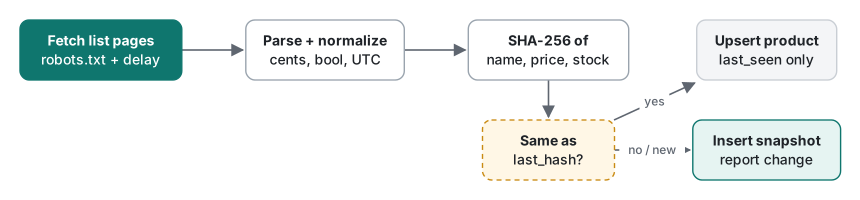
Here is the whole script. It reuses the html.parser approach from lecture 2 and the polite pagination loop from lecture 3.
"""shopwatch.py - snapshot a practice shop into SQLite and report price/stock changes.
Python 3.9+ stdlib only. Point it ONLY at a site you run yourself (php -S 127.0.0.1:18172).
"""
import hashlib, json, os, sqlite3, sys, time
import urllib.request, urllib.robotparser
from datetime import datetime, timezone
from html.parser import HTMLParser
from urllib.parse import urljoin

BASE = os.environ.get("SHOP", "http://127.0.0.1:18172")
UA = "shopwatch/1.0 (+https://example.com/bot-contact)"   # honest name + contact page

SCHEMA = """
CREATE TABLE IF NOT EXISTS products (
  sku TEXT PRIMARY KEY, name TEXT NOT NULL, url TEXT NOT NULL,
  first_seen TEXT NOT NULL, last_seen TEXT NOT NULL, last_hash TEXT NOT NULL);
CREATE TABLE IF NOT EXISTS snapshots (
  sku TEXT NOT NULL REFERENCES products(sku), seen_at TEXT NOT NULL,
  price_cents INTEGER NOT NULL, in_stock INTEGER NOT NULL, hash TEXT NOT NULL,
  PRIMARY KEY (sku, seen_at));
"""

class ListParser(HTMLParser):
    def __init__(self):
        super().__init__(); self.items, self.next, self.cur, self.field = [], None, None, None
    def handle_starttag(self, tag, attrs):
        a = dict(attrs)
        if tag == "li" and a.get("class") == "product":
            self.cur = {"sku": a.get("data-sku"), "name": "", "price": None, "stock": None, "url": None}
        elif self.cur is not None and tag == "a":
            self.cur["url"], self.field = a.get("href"), "name"
        elif self.cur is not None and tag == "span":
            self.field = a.get("class")
        elif tag == "a" and a.get("rel") == "next":
            self.next = a.get("href")
    def handle_data(self, data):
        if self.cur is not None and self.field in ("name", "price", "stock"):
            self.cur[self.field] = (self.cur[self.field] or "") + data
    def handle_endtag(self, tag):
        if tag in ("a", "span"): self.field = None
        if tag == "li" and self.cur is not None:
            self.items.append(self.cur); self.cur = None

def normalize(raw, page_url):
    price = raw["price"].strip().lstrip("$").replace(",", "")
    return {"sku": raw["sku"], "name": " ".join(raw["name"].split()),
            "url": urljoin(page_url, raw["url"]),
            "price_cents": round(float(price) * 100),          # money as integer cents
            "in_stock": raw["stock"].strip() == "In stock"}

def content_hash(item):
    # hash only the fields we care about, in a fixed order - never the raw HTML
    key = json.dumps([item["name"], item["price_cents"], item["in_stock"]], separators=(",", ":"))
    return hashlib.sha256(key.encode()).hexdigest()[:16]

def fetch(url):
    req = urllib.request.Request(url, headers={"User-Agent": UA})
    with urllib.request.urlopen(req, timeout=10) as r:
        return r.read().decode(r.headers.get_content_charset() or "utf-8")

def crawl(delay=None):
    rp = urllib.robotparser.RobotFileParser(BASE + "/robots.txt"); rp.read()
    delay = (rp.crawl_delay(UA) or 1) if delay is None else delay
    url, items, pages = BASE + "/products?page=1", [], 0
    while url:
        if not rp.can_fetch(UA, url):
            print("robots.txt disallows", url, file=sys.stderr); break
        p = ListParser(); p.feed(fetch(url)); pages += 1
        items += [normalize(i, url) for i in p.items]
        url = urljoin(url, p.next) if p.next else None
        if url: time.sleep(delay)
    return items, pages

def utc_now():
    fake = os.environ.get("SHOPWATCH_NOW")       # for tests and the 30-day simulation
    return fake or datetime.now(timezone.utc).strftime("%Y-%m-%dT%H:%M:%SZ")

def store(db, items, now):
    changes = []
    with db:                                      # one transaction per run
        for it in items:
            h = content_hash(it)
            old = db.execute("SELECT last_hash FROM products WHERE sku=?", (it["sku"],)).fetchone()
            db.execute("""INSERT INTO products (sku, name, url, first_seen, last_seen, last_hash)
                          VALUES (?, ?, ?, ?, ?, ?)
                          ON CONFLICT(sku) DO UPDATE SET name=excluded.name, url=excluded.url,
                            last_seen=excluded.last_seen, last_hash=excluded.last_hash""",
                       (it["sku"], it["name"], it["url"], now, now, h))
            if old is None or old[0] != h:        # new product or something changed
                prev = db.execute("""SELECT price_cents, in_stock FROM snapshots WHERE sku=?
                                     ORDER BY seen_at DESC LIMIT 1""", (it["sku"],)).fetchone()
                db.execute("INSERT OR IGNORE INTO snapshots VALUES (?, ?, ?, ?, ?)",
                           (it["sku"], now, it["price_cents"], int(it["in_stock"]), h))
                if prev: changes.append((it["sku"], prev, (it["price_cents"], int(it["in_stock"]))))
    return changes

if __name__ == "__main__":
    db = sqlite3.connect(os.environ.get("SHOPWATCH_DB", "shop.db"), timeout=5)
    db.executescript(SCHEMA)
    t0 = time.perf_counter()
    items, pages = crawl()
    changes = store(db, items, utc_now())
    for sku, (p0, s0), (p1, s1) in changes:
        what = f"price {p0/100:.2f} -> {p1/100:.2f}" if p0 != p1 else f"stock {s0} -> {s1}"
        print(f"CHANGE {sku} {what}")
    print(f"{utc_now()} pages={pages} items={len(items)} changes={len(changes)} "
          f"secs={time.perf_counter() - t0:.1f}")
We ran it for "day 0" twice in a row, then for "day 1":
$ SHOPWATCH_NOW=2026-11-01T03:00:00Z python3 shopwatch.py
2026-11-01T03:00:00Z pages=10 items=200 changes=0 secs=9.2
$ SHOPWATCH_NOW=2026-11-01T03:00:00Z python3 shopwatch.py
2026-11-01T03:00:00Z pages=10 items=200 changes=0 secs=9.1
$ echo 1 > ~/demo/shop/state/day
$ SHOPWATCH_NOW=2026-11-02T03:00:00Z python3 shopwatch.py
CHANGE SKU-0020 price 66.79 -> 63.49
CHANGE SKU-0029 price 84.09 -> 88.29
CHANGE SKU-0036 price 74.89 -> 67.39
CHANGE SKU-0039 stock 1 -> 0
...
CHANGE SKU-0170 price 56.79 -> 53.99
2026-11-02T03:00:00Z pages=10 items=200 changes=10 secs=9.1
$ sqlite3 shop.db "select count(*) from products; select count(*) from snapshots;"
200
210
The second run of day 0 changed nothing: no duplicate rows, no false alerts. That property is called idempotence: running the same job twice has the same effect as running it once. Cron jobs get retried, laptops wake up and catch up, people press the button again; an idempotent job makes all of that harmless.
Common mistakes, and what actually happens
Mistake 1: hashing the raw HTML. It looks clever: hash each page, alert when the hash changes. But our shop, like most real sites, prints a generation timestamp and a request id on every page. During the 30-day run below, the raw-HTML hash changed on 290 of 290 page fetches. Only 217 of those pages had a product whose price or stock had really changed. Fix: hash the normalized fields, as content_hash() does. A fixed field order (a JSON list, not a dict built in random order) keeps the hash stable.
Mistake 2: a plain INSERT for the product row. The second run dies:
IntegrityError: UNIQUE constraint failed: products.sku
Mistake 3: "fixing" that with INSERT OR REPLACE. It runs, but REPLACE means delete the old row, insert a new one. Our test inserted SKU-0001 on Oct 1, then replaced it on Oct 2:
after OR REPLACE: (2, 'SKU-0001', 'Desk lamp 1', '2026-10-02T03:00:00Z', '2026-10-02T03:00:00Z')
after upsert:     (2, 'SKU-0001', 'Desk lamp 1', '2026-10-02T03:00:00Z', '2026-10-03T03:00:00Z')
The rowid jumped from 1 to 2 and first_seen now says Oct 2: the history is quietly wrong. With foreign keys enforced, the delete can also cascade or fail. Fix: INSERT ... ON CONFLICT(sku) DO UPDATE SET ... (SQLite 3.24 or later), listing only the columns that should change. first_seen stays untouched.
Mistake 4: money through int(float(...)). int(float("4.35") * 100) is 434, because 4.35 * 100 is 434.99999999999994 and int() truncates. We tried every price from 1.00 to 99.99: 570 of 9,900 came out one cent short. Fix: round(), as above, or decimal.Decimal if you also do arithmetic.
Mistake 5: local time in the database. With the process time zone set to a fixed 5-hour offset (TZ=EST5), three clocks disagree:
python datetime.now()          : 2026-11-14 18:16:36 (naive local)
python datetime.now(utc)       : 2026-11-14T23:16:36Z
sqlite datetime('now')         : 2026-11-14 23:16:36
Note that SQLite's datetime('now') is UTC. Mix it with naive local times from Python and "changed in the last 24 hours" is off by hours, twice a year by a daylight-saving jump as well. Fix: write UTC with an explicit Z everywhere, convert to local time only for display.
Querying the history
A changes-only history still answers every question, because a product's state at time T is its latest snapshot at or before T:
SELECT price_cents, in_stock, seen_at FROM snapshots
WHERE sku='SKU-0020' AND seen_at <= '2026-10-20T23:59:59Z'
ORDER BY seen_at DESC LIMIT 1;
-- 4589 | 1 | 2026-10-17T03:00:00Z
And "biggest price drops in today's run" is one window function (SQLite 3.25+):
WITH ordered AS (
  SELECT sku, seen_at, price_cents,
         LAG(price_cents) OVER (PARTITION BY sku ORDER BY seen_at) AS before
  FROM snapshots)
SELECT sku, before, price_cents AS now, ROUND(100.0*(price_cents-before)/before,1) AS pct
FROM ordered WHERE seen_at = '2026-10-30T03:00:00Z' AND price_cents < before
ORDER BY pct LIMIT 3;
sku       before  now   pct
--------  ------  ----  -----
SKU-0036  5439    4619  -15.1
SKU-0162  8629    7329  -15.1
SKU-0111  5469    4649  -15.0
If WHERE, ORDER BY and LIMIT are new to you, start with SQL basics: SELECT, WHERE and ORDER BY.
Measured: storage growth, dedupe and commit cost
30 days against the practice shop. We ran the watcher once per simulated day for 30 days (1-second crawl delay, about 9 seconds per run) and, from the same parsed data, also wrote a second database that stores every product on every run. After 30 runs:
| Storage | snapshot rows | file size |
|---|---|---|
| changes only (the watcher) | 594 | 110,592 bytes |
| every product, every run | 6,000 | 577,536 bytes |
The 594 rows are the 200 first sightings plus 394 real changes.
A year, without HTTP. To see growth at scale we inserted 2,000 products × 365 daily runs directly (7% change per day, random.seed(7)):
| after | every run: rows / MB | changes only: rows / MB |
|---|---|---|
| 30 days | 60,000 / 6.13 | 6,095 / 0.62 |
| 90 days | 180,000 / 18.50 | 14,544 / 1.48 |
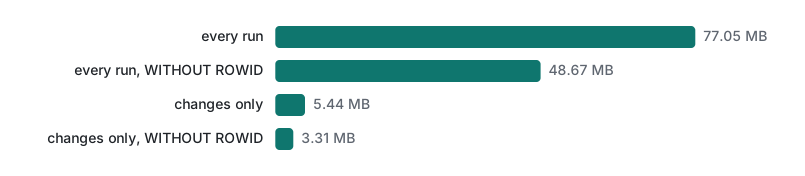
| 365 days | 730,000 / 77.05 | 52,940 / 5.44 |
The dbstat view showed that 33.6 MB of the 77 MB was the automatic index behind PRIMARY KEY (sku, seen_at), because an ordinary table stores the key twice (in the index and in the table). Declaring the table WITHOUT ROWID stores the rows in the key order itself:
Commit cost. The other number that surprises people: 10,000 upserts into a file database, median of 5 runs.
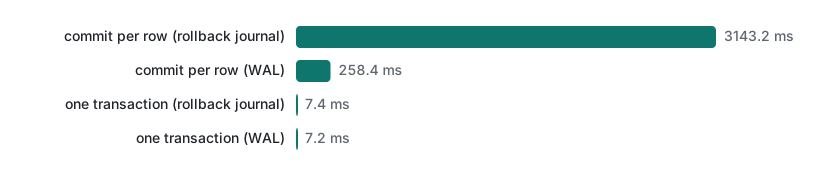
Committing after every row took 3,143.2 ms with the default rollback journal and 258.4 ms in WAL mode; one transaction took 7.4 ms and 7.2 ms. Each commit has to reach the disk; one per run is enough. That is why store() wraps the whole run in with db:, which also means a crash halfway leaves yesterday's data intact instead of half of today's.
Scheduling with cron, in UTC
We did not install anything on the test machine; this is the line you would add with crontab -e on a Linux server or a Mac you control:
15 3 * * * cd "$HOME/demo/shopwatch" && /usr/bin/python3 shopwatch.py >> logs/shopwatch.log 2>&1
- Absolute interpreter path. cron runs with a tiny
PATH;python3alone may not be found. - Log everything.
>> ... 2>&1keeps tracebacks too. Shell script robustness, cron and logging covers rotation and exit codes. - cron uses the machine's local time for the schedule. Some cron implementations (cronie on many Linux distributions) accept
CRON_TZ=UTC; we did not run that here. Either way, the data uses UTC because the script writes it. - Overlapping runs. If a run is slow and the next one starts, two writers meet. We reproduced it: one connection held a write transaction, a second tried to insert.
timeout=0: OperationalError: database is locked after 0.00 s
timeout=2: OperationalError: database is locked after 2.11 s
The timeout argument makes SQLite wait for the lock; it does not remove the conflict. Run the job less often than it takes, add a lock (for example mkdir "$HOME/demo/shopwatch/.lock" at the start and rmdir at the end, skipping the run if mkdir fails), and keep the job idempotent so a skipped or doubled run does no harm.
Which storage choice when
| Situation | Choice |
|---|---|
| You need a price history and alerts | products + changes-only snapshots, as above |
| You must prove what the page looked like on a date | also keep compressed raw HTML, but never hash it for change detection |
| Few products, quick prototype | one table, every run; switch before it grows |
| Many readers, one writer | SQLite in WAL mode is fine |
| Several machines write at once | a server database (PostgreSQL, MySQL); SQLite is a single-file database |
| The site sends ETag or Last-Modified | send conditional requests and skip unchanged pages entirely; see HTTP caching |
Honest limits and version notes
- Checked on Python 3.9.6 with SQLite 3.51.0.
ON CONFLICT ... DO UPDATEneeds SQLite 3.24 (2018) andLAG()needs 3.25; checksqlite3.sqlite_versionon your server, which may be older than your laptop. - The practice shop has stable SKUs. Real sites change ids, merge variants and show different prices per region or login. Your key choice is the hardest part.
requestshappened to be present on this machine, but the script uses only the standard library. Withrequeststhe fetch isrequests.get(url, headers=..., timeout=10).text; not run here.- File sizes depend on page size, key length and SQLite version. Re-measure with your own data before planning disk space.
- A 16-hex-digit (64-bit) truncated SHA-256 is plenty for change detection on thousands of rows; it is not a security measure.
Exercises
- Add a
removedreport: a product that was inproductsbut did not appear in today's run. Which column already tells you? - Write the SQL that lists products that went out of stock in the run at
2026-10-23T03:00:00Z.
Answers
last_seen. Afterstore(),SELECT sku FROM products WHERE last_seen < ?with today's timestamp lists products not seen this run. Do not delete them: a product missing for one day is often a page that failed (lecture 6).- Use
LAG(in_stock)the same way as the price query:WITH o AS (SELECT sku, seen_at, in_stock, LAG(in_stock) OVER (PARTITION BY sku ORDER BY seen_at) AS before FROM snapshots) SELECT sku FROM o WHERE seen_at='2026-10-23T03:00:00Z' AND before=1 AND in_stock=0;. In our data it returnsSKU-0020andSKU-0136.
Series navigation
- Previous: Web Scraping lecture 4/6: sessions, forms, cookies and CSRF
- Next: Web Scraping lecture 6/6: robustness, monitoring and layout changes
- Start of the series: lecture 1/6: robots.txt and urllib
- Testing code that depends on time: flaky tests, time, randomness and concurrency
- All lecture series: the programming learning roadmap
FAQ
Should I hash the whole HTML page to detect changes?
No. A page usually contains something that changes on every request, such as a timestamp, a request id or a CSRF token. In our 30-day run the raw-HTML hash changed on all 290 page fetches, while only 217 of those pages actually had a changed product. Hash only the normalized fields you care about, such as name, price in cents and stock.
Is INSERT OR REPLACE the same as an upsert in SQLite?
No. INSERT OR REPLACE deletes the old row and inserts a new one, so every column you did not pass is reset and the rowid changes. In our test first_seen was overwritten and the rowid went from 1 to 2. INSERT ... ON CONFLICT(sku) DO UPDATE updates only the columns you name and keeps the row.
How much space do daily price snapshots take in SQLite?
It depends on whether you store every row or only changes. For 2,000 products over 365 daily runs with 7% changing per day, storing every row took 77.05 MB and storing only changed rows took 5.44 MB; a WITHOUT ROWID table cut those to 48.67 MB and 3.31 MB.