Python html.parser: Build a 40-Line HTML Extractor
Scraping lecture 2: extract products with the stdlib html.parser, fix relative URLs with urljoin, clean whitespace and entities, and watch regex fail.
Series: Web Scraping lecture 2/6 (beginner). For developers who can download a page (lecture 1) and now need the data inside it. By the end you will have a 40-line extractor built on Python's standard html.parser, know when to read text and when to read attributes, and build links that do not 404.
Every price monitor, every internal dashboard fed from a supplier's web page, has a parser at its heart. Most beginners write that parser with str.find or a regular expression, it works on the first page, and it breaks quietly the week the site changes. This lecture builds the parser properly with nothing but the standard library, shows the regex version failing on real output, and measures how fast each one is. Everything was run on an Apple Silicon Mac (M1 Pro, macOS 26.6) with Python 3.9.6, compared on Python 3.12.14, against the practice shop from lecture 1 running on 127.0.0.1:18160 with PHP 8.5.6.
If you have not set up the shop yet, do that first: it is one PHP file and one command in lecture 1.
What parsing means here
An HTML page is text made of tags (<li>, <a>), attributes inside tags (class="product", href="product/101") and text between tags (USB-C cable 1m). A tag pair with everything inside it is an element. One product in our shop looks like this:
  <li class="product" data-id="101">
    <a href="product/101">
      USB-C cable 1m
    </a>
    <span class="price">$9.99</span>
    <span class="stock out">0</span>
  </li>
A parser reads that text and tells you its structure. html.parser.HTMLParser is an event-based parser: it walks through the page once and calls your methods as it meets things. handle_starttag(tag, attrs) for <li ...>, handle_data(text) for the text, handle_endtag(tag) for </li>. It does not build a tree you can search later. Your code has to remember where it is: "I am inside a product", "the text I am about to see is the price".
That sounds primitive next to BeautifulSoup, but it comes with every Python, it is forgiving with messy HTML, and it is enough for most list pages.
The 40-line extractor
Save this as extract.py next to the shop. The parser class plus imports is 39 lines; main() fetches a page and prints the result.
import sys
import urllib.request
from html.parser import HTMLParser
from urllib.parse import urljoin

UA = "PracticeShopBot/0.1 (+https://example.com/bot-contact)"

class ProductParser(HTMLParser):
    def __init__(self, base_url):
        super().__init__()                      # convert_charrefs=True by default
        self.base_url = base_url
        self.items, self.next_url = [], None
        self.cur, self.field = None, None

    def handle_starttag(self, tag, attrs):
        a = dict(attrs)
        classes = (a.get("class") or "").split()
        if tag == "li" and "product" in classes:
            self.cur = {"id": a.get("data-id"), "name": "", "price": "", "url": None}
        elif self.cur is not None and tag == "a":
            self.cur["url"] = urljoin(self.base_url, a.get("href", ""))
            self.field = "name"
        elif self.cur is not None and tag == "span" and "price" in classes:
            self.field = "price"
        elif tag == "a" and a.get("rel") == "next":
            self.next_url = urljoin(self.base_url, a["href"])

    def handle_endtag(self, tag):
        if tag in ("a", "span"):
            self.field = None
        elif tag == "li" and self.cur is not None:
            self.cur = {k: " ".join(v.split()) if isinstance(v, str) else v
                        for k, v in self.cur.items()}
            self.items.append(self.cur)
            self.cur = None

    def handle_data(self, data):
        if self.cur is not None and self.field:
            self.cur[self.field] += data

def main():
    url = sys.argv[1] if len(sys.argv) > 1 else "http://127.0.0.1:18160/en/products"
    req = urllib.request.Request(url, headers={"User-Agent": UA})
    with urllib.request.urlopen(req, timeout=10) as resp:
        html = resp.read().decode(resp.headers.get_content_charset() or "utf-8")
    p = ProductParser(resp.url)
    p.feed(html)
    p.close()
    for item in p.items:
        print(item)
    print("next:", p.next_url)

if __name__ == "__main__":
    main()
$ python3 extract.py
{'id': '101', 'name': 'USB-C cable 1m', 'price': '$9.99', 'url': 'http://127.0.0.1:18160/en/product/101'}
{'id': '102', 'name': 'Wireless mouse', 'price': '$24.50', 'url': 'http://127.0.0.1:18160/en/product/102'}
{'id': '103', 'name': 'Laptop stand', 'price': '$39.00', 'url': 'http://127.0.0.1:18160/en/product/103'}
{'id': '104', 'name': 'Mechanical keyboard', 'price': '$89.90', 'url': 'http://127.0.0.1:18160/en/product/104'}
next: http://127.0.0.1:18160/en/products?page=2
$ python3 extract.py 'http://127.0.0.1:18160/en/products?page=2'
{'id': '105', 'name': '27" monitor', 'price': '$219.00', 'url': 'http://127.0.0.1:18160/en/product/105'}
{'id': '106', 'name': 'Webcam HD', 'price': '$45.00', 'url': 'http://127.0.0.1:18160/en/product/106'}
{'id': '107', 'name': 'Desk lamp', 'price': '$19.95', 'url': 'http://127.0.0.1:18160/en/product/107'}
{'id': '108', 'name': 'Noise-cancelling headphones', 'price': '$149.00', 'url': 'http://127.0.0.1:18160/en/product/108'}
next: None
Quote the URL in the shell: an unquoted ? is a glob character, and zsh answered no matches found when we forgot.
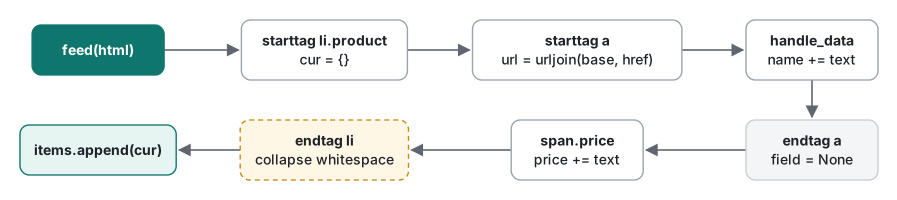
The pattern is always the same: handle_starttag decides "this is interesting" and sets a flag (self.cur, self.field), handle_data collects text only while a flag is set, and handle_endtag clears the flag and stores the result. Once you can write this one, you can write a parser for any list page.
Text vs attributes
Some data lives in the text between tags (the name, the price) and some in attributes (the product id in data-id, the link in href). attrs arrives as a list of pairs, which is why the extractor turns it into a dict first. Three details we checked:
li [('class', 'product featured'), ('data-id', '109')] {'class': 'product featured', 'data-id': '109'}
input [('disabled', None), ('value', '3')] {'disabled': None, 'value': '3'}
a [('href', 'x'), ('href', 'y')] {'href': 'y'}
classis one string with spaces.<li class="product featured">gives'product featured', soa.get("class") == "product"is False. Split it and test membership, as the extractor does.- An attribute with no value gives
None. That is why the code writes(a.get("class") or "")before.split();None.split()would crash. - A duplicated attribute keeps the last one in
dict(). Rare, but it happens on hand-edited pages.
Attribute names are lowercased for you, so HREF and href both come out as href. Values are not changed.
Relative links and urljoin
The shop writes links as href="product/101", a relative URL: "product/101, starting from the folder of the current page". To fetch it you need an absolute URL, and urllib.parse.urljoin builds it the same way a browser would:
http://127.0.0.1:18160/en/products         + product/101              -> http://127.0.0.1:18160/en/product/101
http://127.0.0.1:18160/en/products/        + product/101              -> http://127.0.0.1:18160/en/products/product/101
http://127.0.0.1:18160/                    + product/101              -> http://127.0.0.1:18160/product/101
http://127.0.0.1:18160/en/products?page=1  + ?page=2                  -> http://127.0.0.1:18160/en/products?page=2
http://127.0.0.1:18160/en/products         + /static/101.png          -> http://127.0.0.1:18160/static/101.png
http://127.0.0.1:18160/en/products         + //cdn.example.com/a.png  -> http://cdn.example.com/a.png
http://127.0.0.1:18160/en/products         + https://example.com/     -> https://example.com/
Never glue URLs with + or f-strings: the second line shows how one trailing slash changes the result. And the base must be the page you actually received. Here is the extractor run on /, which the shop redirects to /en/products, with each possible base:
base=http://127.0.0.1:18160/                -> http://127.0.0.1:18160/product/101  404
base=http://127.0.0.1:18160/en/products     -> http://127.0.0.1:18160/en/product/101  200
That is why main() passes resp.url, not the URL it asked for. (A page can also declare <base href="...">, which changes the base again. Our extractor ignores it; check for it if links come out wrong.)
Whitespace and entities
Without the cleanup line in handle_endtag, the name keeps every newline and indent from the HTML source:
{'id': '105', 'name': '\n 27" monitor\n ', 'price': '$219.00', 'url': 'http://127.0.0.1:18160/en/product/105'}
" ".join(v.split()) fixes that, and because str.split() with no argument splits on any Unicode whitespace, it also handles the non-breaking space and the full-width space:
'27" & HD' -> '27" & HD' -> '27" & HD'
'¥980 (税込)' -> '¥980\xa0(税込)' -> '¥980 (税込)'
'ノートPC スタンド' -> 'ノートPC スタンド' -> 'ノートPC スタンド'
'₩8,900' -> '₩8,900' -> '₩8,900'
'café' -> 'café' -> 'café'
That is html.unescape(s) and then the split-join. Entities like & and " are how HTML writes characters that would otherwise confuse it; the shop's source has 27" monitor, and our extractor printed 27" monitor because HTMLParser decodes them for you by default. Turn that off and see what happens:
convert_charrefs = True
  data: 'Practice Shop & Co.'
  data: 'Next »'
convert_charrefs = False
  data: 'Practice Shop '
  entityref: 'amp'
  data: ' Co.'
  data: 'Next '
  entityref: 'raquo'
With False, the text arrives in pieces and the entity goes to a different method. An extractor that only implements handle_data silently drops the &; our product extractor with convert_charrefs=False returned 27 monitor for product 105. Leave the default alone.
The regex-on-HTML trap
Here is the version most people write first, run against page 2 of the shop:
import re, urllib.request

html = urllib.request.urlopen("http://127.0.0.1:18160/en/products?page=2", timeout=10).read().decode()

# attempt 1: "simple" regex
print("1:", re.findall(r'<a href="(.*?)">(.*?)</a>', html))
# attempt 2: let . match newlines
print("2:", re.findall(r'<a href="(.*?)">(.*?)</a>', html, re.S)[:2])
# attempt 3: greedy by accident
m = re.search(r'<a href="(.*)">', html, re.S)
print("3:", len(m.group(1)), "chars captured as one href")
# attempt 4: the site adds one attribute (same data, same browser view)
v2 = html.replace('<a href=', '<a class="p-link" href=')
print("4:", re.findall(r'<a href="(.*?)">(.*?)</a>', v2, re.S))
1: []
2: [('product/105', '\n      27" monitor\n    '), ('product/106', '\n      Webcam HD\n    ')]
3: 643 chars captured as one href
4: []
- Nothing, because
.does not match a newline and the name sits on its own line. - With
re.Sit matches, but you get the indentation and the raw"and still have to clean both. - Drop one
?and.*swallows 643 characters, from the first link to the last. - The site adds
class="p-link", a change no visitor would notice, and the regex finds zero links, without any error.
The html.parser extractor on the same v2 page:
v2: ['27" monitor', 'Webcam HD', 'Desk lamp', 'Noise-cancelling headphones']
It reads attributes by name, so their order and extra ones do not matter. Regex is still the right tool inside a field you have already extracted (pulling 24.50 out of $24.50), just not for finding the field. If you want a refresher, see what regular expressions are.
Common mistakes, and what actually happens
| Mistake | What happened here | Fix |
|---|---|---|
| Joining links to the requested URL | /product/101, 404 |
urljoin(resp.url, href) |
a.get("class") == "product" |
Misses class="product featured" |
Split, then "product" in classes |
convert_charrefs=False with only handle_data |
27" monitor became 27 monitor |
Keep the default |
Page has <li> without </li> |
0 items, no error |
Count results and alarm on zero (lecture 6) |
Not quoting a URL with ? in zsh |
no matches found |
Put the URL in quotes |
The fourth row deserves a second look. Browsers close <li> for you, so the broken page looks fine on screen, but html.parser is not a browser: it just reports tags as written. Our extractor waits for </li> to save an item, so it saved none and raised nothing. A scraper that returns an empty list is the most dangerous kind of broken.
Which tool for which page
| Page | Use | Run here? |
|---|---|---|
The site offers JSON (an API, or JSON inside a <script> tag) |
json.loads |
Yes (lecture 1) |
| Regular list or detail pages | html.parser, like this lecture |
Yes |
| Very messy HTML, or you want CSS selectors | BeautifulSoup or lxml | No, not installed |
| One value inside text you already extracted | re |
Yes |
| Content built by JavaScript after load | Find the JSON request the page makes (lecture 6) | Described only |
BeautifulSoup would let you write soup.select("li.product") instead of tracking state yourself. It is a fine choice when you can install packages; the ideas in this lecture (text vs attributes, urljoin, whitespace) are the same.
Measured: parse speed vs page size
The shop can return one page with any number of products (?per_page=N). We fetched pages of 10 to 10,000 products once, then parsed each 5 times and took the median (Apple M1 Pro, time.perf_counter):
| Products | Page size | html.parser 3.9.6 | html.parser 3.12.14 | regex 3.9.6 |
|---|---|---|---|---|
| 10 | 1,981 B | 0.48 ms | 0.29 ms | 0.01 ms |
| 100 | 18,419 B | 4.18 ms | 2.47 ms | 0.06 ms |
| 1,000 | 183,824 B | 40.74 ms | 29.65 ms | 0.62 ms |
| 10,000 | 1,862,959 B | 408.61 ms | 269.25 ms | 6.83 ms |
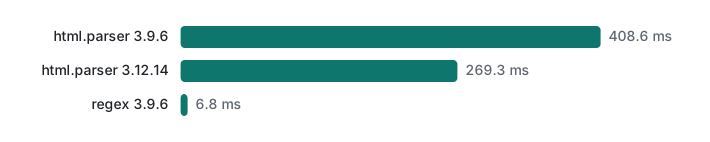
Three things to take away:
- Time grows linearly with page size. About 24,000 products (4.5 MB) per second on 3.9.6 and about 37,000 (7 MB) per second on 3.12.14, at every size.
- Newer Python is about 1.5 times faster on the same code, with no changes.
- Parsing is not your bottleneck. A normal 10-product page took half a millisecond. With the 1-second delay from lecture 1 between requests, parsing is 0.05% of the run. Write the parser that survives redesigns, not the fastest one.
Honest limits and version notes
- Run on Python 3.9.6, compared on 3.12.14; both gave the same extracted data.
convert_charrefshas defaulted to True since Python 3.5. html.parserdoes not build a tree, does not fix broken nesting the way browsers do (the HTML5 parsing algorithm), and does not run JavaScript.- We did not run BeautifulSoup, lxml or html5lib; they are not installed here. What we say about them is from their documentation, not measurement.
- The page sizes are generated by our shop. Real pages carry far more markup per product, so they parse slower per product; the linear shape is what carries over.
- Encodings other than UTF-8 (Shift_JIS, EUC-KR, Windows-1252) come back in lecture 6; until then, see detecting text encodings.
Exercises
1. Add the stock count (<span class="stock ...">) to each item without editing ProductParser.
2. Write to_number(text) that turns the shop's price strings into numbers, and make it work for a price written $ 1.299,00, as many Latin American and European sites do.
3. Using next_url, collect every product from all pages, with a 1-second pause between pages.
Answers
1. Subclass it and set a field for the stock span:
class StockParser(ProductParser):
    def handle_starttag(self, tag, attrs):
        super().handle_starttag(tag, attrs)
        a = dict(attrs)
        if self.cur is not None and tag == "span" and "stock" in (a.get("class") or "").split():
            self.cur.setdefault("stock", "")
            self.field = "stock"
On page 1 it printed [('101', 0), ('102', 5), ('103', 9), ('104', 4)] after converting with int().
2. Keep only digits and the decimal mark, then convert:
import re

def to_number(text, decimal="."):
    s = re.sub(r"[^\d" + re.escape(decimal) + "]", "", text)
    return float(s.replace(decimal, ".")) if s else None

for t in ["$24.50", "¥2,480", "₩24,500", "MX$1,299.00"]:
    print(f"{t:12} -> {to_number(t)}")
print(f"{'$ 1.299,00':12} -> {to_number('$ 1.299,00')}  (wrong)")
print(f"{'$ 1.299,00':12} -> {to_number('$ 1.299,00', decimal=',')}")
$24.50       -> 24.5
¥2,480       -> 2480.0
₩24,500      -> 24500.0
MX$1,299.00  -> 1299.0
$ 1.299,00   -> 1.299  (wrong)
$ 1.299,00   -> 1299.0
The fifth line is the trap: with the wrong decimal mark the price is off by a factor of 1,000, silently. Decide the format per site, not per value. (For money, decimal.Decimal is better than float once you store it.)
3.
import time, urllib.request
from extract import ProductParser, UA

url, items = "http://127.0.0.1:18160/en/products", []
while url:
    req = urllib.request.Request(url, headers={"User-Agent": UA})
    with urllib.request.urlopen(req, timeout=10) as resp:
        p = ProductParser(resp.url)
        p.feed(resp.read().decode())
    items += p.items
    print(url, len(p.items))
    url = p.next_url
    if url:
        time.sleep(1)
print("total", len(items))
http://127.0.0.1:18160/en/products 4
http://127.0.0.1:18160/en/products?page=2 4
total 8
Lecture 3 adds what this loop is missing: a maximum page count, handling of 429 responses, and retries.
Next
- Previous: Web Scraping lecture 1/6: robots.txt and urllib
- Next: Web Scraping lecture 3/6: pagination, rate limits and retries
- Later: sessions, forms, cookies and CSRF, change detection with SQLite, robustness and layout changes
- When the text comes out garbled: fixing mojibake
- All lecture series: the programming learning roadmap
FAQ
Why do my scraped links return 404 even though they look right?
They were probably joined to the wrong base URL. The shop redirected / to /en/products, and joining href="product/101" to the URL we asked for gave /product/101 (404), while joining it to resp.url, the URL we ended up at, gave /en/product/101 (200). Always pass the final URL to urljoin.
Is regex really that bad for scraping HTML?
On one exact page it can work and it is fast: about 60 times faster than html.parser in our measurement. But the simple pattern found nothing until we added re.S, captured whitespace and undecoded ", and found zero links once the site added class="p-link" before href. html.parser kept working on that change.
What does convert_charrefs do in html.parser?
With the default convert_charrefs=True, entities like & and " are decoded inside the text passed to handle_data. With False, the text is split and the entity goes to handle_entityref instead, so an extractor that only implements handle_data silently loses characters: 27" monitor came out as 27 monitor.