Web Scraping Basics: robots.txt and urllib, Politely
Scraping lecture 1: a local practice shop, a first urllib fetch with an honest User-Agent, robotparser traps, and the real 404/403/timeout tracebacks.
Series: Web Scraping lecture 1/6 (beginner). For developers who have been asked to "just grab the prices from that site" and have never written a scraper. By the end you will fetch a page with nothing but the Python standard library, check robots.txt the right way, and recognise the four errors every scraper hits in its first week.
Price monitoring, a weekly competitor check, an internal dashboard that copies numbers from a supplier portal: these are the jobs that land on a new developer's desk with the words "can you scrape this?". The code is the easy part. The hard part is knowing when you should not scrape at all, how to identify your bot honestly, and what the error messages mean. This lecture covers all three, with every command run on an Apple Silicon Mac (M1 Pro, macOS 26.6), Python 3.9.6 (the one that ships with the Xcode command line tools), PHP 8.5.6 for the practice site and curl 8.7.1. Paths are shortened to ~/demo/.
Everything here runs against a small shop that you start on your own machine, so you can make mistakes without bothering anyone.
What scraping is, and when an API is better
Scraping means downloading web pages that were made for humans and pulling data out of their HTML. Crawling is the part that decides which URL to visit next. A scraper usually does both.
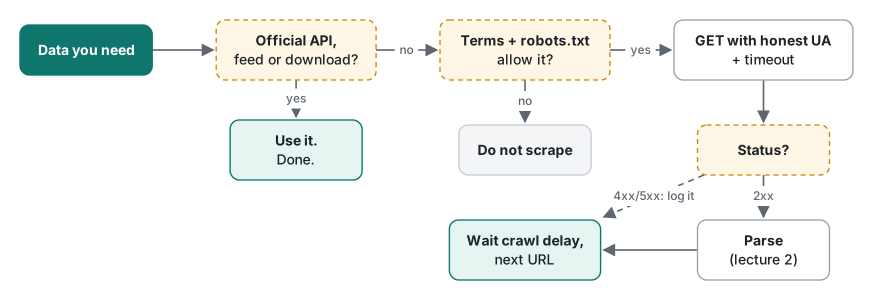
Scraping is the last resort, not the first tool. Before you write a line of code, look for:
| You need | Check first | Why |
|---|---|---|
| Product prices, stock | An official API, affiliate or partner feed, CSV export | Structured, stable, and you are allowed to use it |
| Public statistics | The publisher's open-data portal | Usually a download link and a licence |
| Data from a supplier you work with | Ask them for an export or API key | One email beats a fragile scraper |
| Data from your own company's site | The database or an internal API | Scraping yourself is a sign the data path is missing |
| None of the above, and the terms allow it | A polite scraper (this series) | Slow, honest, cached |
Our practice shop has both: an HTML product list and a JSON endpoint. Here is the JSON one:
import json, urllib.request

UA = "PracticeShopBot/0.1 (+https://example.com/bot-contact)"
req = urllib.request.Request("http://127.0.0.1:18160/en/api/products",
                             headers={"User-Agent": UA})
with urllib.request.urlopen(req, timeout=10) as resp:
    data = json.load(resp)
print(len(data["items"]), "items")
for item in data["items"][:3]:
    print(item)
8 items
{'id': 101, 'name': 'USB-C cable 1m', 'price': 9.99, 'stock': 0}
{'id': 102, 'name': 'Wireless mouse', 'price': 24.5, 'stock': 5}
{'id': 103, 'name': 'Laptop stand', 'price': 39, 'stock': 9}
One request and 475 bytes gave all 8 products, already split into fields. The HTML version needed two pages (953 + 913 bytes) and, as lecture 2 shows, a parser. On real sites the API also tends to survive redesigns that break HTML scrapers. If you are monitoring prices on a big marketplace, check for a product or affiliate API before anything else.
Set up the practice shop (5 minutes)
Save this as ~/demo/shop.php. It is a tiny shop with a paginated product list, product pages, a robots.txt, a forbidden /admin/ area, a page that takes 5 seconds to answer, and the JSON endpoint above. It needs PHP 8.0 or later (for str_starts_with).
<?php // shop.php: practice shop for the scraping lectures. Run: php -S 127.0.0.1:18160 shop.php
$LANG = 'en';
$ITEMS = [['USB-C cable 1m', 9.99], ['Wireless mouse', 24.50], ['Laptop stand', 39.00], ['Mechanical keyboard', 89.90],
['27" monitor', 219.00], ['Webcam HD', 45.00], ['Desk lamp', 19.95], ['Noise-cancelling headphones', 149.00]];
function money($v) { return '$' . number_format($v, 2); }
$uri = parse_url($_SERVER['REQUEST_URI'], PHP_URL_PATH);
error_log($_SERVER['REQUEST_METHOD'] . ' ' . $_SERVER['REQUEST_URI'] . ' ua="' . ($_SERVER['HTTP_USER_AGENT'] ?? '-') . '"');
function h($s) { return htmlspecialchars($s, ENT_QUOTES, 'UTF-8'); }
function products($n) {
global $ITEMS; $out = [];
for ($i = 0; $i < $n; $i++) {
[$name, $price] = $ITEMS[$i % 8]; $r = intdiv($i, 8);
$out[] = ['id' => 101 + $i, 'name' => $r ? "$name (#" . ($r + 1) . ")" : $name,
'price' => $price, 'stock' => ($i * 7) % 5 == 0 ? 0 : ($i * 13) % 9 + 1];
}
return $out;
}
if ($uri === '/robots.txt') {
header('Content-Type: text/plain; charset=utf-8');
echo "# Practice shop robots.txt\nUser-agent: *\nDisallow: /admin/\nDisallow: /cart\nDisallow: /members/\nAllow: /members/help\nDisallow: /*?sort=\nCrawl-delay: 1\n\nUser-agent: BadBot\nDisallow: /\n";
} elseif (str_starts_with($uri, '/admin/')) { http_response_code(403); echo "<h1>403 Forbidden</h1>";
} elseif ($uri === '/slow') { sleep(5); echo "finally";
} elseif ($uri === '/echo-ua') { header('Content-Type: text/plain'); echo "You sent User-Agent: " . ($_SERVER['HTTP_USER_AGENT'] ?? '-') . "\n";
} elseif ($uri === '/') { header('Location: /' . $LANG . '/products', true, 302);
} elseif ($uri === "/$LANG/api/products") {
header('Content-Type: application/json; charset=utf-8');
echo json_encode(['items' => products(8)], JSON_UNESCAPED_UNICODE) . "\n";
} elseif ($uri === "/$LANG/products") {
$per = max(1, min(20000, (int)($_GET['per_page'] ?? 4)));
$all = products(isset($_GET['per_page']) ? $per : 8);
$page = max(1, (int)($_GET['page'] ?? 1)); $pages = (int)ceil(count($all) / $per);
if ($page > $pages) { http_response_code(404); echo "<h1>Not Found</h1>"; return; }
header('Content-Type: text/html; charset=utf-8');
echo "<!doctype html>\n<html lang=\"$LANG\"><head><meta charset=\"utf-8\"><title>Practice Shop & Co.</title></head>\n<body>\n<h1>Practice Shop & Co.</h1>\n<ul class=\"products\">\n";
foreach (array_slice($all, ($page - 1) * $per, $per) as $p) {
$stock = $p['stock'] ? '<span class="stock in">' . $p['stock'] . '</span>' : '<span class="stock out">0</span>';
echo " <li class=\"product\" data-id=\"{$p['id']}\">\n <a href=\"product/{$p['id']}\">\n " . h($p['name'])
. "\n </a>\n <span class=\"price\">" . h(money($p['price'])) . "</span>\n $stock\n </li>\n";
}
echo "</ul>\n<nav>" . ($page < $pages ? "<a rel=\"next\" href=\"?page=" . ($page + 1) . "\">Next »</a>" : "") . "</nav>\n</body></html>\n";
} elseif (preg_match("#^/$LANG/product/(\d+)$#", $uri, $m) && (int)$m[1] >= 101 && (int)$m[1] <= 108) {
$p = products(8)[(int)$m[1] - 101];
header('Content-Type: text/html; charset=utf-8');
echo "<!doctype html><html><head><meta charset=\"utf-8\"><title>" . h($p['name']) . "</title></head><body><h1>" . h($p['name'])
. "</h1><p class=\"price\">" . h(money($p['price'])) . "</p><img src=\"/static/{$p['id']}.png\" alt=\"\"></body></html>\n";
} else { http_response_code(404); header('Content-Type: text/html; charset=utf-8'); echo "<h1>Not Found</h1>\n"; }
Start it in one terminal and leave it running; it prints one log line per request:
cd ~/demo && php -S 127.0.0.1:18160 shop.php
127.0.0.1 means only your own machine can reach it. Open a second terminal for the Python scripts.
Your first fetch with urllib
urllib.request is part of the standard library, so there is nothing to install. Save this as first_fetch.py:
import urllib.request

URL = "http://127.0.0.1:18160/en/products"
UA = "PracticeShopBot/0.1 (+https://example.com/bot-contact)"

req = urllib.request.Request(URL, headers={"User-Agent": UA})
with urllib.request.urlopen(req, timeout=10) as resp:
    print(resp.status, resp.reason)
    print("Content-Type:", resp.headers["Content-Type"])
    body = resp.read()
    print(len(body), "bytes")
    html = body.decode(resp.headers.get_content_charset() or "utf-8")
    print(html[html.index("<li"):html.index("</li>") + 5])
200 OK
Content-Type: text/html; charset=utf-8
953 bytes
<li class="product" data-id="101">
    <a href="product/101">
      USB-C cable 1m
    </a>
    <span class="price">$9.99</span>
    <span class="stock out">0</span>
  </li>
Three ideas are hiding in those twelve lines:
resp.read()returns bytes, not text. HTML travels as bytes; you turn them into a string with.decode(). The charset comes from theContent-Typeheader (charset=utf-8). When the site lies about it, you get mojibake, which the mojibake guide untangles.- The status code (
200 OK) says how the request went. 2xx is success, 3xx is a redirect, 4xx is "your request was wrong or not allowed", 5xx is "the server broke". The HTTP status code lecture has the full tour. timeout=10is not optional. More on that in the errors section.
urllib also follows redirects silently. This script asks for /, which the shop redirects:
import urllib.request

UA = "PracticeShopBot/0.1 (+https://example.com/bot-contact)"
req = urllib.request.Request("http://127.0.0.1:18160/", headers={"User-Agent": UA})
with urllib.request.urlopen(req, timeout=10) as resp:
    print("asked for :", req.full_url)
    print("ended at  :", resp.url, resp.status)
    for k, v in resp.headers.items():
        print(f"{k}: {v}")
asked for : http://127.0.0.1:18160/
ended at  : http://127.0.0.1:18160/en/products 200
Host: 127.0.0.1:18160
Date: Sat, 14 Nov 2026 23:18:41 GMT
Connection: close
X-Powered-By: PHP/8.5.6
Content-Type: text/html; charset=utf-8
You never saw the 302. resp.url is the address you actually ended up at, and lecture 2 shows why you need it for building links. If you want to see the raw exchange, curl -v does it, as covered in HTTP basics with curl.
An honest User-Agent
Every HTTP request carries a User-Agent header saying what software sent it. Here is what the shop's log recorded for two requests, one with our header and one without (timestamps removed):
GET /en/products ua="PracticeShopBot/0.1 (+https://example.com/bot-contact)"
GET /en/products ua="Python-urllib/3.9"
Python-urllib/3.9 tells the site owner nothing except "some script". Many sites block it outright. A good bot User-Agent has three parts: a name, a version, and a URL (or contact page) where the owner can read what the bot does and how to ask you to stop. Replace https://example.com/bot-contact with a real page you control.
What you should not do is copy a browser's User-Agent string to look like a person. If a site blocks your honest bot, that is an answer, not an obstacle. The same goes for rotating IP addresses or proxies to get around blocks: this series does not teach them, and you should not use them.
robots.txt with urllib.robotparser
robots.txt is a plain-text file at the root of a site that tells automated clients which paths they may visit. It was standardised in 2022 as RFC 9309 (the Robots Exclusion Protocol). It is a request, not a lock: nothing stops a bot from ignoring it, which is exactly why respecting it matters. Ours:
# Practice shop robots.txt
User-agent: *
Disallow: /admin/
Disallow: /cart
Disallow: /members/
Allow: /members/help
Disallow: /*?sort=
Crawl-delay: 1

User-agent: BadBot
Disallow: /
Python has a parser built in:
import urllib.robotparser

BASE = "http://127.0.0.1:18160"
UA = "PracticeShopBot/0.1 (+https://example.com/bot-contact)"

rp = urllib.robotparser.RobotFileParser(BASE + "/robots.txt")
rp.read()
for path in ["/en/products", "/admin/users", "/cart", "/members/help",
             "/members/orders", "/en/products?sort=price"]:
    print(f"{path:25} {rp.can_fetch(UA, BASE + path)}")
print("crawl_delay:", rp.crawl_delay(UA))
print("BadBot /en/products:", rp.can_fetch("BadBot", BASE + "/en/products"))
/en/products              True
/admin/users              False
/cart                     False
/members/help             False
/members/orders           False
/en/products?sort=price   True
crawl_delay: 1
BadBot /en/products: False
Two of those answers are not what the file's author meant, and both came out the same on Python 3.12.14:
/members/help→ False. RFC 9309 says the most specific (longest) matching rule wins, soAllow: /members/helpshould beatDisallow: /members/. Python's parser uses the first line that matches, in file order. When you write your own robots.txt, putAllowlines above the broaderDisallow; with the order swapped, Python returned True for/members/helpand still False for/members/orders./en/products?sort=price→ True.*wildcards are common (Google supports them and RFC 9309 includes them), but Python's parser compares the path as a plain prefix, so/*?sort=matches nothing. If a site uses wildcards, read them yourself and stay out of those URLs.
The other behaviours worth knowing, all run here:
| Situation | What robotparser did |
|---|---|
Forgot to call rp.read() |
can_fetch returned False for everything |
| robots.txt returned 404 | Everything allowed (allow_all = True) |
| robots.txt returned 403 | Everything forbidden (disallow_all = True) |
| Server unreachable | rp.read() raised URLError: [Errno 61] Connection refused |
A polite loop reads robots.txt once, checks each URL, and waits between requests:
import time, urllib.request, urllib.robotparser

BASE = "http://127.0.0.1:18160"
UA = "PracticeShopBot/0.1 (+https://example.com/bot-contact)"

rp = urllib.robotparser.RobotFileParser(BASE + "/robots.txt")
rp.read()
delay = rp.crawl_delay(UA) or 1.0          # no Crawl-delay? pick your own pace

start = time.perf_counter()
for path in ["/en/products?page=1", "/en/products?page=2", "/cart",
             "/en/product/101", "/en/product/102"]:
    url = BASE + path
    if not rp.can_fetch(UA, url):
        print(f"{time.perf_counter() - start:5.2f}s skip  {path} (robots.txt)")
        continue
    req = urllib.request.Request(url, headers={"User-Agent": UA})
    with urllib.request.urlopen(req, timeout=10) as resp:
        print(f"{time.perf_counter() - start:5.2f}s {resp.status}   {path} {len(resp.read())} bytes")
    time.sleep(delay)
 0.00s 200   /en/products?page=1 953 bytes
 1.01s 200   /en/products?page=2 913 bytes
 2.01s skip  /cart (robots.txt)
 2.01s 200   /en/product/101 189 bytes
 3.02s 200   /en/product/102 190 bytes
Crawl-delay is not in RFC 9309 and Google ignores it, but plenty of sites still use it, and when a site states a pace, follow it. When there is none, one request per second for a small site is a reasonable start.
Reading a real robots.txt
We made one polite request for our own site's file, https://tlaboratory.net/robots.txt, saved it, and fed it to the parser with rp.parse(lines) so no further requests were needed. It had 65 lines: a default group for everyone, a group naming 20 AI crawlers that keeps them out of a few app and API paths, a group of 11 SEO-analysis bots that are disallowed from the whole site, one group for a single search engine, and a Sitemap: line.
PracticeShopBot/0.1 [True, True]
GPTBot [True, True]
AhrefsBot [False, False]
['https://tlaboratory.net/sitemap.xml'] None
Those are can_fetch for /en/ and one lecture page, then rp.site_maps() and crawl_delay. Two lessons from a real file: one site can treat different bots very differently, and site_maps() (added in Python 3.8) gives you the sitemap URL, which is often a cleaner list of pages than following links. It also contained a /*/json/ line, the kind of wildcard Python ignores.
First-week errors, with the real tracebacks
These four come up in nearly every new scraper. Here is what Python 3.9.6 printed (the long library paths trimmed to …):
urllib.error.HTTPError: HTTP Error 404: Not Found
urllib.error.HTTPError: HTTP Error 403: Forbidden
urllib.error.URLError: <urlopen error [Errno 61] Connection refused>
socket.timeout: timed out
- 404 Not Found: the URL is wrong or the page is gone. Check the URL you built (lecture 2 shows the classic relative-link mistake).
- 403 Forbidden: the server understood and refused. Often it means "bots not welcome here" or "you need to log in". Do not retry with a fake browser User-Agent.
- Connection refused (
Errno 61on macOS,111on Linux): nothing is listening on that port. Usually the server is not running, or you typed the wrong port. - timed out: the server did not answer within your
timeout. On Python 3.10 and later the last line readsTimeoutError: timed outinstead (checked on 3.12.14).
One function that handles all four and returns a status instead of crashing:
import socket
import urllib.error
import urllib.request

UA = "PracticeShopBot/0.1 (+https://example.com/bot-contact)"

def get(url, timeout=10):
    req = urllib.request.Request(url, headers={"User-Agent": UA})
    try:
        with urllib.request.urlopen(req, timeout=timeout) as resp:
            return resp.status, resp.read()
    except urllib.error.HTTPError as e:      # server answered 4xx/5xx
        return e.code, e.read()
    except urllib.error.URLError as e:       # never got an answer
        return None, f"URLError: {e.reason}".encode()
    except socket.timeout:                   # answer too slow (TimeoutError on 3.10+)
        return None, b"timeout"

for path in ["/en/products", "/en/products/999", "/admin/users", "/slow"]:
    status, body = get("http://127.0.0.1:18160" + path, timeout=2)
    print(f"{path:18} {status!s:5} {body[:40]!r}")
status, body = get("http://127.0.0.1:18165/en/products")
print(f"{'port 18165':18} {status!s:5} {body[:60]!r}")
/en/products       200   b'<!doctype html>\n<html lang="en"><head><m'
/en/products/999   404   b'<h1>Not Found</h1>\n'
/admin/users       403   b'<h1>403 Forbidden</h1>'
/slow              None  b'timeout'
port 18165         None  b'URLError: [Errno 61] Connection refused'
Common mistakes, and what actually happens
Mistake 1: catching URLError before HTTPError. HTTPError is a subclass of URLError (issubclass printed True), so with the order reversed a 404 lands in the URLError branch:
caught as URLError: HTTPError 404 Not Found
Your log then says "network problem" for what was really a wrong URL. Fix: catch HTTPError first, as above.
Mistake 2: no timeout. socket.getdefaulttimeout() printed None, which means "wait forever". Against /slow the call came back after 5.01 s; against a server that accepts the connection and never answers, your cron job would still be hanging tomorrow. Fix: always pass timeout=.
Mistake 3: re-reading robots.txt for every URL. It feels extra-polite but it is the opposite: it doubles your traffic. Fix: read it once per run (or once a day for long crawls).
Mistake 4: a fast loop after an error. A while True that retries a 403 or 500 immediately hammers the server. Lecture 3 adds proper backoff; for now, log the error and move on.
Measured: what robots.txt checking costs
Fifty pages from the practice shop, three ways, 5 runs each, median shown (Python 3.9.6, 127.0.0.1, Apple M1 Pro). Request counts come from the server log.

Reading robots.txt once added one request and no measurable time (12.1 vs 12.7 ms is within the run-to-run noise; the fastest runs were 11.2 and 12.2 ms). Reading it for every URL sent 100 requests instead of 51 and doubled the time. On a real network, where one request took about 59 ms to example.com in the HTTP lecture, that waste is seconds per run, and all of it lands on someone else's server.
The bigger number is the one you choose: with Crawl-delay: 1, 50 pages take at least 49 seconds. That is fine. A scraper that runs from cron at night does not need to be fast; it needs to be welcome.
Before you scrape a real site
- Terms of service. Many sites forbid automated access in their terms, even where robots.txt says nothing. Read them.
- Personal data. Names, emails, profiles and reviews tied to people are personal data in most countries. Do not collect what you do not need, and do not republish it.
- Copyright. Facts like a price are one thing; copying descriptions, photos or whole articles is another.
- Load. One request at a time, a delay between them, caching (see ETag and Cache-Control), and runs at quiet hours.
- This is not legal advice. Check the site's terms and your local law, and ask the site owner when in doubt.
Honest limits and version notes
- Run on Python 3.9.6 (macOS system Python) and compared on Python 3.12.14 (Homebrew).
robotparsergave the same answers on both.site_maps()was added in 3.8,crawl_delay()andrequest_rate()in 3.6. - The timeout exception name changed:
socket.timeoutbecame an alias ofTimeoutErrorin Python 3.10. - RFC 9309 (September 2022) defines robots.txt matching, including longest-match and
*/$. Python's parser predates it and, as shown, does neither. Other parsers (Google's open-source one, Scrapy's) behave differently; we did not run them. requestsand Scrapy are the usual third-party tools. They were not used here;urllibdoes everything this lecture needs.- Times were measured on 127.0.0.1, so they show overhead, not network latency.
Exercises
1. With the practice robots.txt, Python says /members/help is not allowed. Change only the order of lines so Python agrees with the RFC's longest-match answer, without changing what /members/orders gets.
2. Your scraper's log shows ua="Python-urllib/3.9". Write the one change that fixes it, and say what the contact URL is for.
3. A site's robots.txt says Crawl-delay: 2 and you need 300 pages. What is the minimum run time, and would running 4 threads to finish faster be acceptable?
Answers
1. Move Allow: /members/help above Disallow: /members/. Python then returned True for /members/help and False for /members/orders, because the first matching line wins.
2. Build a Request with headers={"User-Agent": "PracticeShopBot/0.1 (+https://example.com/bot-contact)"}. The URL gives the site owner a page explaining your bot and a way to ask you to slow down or stop.
3. 299 gaps of 2 s, so about 10 minutes. Four threads would send four times the requested rate; the delay applies to your bot as a whole, not to each thread. Run it overnight instead.
Next
- Next: Web Scraping lecture 2/6: parsing HTML with html.parser
- Later: pagination, rate limits and retries, sessions, forms, cookies and CSRF, change detection with SQLite, robustness and layout changes
- Background: HTTP headers, cookies and sessions
- All lecture series: the programming learning roadmap
FAQ
Does Python's urllib.robotparser follow the same rules as Googlebot?
Not exactly. On Python 3.9.6 and 3.12.14 it used the first matching line, so a Disallow: /members/ line above Allow: /members/help blocked /members/help, while RFC 9309 says the longest match wins. It also treated Disallow: /*?sort= literally, so /en/products?sort=price came back as allowed.
Why does my scraper show up as Python-urllib/3.9 in the server log?
That is urllib's default User-Agent. Pass headers={'User-Agent': 'YourBot/0.1 (+https://your-site/bot-contact)'} to urllib.request.Request so the site owner can see who you are and how to reach you. Do not copy a browser's User-Agent to hide that you are a bot.
What happens if I call urlopen without a timeout?
It waits as long as the server takes, because the default socket timeout is None. Against a page that sleeps 5 seconds it returned after 5.01 s; against a server that never answers it would hang forever. Always pass timeout=, and catch socket.timeout (TimeoutError on Python 3.10+).