Win32 CreateWindowEx and ShowWindow: A Complete Window
A complete Win32 window: CreateWindowEx, ShowWindow, the message loop, WM_DESTROY, DPI awareness and a C# LibraryImport version, built with MinGW-w64.
Revised November 2026. This tutorial first appeared in Korean in 2021. Its examples were fragments of the Visual Studio template's
InitInstancefunction: the first one was missing its closing brace, and the second one failed to compile with MinGW-w64 (cannot convert 'WCHAR*' to 'LPCSTR'). This version replaces them with a complete program — class registration, message loop, clean shutdown and DPI awareness — plus a C# version that usesLibraryImport. Every sample was compiled for Windows with MinGW-w64 (GCC 16.2.0) or the .NET 10 SDK; none was run on this machine, which is a Mac. Where we describe run-time behavior, it comes from the Microsoft Learn documentation, not from a screenshot.
This article is for anyone who wants to put a window on screen with the raw Win32 API and ran into one of the usual problems: the process stays alive after the window closes, the text is blurry on a laptop display, or a pasted sample does not compile. The short answer: CreateWindowEx only creates the window, ShowWindow makes it visible, and everything after that is done by the message loop and the window procedure. Leave out any of the three and you get one of those symptoms.
CreateWindow is a macro, not a function
The 2021 article presented CreateWindow as a function. In winuser.h it is a macro: CreateWindow(...) becomes CreateWindowEx(0, ...) with no extended style, and that in turn becomes CreateWindowExW or CreateWindowExA depending on whether UNICODE is defined. The original prototype also listed the tenth parameter as HANDLE; the real type is HINSTANCE.
HWND CreateWindowExW(
    DWORD     dwExStyle,    // WS_EX_... ; CreateWindow passes 0
    LPCWSTR   lpClassName,  // name (or ATOM) registered with RegisterClassExW
    LPCWSTR   lpWindowName, // caption text
    DWORD     dwStyle,      // WS_OVERLAPPEDWINDOW, WS_CHILD, ...
    int X, int Y, int nWidth, int nHeight,
    HWND      hWndParent,   // parent or owner window
    HMENU     hMenu,        // menu, or the control ID for a child window
    HINSTANCE hInstance,
    LPVOID    lpParam);     // arrives in WM_CREATE as CREATESTRUCT.lpCreateParams
The style table in the old post was essentially correct. These are the styles you will actually use:
| Style | Meaning |
|---|---|
WS_OVERLAPPEDWINDOW |
A normal top-level window: caption, system menu, sizing border, minimize and maximize buttons |
WS_POPUP |
A window without a caption; cannot be combined with WS_CHILD |
WS_CHILD |
A control inside a parent; hWndParent is required |
WS_VISIBLE |
Visible immediately, so no separate ShowWindow call is needed |
WS_CLIPCHILDREN |
The parent does not paint over its children, which reduces flicker |
WS_BORDER |
A thin, non-sizable border |
The second 2021 example used only WS_BORDER. Because WS_OVERLAPPED is 0, that still creates an overlapped window, and Windows always gives overlapped windows a title bar — which is why the old screenshot showed one. What you lose is resizing and the minimize/maximize buttons.
What happened when we compiled the 2021 code
The old samples were cut out of Visual Studio's "Windows Desktop Application" template, so we added the template's globals (WCHAR szWindowClass[100] and friends) and compiled them with x86_64-w64-mingw32-g++.
The first sample stopped at the end of the file because the function had no closing brace:
create2021_first.cpp:23:16: error: expected '}' at end of input
   23 |    return TRUE;
      |                ^
With the brace added, the second sample failed with MinGW's default settings:
create2021.cpp:14:24: error: cannot convert 'WCHAR*' {aka 'wchar_t*'} to 'LPCSTR' {aka 'const char*'}
   14 |    hWnd = CreateWindow(szWindowClass, L"타이틀", WS_BORDER,
      |                        ^~~~~~~~~~~~~
…/winuser.h:2203:65: note: initializing argument 2 of 'HWND__* CreateWindowExA(DWORD, LPCSTR, LPCSTR, …)'
This is the classic ANSI/Unicode mix-up. A Visual Studio project sets the character set to Unicode, defines UNICODE, and the macro picks CreateWindowExW, which accepts the WCHAR array and the L"..." literal. MinGW defines nothing, so the macro picks CreateWindowExA, which wants char strings. Adding -DUNICODE -D_UNICODE made the same file compile without warnings.
You can define UNICODE in the build, but we recommend the other fix: call the W functions directly — CreateWindowExW, RegisterClassExW, DefWindowProcW. The code then means the same thing under any build configuration, and non-ASCII captions never pass through the system code page.
The complete program, message loop included
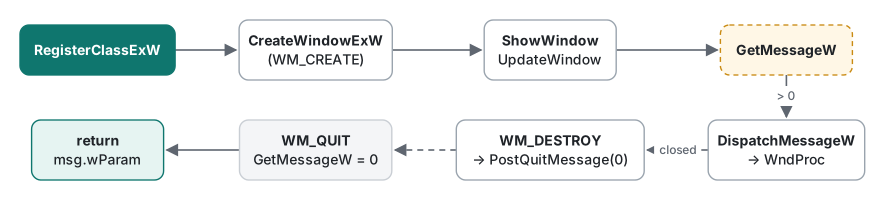
The 2021 article ended with the sequence "define the class, register it, create the window, show it, run the message loop" without showing it. Here it is in one file:
// window.cpp — Unicode, per-monitor V2 DPI aware (Windows 10 1703+)
#include <windows.h>

static LRESULT CALLBACK WndProc(HWND hwnd, UINT msg, WPARAM wp, LPARAM lp)
{
    switch (msg) {
    case WM_PAINT: {
        PAINTSTRUCT ps;
        HDC hdc = BeginPaint(hwnd, &ps);
        TextOutW(hdc, 16, 16, L"Hello, Win32", 12);
        EndPaint(hwnd, &ps);
        return 0;
    }
    case WM_DPICHANGED: {                 // moved to a monitor with another scale
        RECT* r = reinterpret_cast<RECT*>(lp);
        SetWindowPos(hwnd, nullptr, r->left, r->top, r->right - r->left,
                     r->bottom - r->top, SWP_NOZORDER | SWP_NOACTIVATE);
        return 0;
    }
    case WM_DESTROY:
        PostQuitMessage(0);               // without this the process never exits
        return 0;
    }
    return DefWindowProcW(hwnd, msg, wp, lp);
}

int WINAPI wWinMain(HINSTANCE hInst, HINSTANCE, PWSTR, int nCmdShow)
{
    SetProcessDpiAwarenessContext(DPI_AWARENESS_CONTEXT_PER_MONITOR_AWARE_V2);

    WNDCLASSEXW wc{};
    wc.cbSize        = sizeof(wc);
    wc.lpfnWndProc   = WndProc;
    wc.hInstance     = hInst;
    wc.hCursor       = LoadCursorW(nullptr, IDC_ARROW);
    wc.hbrBackground = reinterpret_cast<HBRUSH>(COLOR_WINDOW + 1);
    wc.lpszClassName = L"TLabDemoWindow";
    if (!RegisterClassExW(&wc)) return 1;

    UINT dpi = GetDpiForSystem();         // 96 = 100 %, 144 = 150 %
    HWND hwnd = CreateWindowExW(0, L"TLabDemoWindow", L"Demo",
        WS_OVERLAPPEDWINDOW, CW_USEDEFAULT, CW_USEDEFAULT,
        MulDiv(500, dpi, 96), MulDiv(300, dpi, 96),
        nullptr, nullptr, hInst, nullptr);
    if (!hwnd) return 1;

    ShowWindow(hwnd, nCmdShow);
    UpdateWindow(hwnd);

    MSG msg;
    while (GetMessageW(&msg, nullptr, 0, 0) > 0) {   // 0 = WM_QUIT, -1 = error
        TranslateMessage(&msg);
        DispatchMessageW(&msg);
    }
    return static_cast<int>(msg.wParam);
}
$ x86_64-w64-mingw32-g++ -std=c++17 -Wall -Wextra -O2 -municode -mwindows window.cpp -o window.exe -luser32 -lgdi32
$ file window.exe
window.exe: PE32+ executable (GUI) x86-64, for MS Windows
No warnings, even with -Wall -Wextra. A few details are worth spelling out:
- Drop
-municodeand the link fails withundefined reference to 'WinMain': MinGW only treatswWinMainas the entry point with that flag, and-DUNICODEalone did not change the result. WithoutUNICODEat all,IDC_ARROWexpands to achar*constant andLoadCursorW(nullptr, IDC_ARROW)fails withcannot convert 'LPSTR' to 'LPCWSTR'. Half-configured Unicode breaks in places you would not look first. - Never write
while (GetMessage(...)).GetMessagereturns -1 on error, -1 is true, and the loop spins forever. The GetMessage page on Microsoft Learn warns about exactly this. Comparing with> 0leaves the loop on both WM_QUIT (0) and errors (-1). - Pass
nCmdShowto the firstShowWindowcall. That is how a shortcut set to "Run: Minimized" reaches your window. The old table's note thatSW_FORCEMINIMIZEneeds "Windows 2000 or later" no longer matters. UpdateWindowsendsWM_PAINTright away so the first frame is drawn immediately. It is optional, but the template keeps it.
WM_DESTROY and PostQuitMessage
Clicking the close button sends WM_CLOSE. DefWindowProcW answers it by calling DestroyWindow, and while the window is being destroyed it receives WM_DESTROY. Calling PostQuitMessage(0) there puts WM_QUIT in the thread's queue; GetMessageW then returns 0 and the loop ends.
Forget that line and you get the "zombie" process: the window is gone, but the loop is asleep waiting for a WM_QUIT that never comes. The opposite mistake happens in programs with several windows: if a secondary window also calls PostQuitMessage, closing it ends the whole application. Call it from the main window only. If you want to ask "Save changes?" before closing, handle WM_CLOSE and simply do not call DestroyWindow when the user cancels.
DPI awareness: prefer the manifest
A program that does not declare DPI awareness is drawn at 96 DPI and then stretched as a bitmap by Windows, so on a 150 % display its text is soft and blurry. The 2021 article did not mention this, but almost every laptop now ships with a scale above 100 %, so you cannot skip it.
The program above calls SetProcessDpiAwarenessContext (available since Windows 10 version 1703) before it creates any window. Microsoft Learn, however, recommends setting the awareness in the application manifest, because it is fixed before your first line of code runs and there is no call order to get wrong. With MinGW you embed it as a resource:
<!-- app.manifest -->
<assembly xmlns="urn:schemas-microsoft-com:asm.v1" manifestVersion="1.0">
  <application xmlns="urn:schemas-microsoft-com:asm.v3">
    <windowsSettings>
      <dpiAware xmlns="http://schemas.microsoft.com/SMI/2005/WindowsSettings">true/pm</dpiAware>
      <dpiAwareness xmlns="http://schemas.microsoft.com/SMI/2016/WindowsSettings">PerMonitorV2</dpiAwareness>
    </windowsSettings>
  </application>
</assembly>
$ printf '#include <winuser.h>\nCREATEPROCESS_MANIFEST_RESOURCE_ID RT_MANIFEST "app.manifest"\n' > app.rc
$ x86_64-w64-mingw32-windres app.rc -O coff -o app.res.o
$ x86_64-w64-mingw32-g++ … window.cpp app.res.o -o window_m.exe -luser32 -lgdi32
We checked that the resulting exe has an .rsrc section containing the PerMonitorV2 string. Windows versions older than 10 1607 ignore dpiAwareness and read the dpiAware line instead. Use either the manifest or the API, not both: according to the documentation, the API call fails with ERROR_ACCESS_DENIED once the manifest has set the awareness.
Declaring awareness makes scaling your job. A hard-coded 500 × 300 window would look small at 150 %, so the code converts with MulDiv(500, dpi, 96). When the window moves to a monitor with a different scale, WM_DPICHANGED arrives with a suggested rectangle in lParam, and the code simply applies it. Fonts and icons also need to be recreated for the new DPI — the most tedious part of doing UI in raw Win32.
The same window from C# with LibraryImport
You can do all of this from .NET through P/Invoke. Since .NET 7 the recommended form is LibraryImport, whose marshalling code is generated at compile time by a source generator, instead of DllImport, whose marshalling stubs are built at run time. If you declare, say, FindWindow with DllImport and raise SYSLIB1054 to a warning, the analyzer tells you so:
warning SYSLIB1054: Mark the method 'FindWindow' with 'LibraryImportAttribute' instead of 'DllImportAttribute' to generate P/Invoke marshalling code at compile time
SYSLIB1054 is an "info" diagnostic by default and does not show up in a normal build; we added dotnet_diagnostic.SYSLIB1054.severity = warning to .editorconfig to see it. Here is the core of a net10.0-windows project with <AllowUnsafeBlocks>true</AllowUnsafeBlocks> and <OutputType>WinExe</OutputType> (structs and some declarations are shortened with …):
using System.Runtime.InteropServices;

unsafe
{
    Native.SetProcessDpiAwarenessContext(-4);  // PER_MONITOR_AWARE_V2
    nint hInst = Native.GetModuleHandleW(null);
    fixed (char* cls = "TLabDemoWindowCs")
    {
        var wc = new WNDCLASSEXW
        {
            cbSize = (uint)sizeof(WNDCLASSEXW),
            lpfnWndProc = &WndProc,                 // static [UnmanagedCallersOnly] function
            hInstance = hInst,
            hCursor = Native.LoadCursorW(0, 32512), // IDC_ARROW
            hbrBackground = 5 + 1,                  // COLOR_WINDOW + 1
            lpszClassName = cls,
        };
        if (Native.RegisterClassExW(in wc) == 0) return 1;
    }
    uint dpi = Native.GetDpiForSystem();
    nint hwnd = Native.CreateWindowExW(0, "TLabDemoWindowCs", "Demo (C#)",
        0x00CF0000 /* WS_OVERLAPPEDWINDOW */, unchecked((int)0x80000000), unchecked((int)0x80000000),
        (int)(500 * dpi / 96), (int)(300 * dpi / 96), 0, 0, hInst, 0);
    if (hwnd == 0) return 1;
    Native.ShowWindow(hwnd, 1);                     // SW_SHOWNORMAL
    MSG msg;
    while (Native.GetMessageW(&msg, 0, 0, 0) > 0)
    {
        Native.TranslateMessage(&msg);
        Native.DispatchMessageW(&msg);
    }
    return (int)msg.wParam;
}

[UnmanagedCallersOnly]
static nint WndProc(nint hwnd, uint msg, nint wParam, nint lParam)
{
    if (msg == 0x0002) { Native.PostQuitMessage(0); return 0; }   // WM_DESTROY
    return Native.DefWindowProcW(hwnd, msg, wParam, lParam);
}

static unsafe partial class Native
{
    [LibraryImport("user32.dll", StringMarshalling = StringMarshalling.Utf16, SetLastError = true)]
    public static partial nint CreateWindowExW(uint exStyle, string cls, string title, uint style,
        int x, int y, int w, int h, nint parent, nint menu, nint inst, nint param);
    [LibraryImport("user32.dll")] [return: MarshalAs(UnmanagedType.Bool)]
    public static partial bool ShowWindow(nint hwnd, int cmd);
    [LibraryImport("user32.dll")]
    public static partial int GetMessageW(MSG* msg, nint hwnd, uint min, uint max);
    // … RegisterClassExW, TranslateMessage, DispatchMessageW, DefWindowProcW, etc.
}
$ dotnet build -c Release -r win-x64 --self-contained false -p:EnableWindowsTargeting=true
Build succeeded.
$ file bin/Release/net10.0-windows/win-x64/WinCreate.exe
WinCreate.exe: PE32+ executable (GUI) x86-64, for MS Windows
It built without warnings on .NET SDK 10.0.403 (and, again, was not run). These are the real diagnostics we hit while moving declarations to LibraryImport:
| Mistake | Diagnostic |
|---|---|
The containing class is not partial |
SYSLIB1050, plus CS0751 and CS8795 |
A string parameter without StringMarshalling |
error SYSLIB1051: Marshalling string or char without explicit marshalling information is not supported |
A bool return without MarshalAs |
error SYSLIB1051: Marshalling bool without explicit marshalling information is not supported |
No AllowUnsafeBlocks in the project |
error SYSLIB1062: LibraryImportAttribute requires unsafe code |
The window procedure is passed as a function pointer (delegate* unmanaged<...>) to a static [UnmanagedCallersOnly] method rather than as a delegate. A delegate passed to native code must be kept alive so the GC does not collect it while Windows still calls it; a static function pointer has no such problem. Delegates and callbacks in general are covered in C# delegates and callbacks.
Measured: executable size, and what to pick in 2026
We measured the C++ program built with MinGW-w64 GCC 16.2.0 at -O2:
| Build | Size |
|---|---|
window.exe (with debug symbols) |
154,440 bytes |
window_s.exe (stripped with -s) |
17,920 bytes |
window_m.exe (stripped + DPI manifest) |
18,944 bytes |
C# WinCreate.dll + WinCreate.exe app host |
8,192 + 162,304 bytes, plus the .NET 10 runtime |
The stripped C++ build is under 19 KB and imports only USER32, GDI32, KERNEL32 and the Universal CRT (api-ms-win-crt-*), which ships with Windows 10 and later. For a tiny tool you can copy anywhere without an installer, raw Win32 is still the lightest option.
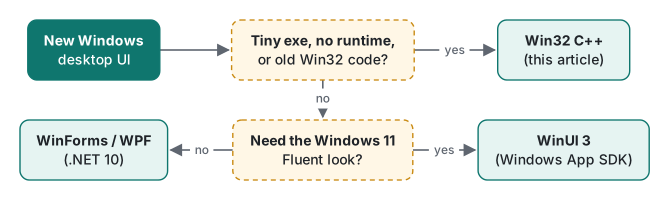
For a new desktop app, though, there are few reasons to start from raw Win32. You handle every button, font and DPI change yourself, and accessibility (screen readers) and dark mode are on you as well. For line-of-business tools, WinForms or WPF on .NET 10 is far quicker; if you want the Windows 11 look, WinUI 3 from the Windows App SDK is the fit. All of them still sit on CreateWindowEx and a message loop underneath, so the structure in this article is exactly what you need when you debug a frozen UI thread.
To find the handle of a window that another program owns, continue with FindWindow vs EnumWindows; to send it messages without deadlocking, see SendMessage vs PostMessage.
Tested with MinGW-w64 x86_64-w64-mingw32-g++ (GCC) 16.2.0 and .NET SDK 10.0.403 (EnableWindowsTargeting=true) on macOS (Apple Silicon). Compiled for Windows; not run on this machine.
FAQ
Why does my process keep running after I close the window?
The window procedure does not call PostQuitMessage(0) on WM_DESTROY. The window is gone, but the GetMessage loop only ends when it receives WM_QUIT, so the process stays in Task Manager. Call PostQuitMessage(0) when the main window receives WM_DESTROY.
Why does MinGW reject CreateWindow with an L"..." string?
MinGW does not define UNICODE by default, so the CreateWindow macro expands to CreateWindowExA, which takes char strings. Passing a wchar_t string gives error: cannot convert 'WCHAR*' to 'LPCSTR'. Visual Studio projects define UNICODE, which is why the same code compiled there. Calling the W functions such as CreateWindowExW directly avoids the problem.
My window looks blurry on a high-DPI monitor. How do I fix it?
Declare per-monitor DPI awareness, preferably with dpiAwareness PerMonitorV2 in the application manifest, or call SetProcessDpiAwarenessContext before creating any window. Then scale your sizes by the DPI and handle WM_DPICHANGED. Without that, Windows stretches the 96-DPI bitmap of your window and it looks blurry.