C# Delegate Callbacks: Progress, Cancellation, Chains
C# callbacks on .NET 10: Action vs IProgress<T> (and why Progress<T> reorders output), CancellationToken, and what a throwing handler does to a chain.
Revised November 2026. This tutorial first appeared in Korean in 2021. We recompiled all of its examples on .NET 10.0.14 (C# 14). None of the four full examples compiled as written. The delegate was declared as
MtDelegatebut used asMyDelegate(error CS0246),Consolewas misspelledComsoleandColsole(error CS0103), the generic example used3.3 fwith a space, and the declaration snippetdelegate void typeA(void);is C, not C# (error CS1536). The snippet that assignednew typeA(funcB)to atypeBvariable would also fail (error CS0123). After the fixes all examples printed what the post claimed. Below we keep the short delegate recap and spend the rest on what the original only hinted at: designing callbacks in real code.
This article is for developers who understand that a delegate can be passed to a method, and now have to design an API that calls back: report progress, allow cancellation, or notify several listeners. Short version: take an IProgress<T> for progress and a CancellationToken for cancellation, and remember two chain rules. An exception stops the rest of a chain, and a chain returns only the last value; GetInvocationList() fixes both. For delegate basics and the event keyword, see C# delegates and events. For Func/Action and their call cost, see Func and Action delegates.
The 2021 examples, fixed and re-run
A delegate type is declared with the signature of the methods it will refer to. The original listed four declarations in C style:
delegate void typeA(void);   →  error CS1536: Invalid parameter type 'void'
delegate void typeB(int);    →  error CS1001: Identifier expected
C# has no (void) parameter list; an empty list is (). And a delegate parameter needs a name: delegate void typeB(int value);. Assigning a method of the wrong shape is caught at compile time: typeA d = new typeA(funcB);, where funcB takes an int, gave error CS0123: No overload for 'funcB' matches delegate 'typeA'.
With MtDelegate renamed and Comsole corrected, the first example printed:
11 + 22 = 33
22 - 11 = 11
The callback example passes the operation into a Calculator method. Modern C# lets you skip new MyDelegate(...) and pass the method group directly, or a lambda:
Calculator(11, 22, Plus);              // 33
Calculator(33, 22, (a, b) => a - b);   // 11
Calculator(11, 22, (a, b) => a * b);   // 242

static void Calculator(int a, int b, Func<int, int, int> op) => Console.WriteLine(op(a, b));
static int Plus(int a, int b) => a + b;
The generic version, delegate T MyDelegate<T>(T a, T b), printed 33, 7.7 and 12.1. One detail the original did not mention: new MyDelegate<int>(plus) works even though plus is overloaded three times, because the delegate's signature picks the right overload. Today you would normally use Func<T, T, T> instead of declaring your own generic delegate.
Callbacks as a design: progress
The original called a method that receives a callback a "callback method". In real code the most common callback is progress reporting. The simplest form takes an Action<int>:
static void Process(int items, Action<int> onProgress, CancellationToken ct)
{
    for (int i = 1; i <= items; i++)
    {
        ct.ThrowIfCancellationRequested();
        Thread.Sleep(1);                       // the real work
        onProgress(i * 100 / items);
    }
}

Process(5, p => Console.Write($"{p}% "), CancellationToken.None);
Console.WriteLine("| done (Action)");
20% 40% 60% 80% 100% | done (Action)
The callback runs synchronously, on the worker's thread, in order. That is fine for a console tool and wrong for a UI: the callback would touch UI controls from a background thread.
.NET's answer is IProgress<T> and its standard implementation Progress<T>. Progress<T> captures the SynchronizationContext when it is created and posts each report there. In a WPF, WinForms or MAUI app that is the UI thread, which is exactly right. In a console app or ASP.NET Core there is no context, so each report is queued to the thread pool. We passed the same Progress<T> to the same loop:
20% 40% 60% 80% | done (Progress<T>)
100%
The method returned and printed done before the last report ran. With the Thread.Sleep(1) removed, the effect was worse. Ten reports, five runs:
IProgress<int> ip = new Progress<int>(p => Console.Write($"{p} "));
for (int i = 1; i <= 10; i++) ip.Report(i);
Console.WriteLine("| loop finished");
| loop finished
6 5 8 2 4 10 9 7 3 1
| loop finished
7 6 4 8 1 5 3 9 2 10
| loop finished
2 8 4 7 3 1 6 9 10 5
Every run printed a different order, and every report arrived after the loop finished. Keep it as the parameter type anyway: accept IProgress<T>, so a UI caller can pass Progress<T> and a console or test caller can pass a tiny synchronous class of its own (class SyncProgress<T>(Action<T> a) : IProgress<T> { public void Report(T v) => a(v); }). With that class, five reports printed 1 2 3 4 5 | done, in order.
Reporting too often has a cost as well. We reported progress 1,000,000 times from one loop and timed until every callback had run. Method: .NET 10.0.14, Release build, Stopwatch, one warm-up pass then three timed runs, Apple Silicon Mac (M1 Pro).
| Callback | Run 1 | Run 2 | Run 3 |
|---|---|---|---|
Action<int>, 1M calls |
2.91 ms | 2.23 ms | 3.82 ms |
Progress<T>, 1M reports, until all ran |
250.7 ms | 246.9 ms | 214.8 ms |
Progress<T>, report only when % changes (100) |
1.74 ms | 1.12 ms | 1.07 ms |

Each Progress<T> report allocated about 64 bytes (89 bytes in the first run, measured with GC.GetTotalAllocatedBytes) and cost roughly 80 times as much as a direct call. The fix is simple and has nothing to do with delegates: report when the visible value changes, not on every item.
Cancellation with CancellationToken
A callback can also be how the caller stops the work. The standard way is a CancellationToken argument checked inside the loop. Here the progress callback itself cancels at 40%:
using var cts = new CancellationTokenSource();
try
{
    Process(5, p => { Console.Write($"{p}% "); if (p >= 40) cts.Cancel(); }, cts.Token);
}
catch (OperationCanceledException e)
{
    Console.WriteLine($"| {e.GetType().Name}: {e.Message}");
}
20% 40% | OperationCanceledException: The operation was canceled.
Three conventions are worth following: take the token as the last parameter, named cancellationToken or ct, defaulting to default in public APIs; check it at the top of each unit of work with ThrowIfCancellationRequested(); and pass it on to every async API you call (Task.Delay(ms, ct), HttpClient.GetAsync(url, ct)). Do not invent a Func<bool> shouldStop callback: the token already composes with timeouts (cts.CancelAfter) and linked sources.
Delegate chains: what a throwing handler does
The 2021 chain example, with the typos fixed (and the output strings translated), printed what it promised:
first second third
 second
Two things the original did not show. First, -= that removes the last method leaves the variable null; we checked and got null after removing the last one, and a nullable-enabled project warns with CS8601 and CS8602 along the way. Raise chains with ?.Invoke.
Second, the important one in callback code: what happens when one handler throws. We built a "file saved" chain with a logger, a handler that fails, and a cache invalidator:
Action<string> onSaved = name => Console.WriteLine($"  [log]   saved {name}");
onSaved += name => throw new IOException("disk full");
onSaved += name => Console.WriteLine($"  [cache] invalidate {name}");

try { onSaved("a.txt"); }
catch (Exception e) { Console.WriteLine($"  caught {e.GetType().Name}: {e.Message}"); }
  [log]   saved a.txt
  caught IOException: disk full
The cache was never invalidated. A multicast call is a plain loop with no try; the first exception leaves the loop and goes to the caller, and the remaining handlers are skipped. Nothing is rolled back either: the log line was already written. In a real app this shows up as "sometimes the cache is stale", far away from the actual failure.
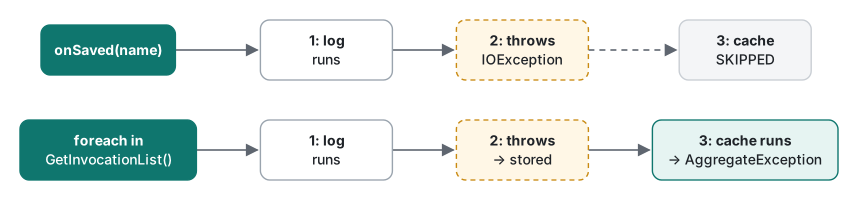
If every handler must run, iterate GetInvocationList() yourself and collect the failures:
static void InvokeAll<T>(Action<T>? handlers, T arg)
{
    if (handlers is null) return;
    List<Exception>? errors = null;
    foreach (Action<T> h in handlers.GetInvocationList())
    {
        try { h(arg); }
        catch (Exception e) { (errors ??= []).Add(e); }
    }
    if (errors is not null) throw new AggregateException(errors);
}
  [log]   saved a.txt
  [cache] invalidate a.txt
  1 failure(s): disk full
All three ran, and the caller still learns that something failed. GetInvocationList() allocates a new array on every call, which was measured in the delegates and events article; for a "file saved" notification that does not matter.
Getting every return value with GetInvocationList
A chain of Funcs runs every method, but the call returns only the last value. With validators that quietly drops errors. Each validator below returns an error message or null:
Func<string, string?> validate = s => s.Length < 8 ? "too short" : null;
validate += s => s.Any(char.IsDigit) ? null : "no digit";
validate += s => s.Contains(' ') ? "contains space" : null;

Console.WriteLine(validate("ab c") ?? "null");
var errors = validate.GetInvocationList()
    .Cast<Func<string, string?>>()
    .Select(v => v("ab c"))
    .OfType<string>()
    .ToList();
Console.WriteLine(string.Join(", ", errors));
Console.WriteLine(validate("abcdefgh") ?? "null");
contains space
too short, no digit, contains space
null
The last line is the dangerous one: "abcdefgh" has no digit, the second validator returned "no digit", and the plain call still returned null because the last validator was satisfied. A caller that checks validate(s) is null accepts an invalid password. If you need every result, either loop over GetInvocationList() as above or, better, keep the validators in a List<Func<string, string?>>, which states the intent.
Choosing a callback shape
| Situation | Use |
|---|---|
| Method needs one function from the caller (operation, filter) | Func<…> / Action<…> parameter |
| Report progress from long work | IProgress<T> parameter |
| Progress in a console app or test, in order | your own synchronous IProgress<T> |
| Let the caller stop the work | CancellationToken as the last parameter |
| Several listeners, publisher should not know them | event (basics, advanced) |
| Every listener must run even if one fails | loop over GetInvocationList() with try, then AggregateException |
| You need every return value | GetInvocationList() loop, or a List<Func<…>> |
| Many reports per second | report only when the visible value changes |
Tested with .NET SDK 10.0.403 / runtime 10.0.14, C# 14, macOS on Apple Silicon (M1 Pro).
FAQ
Should a long-running method take an Action<int> or an IProgress<int> for progress?
Take IProgress<int>; callers can pass new Progress<int>(...) or any small class of their own. Progress<T> captures the SynchronizationContext, which is what you want in a UI app. In a console app or on a server there is none, so each report is queued to the thread pool: in our test ten reports printed in a different random order on every run, and the method returned before the last one ran.
What happens to the other handlers when one method in a delegate chain throws?
The chain stops at the throwing handler; every handler after it is skipped and the exception goes to the caller. Handlers that already ran are not undone. To run them all, loop over GetInvocationList(), wrap each call in try/catch, and throw an AggregateException at the end.
How do I get the return value of every method in a multicast delegate?
Calling the delegate returns only the last method's value. Call each one through GetInvocationList(). With three validators chained, the plain call returned only "contains space", while the loop returned all three messages. In our test a plain call even returned null although the second validator had found an error.