C# Events Beyond the Basics: Accessors, Async, Weak
Advanced C# events on .NET 10: custom add/remove, cancelable EventArgs, the async void handler that kills the process, weak events, events in interfaces.
Revised November 2026. This tutorial first appeared in Korean in 2021, as a very short introduction. We recompiled its example on .NET 10.0.14 (C# 14). It did not compile:
clsassinstead ofclass(error CS1513) and a missing semicolon in theforloop (error CS1002). After the fixes it printed the even numbers from 2 to 10 as intended, with one new warning, CS8618, about the event being non-nullable. The 2021 text also guessed that events cannot be raised from outside the class "for security reasons". That is not quite right: it is encapsulation, and reflection can still raise it, as shown below. The basics (whateventblocks,EventHandler<T>, unsubscribing,?.Invoke) now live in C# delegates and events. This article covers the advanced side only.
This article is for C# developers who already declare and raise events and now hit the harder questions: how to run code when someone subscribes, how a handler can send information back to the publisher, why an async handler took down the whole process, how to avoid leaks when subscribers cannot unsubscribe reliably, and how events work in interfaces. Each section is backed by code we ran on .NET 10.
The 2021 example, and what "cannot be called from outside" really means
The fixed original example declares public event MyDelegate eventCall; in an EventManager, subscribes a static method, and raises the event for even numbers in NumberCheck:
Program.cs(4,33): warning CS8618: Non-nullable event 'eventCall' must contain a non-null value when exiting constructor. Consider adding the 'required' modifier or declaring the event as nullable.
2는 짝수 입니다.
4는 짝수 입니다.
…
10는 짝수 입니다.
(The output strings are the original Korean ones, "2 is even".) The warning is real: with no subscriber, eventCall(num) throws NullReferenceException. Declare the event as MyDelegate? and raise it with eventCall?.Invoke(num); the details and a thread-safety test are in the basics article.
On the "security" point: outside the class, event allows only += and -= (raising it is error CS0070). That protects your design from careless callers, not from hostile code. The compiler stores the handlers in a private field with the same name, and reflection can read it:
var field = typeof(Door).GetField("_opening", BindingFlags.NonPublic | BindingFlags.Instance)!;
var raw = (EventHandler<OpeningEventArgs>?)field.GetValue(door);
raw?.Invoke(null, new OpeningEventArgs("reflection"));   // the handler ran
Treat event as an API contract, not as an access control mechanism.
Custom add/remove accessors
A field-like event (public event EventHandler? Changed;) makes the compiler generate a private delegate field plus add and remove methods. You can write those two methods yourself. This Door logs every subscription and uses a .NET 9 System.Threading.Lock (the lock statement accepts it since C# 13; with LangVersion 12 we got error CS9202):
class Door
{
    private EventHandler<OpeningEventArgs>? _opening;
    private readonly Lock _gate = new();
    public int Count => _opening?.GetInvocationList().Length ?? 0;

    public event EventHandler<OpeningEventArgs>? Opening
    {
        add    { lock (_gate) { _opening += value; } Console.WriteLine($"  + {value?.Method.Name}"); }
        remove { lock (_gate) { _opening -= value; } Console.WriteLine($"  - {value?.Method.Name}"); }
    }

    public bool Open(string who)
    {
        var e = new OpeningEventArgs(who);
        _opening?.Invoke(this, e);
        return !e.Cancel;
    }
}
Two lambdas subscribed and one was removed later; the accessors logged it:
  + <<Main>$>b__0_0
  + <<Main>$>b__0_1
  …
  - <<Main>$>b__0_0
subscribers now: 1
The lambda names are compiler-generated, which is a reminder that Method.Name is not a useful identifier for anonymous handlers. Once you write accessors, the event name no longer refers to a field, so raising it inside the class fails:
error CS0079: The event 'Door.Opened' can only appear on the left hand side of += or -=
You raise the backing field (_opening?.Invoke(...)) instead. Typical reasons to write accessors:
- Forwarding: a wrapper exposes
event EventHandler Changed { add => _inner.Changed += value; remove => _inner.Changed -= value; }so subscribers attach directly to the inner object. - Lazy start: start a timer, file watcher or socket listener when the first handler is added and stop it when the last is removed.
- Different storage: a weak list (see below), or one shared
EventHandlerListfor a class with dozens of rarely used events, which is how WinForms controls store theirs. - Validation or diagnostics: reject duplicate subscriptions, or log who subscribes when you are hunting a leak.
Field-like events already use a lock-free Interlocked.CompareExchange loop, so do not write accessors only for thread safety.
Custom EventArgs vs EventHandler
EventHandler<TEventArgs> is the standard signature: (object? sender, TEventArgs e). The question is what TEventArgs should be.
A custom EventArgs class is the right choice when the handler must send information back to the publisher. The Opening event above uses a Cancel flag, the same idea as CancelEventArgs in .NET:
sealed class OpeningEventArgs(string who) : EventArgs
{
    public string Who { get; } = who;
    public bool Cancel { get; set; }
}

door.Opening += (s, e) => { if (e.Who == "guest") e.Cancel = true; };
door.Opening += (s, e) => Console.WriteLine($"  handler 2 sees Cancel={e.Cancel}");
Console.WriteLine($"admin opened: {door.Open("admin")}");
Console.WriteLine($"guest opened: {door.Open("guest")}");
  handler 2 sees Cancel=False
admin opened: True
  handler 2 sees Cancel=True
guest opened: False
All handlers share one args object, in subscription order, so the second handler sees what the first one decided. That is useful and also a coupling: the last handler to write a property wins.
A tempting shortcut fails to compile:
error CS8864: Records may only inherit from object or another record
That came from record SavedEventArgs(string Path) : EventArgs;. A record cannot derive from a normal class. Use a class with a primary constructor, as above, or skip EventArgs entirely: since .NET Framework 4.5, EventHandler<TEventArgs> has no constraint, so event EventHandler<double>? Changed; raised with Changed?.Invoke(this, 21.5) printed now 21.5 C. An immutable record works the same way as EventHandler<SavedInfo>.
| Payload | Choose |
|---|---|
| Nothing | EventHandler with EventArgs.Empty |
| One or more read-only values | EventHandler<T> with a record, or a sealed EventArgs subclass |
| Handler must reply (cancel, handled, result) | EventArgs subclass with a settable property |
| Public library following .NET guidelines | EventArgs subclass (it can gain members later without breaking callers) |
Async event handlers: the async void trap
An event handler returns void. When you subscribe an async lambda to it, the compiler makes it an async void method. We subscribed one that fails after an await and wrapped the raise in try:
var uploader = new Uploader();
uploader.Done += async (s, e) =>
{
    await Task.Delay(50);
    throw new InvalidOperationException("thumbnail failed");
};
try
{
    uploader.Finish();                       // Done?.Invoke(this, EventArgs.Empty)
    Console.WriteLine("Finish() returned normally");
}
catch (Exception e) { Console.WriteLine($"caught: {e.Message}"); }   // never runs

await Task.Delay(500);
Console.WriteLine("still running?");
Finish() returned normally
Unhandled exception. System.InvalidOperationException: thumbnail failed
   at Program.<>c.<<<Main>$>b__0_0>d.MoveNext() in …/Program.cs:line 5
--- End of stack trace from previous location ---
   at System.Threading.Tasks.Task.<>c.<ThrowAsync>b__124_1(Object state)
   at System.Threading.ThreadPoolWorkQueue.Dispatch()
   …
The shell reported exit code 134, and still running? was never printed. The handler returned to Finish() at its first await, so the try block ended normally. The exception happened 50 ms later on the thread pool, where nobody was waiting, and an unhandled exception there terminates the process. Microsoft Learn's async guidance says the same thing: exceptions from an async void method are raised on the SynchronizationContext that was active when it started. In a UI app that means the UI thread's unhandled-exception path rather than your catch.
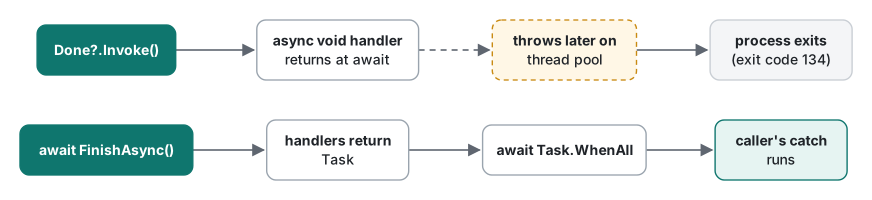
There are two fixes. If you do not own the event (a UI framework's Click), catch inside the handler: put the whole body in try/catch and log. If you own it, make the event return Task:
delegate Task AsyncEventHandler<TArgs>(object sender, TArgs e, CancellationToken ct);

class Uploader
{
    public event AsyncEventHandler<EventArgs>? DoneAsync;

    public async Task FinishAsync(CancellationToken ct = default)
    {
        var handlers = DoneAsync;
        if (handlers is null) return;
        var tasks = handlers.GetInvocationList()
            .Cast<AsyncEventHandler<EventArgs>>()
            .Select(h => h(this, EventArgs.Empty, ct));
        await Task.WhenAll(tasks);
    }
}
With three handlers (one failing after 20 ms):
  notify ok
  thumbnail ok
caught: InvalidOperationException: index failed
process keeps running
Exit code 0. Every handler ran, concurrently, and the failure reached the caller. Two notes: await Task.WhenAll rethrows only the first exception, and the full set is in the returned task's Exception.InnerExceptions; and if handlers must run one at a time, await them in a foreach loop instead. Why you must use GetInvocationList() rather than invoking the multicast delegate directly is covered in the callbacks and chains article: a direct call would return only the last handler's Task.
The weak event pattern
The basics article showed that a subscriber which forgets -= stays alive as long as the publisher. Usually the fix is to unsubscribe in Dispose. When you cannot guarantee that (a plugin system, a long-lived cache that many short-lived views listen to), a weak event holds subscribers through WeakReference so the garbage collector can still collect them. A minimal version:
sealed class WeakEvent<T>
{
    private readonly List<(WeakReference<object>? Target, MethodInfo Method)> _subs = [];
    public int Count => _subs.Count;

    public void Add(EventHandler<T> h) =>
        _subs.Add((h.Target is null ? null : new WeakReference<object>(h.Target), h.Method));

    public void Raise(object? sender, T e)
    {
        _subs.RemoveAll(x => x.Target is not null && !x.Target.TryGetTarget(out _));
        foreach (var (wr, method) in _subs.ToArray())
        {
            object? target = null;
            if (wr is null || wr.TryGetTarget(out target))
                method.Invoke(target, [sender, e]);
        }
    }
}
A Screen that subscribed its instance method OnChanged and never unsubscribed was collected (screen alive after GC (no -=): False), and the next Raise pruned it (subscribers left: 0). So far, so good. Then the trap: a second Screen, still referenced by a local variable, subscribed a lambda that captured a local:
  lambda-screen got it
subscribers left: 0  (keeper is still alive: True)
The handler worked once, then disappeared after a GC although the screen was alive. A capturing lambda's Target is a compiler-generated closure object, and only the delegate referenced that closure. Held weakly, it was collected. Weak events need instance-method handlers (or the subscriber must keep its own strong reference to the delegate).
The price, measured with one subscriber and 1,000,000 raises (.NET 10.0.14, Release, Apple Silicon Mac M1 Pro, three runs after a warm-up):
| Raise | Run 1 | Run 2 | Run 3 | Allocated per raise |
|---|---|---|---|---|
| normal event | 2.1 ms | 2.1 ms | 2.0 ms | 0 B |
WeakEvent<T> above |
71.8 ms | 72.4 ms | 71.4 ms | 80 B |
About 72 ns and 80 bytes per raise, from the reflection call, its argument array and the snapshot copy. That is fine for "settings changed" and too much for per-frame events. On WPF, WeakEventManager provides the same pattern built in; it is Windows-only and we did not test it here.
Events in interfaces
An interface can declare an event; the implementing class satisfies it with an ordinary field-like event:
interface INotify { event EventHandler? Tick; }
class Clock : INotify
{
    public event EventHandler? Tick;
    public void Raise() => Tick?.Invoke(this, EventArgs.Empty);
}
INotifyPropertyChanged is the best-known example. Two rules showed up when we compiled variations:
- Explicit implementation needs accessors.
event EventHandler? INotify.Tick;fails witherror CS0071: An explicit interface implementation of an event must use event accessor syntax(plus CS0535 becauseadd/removeare missing). Writeevent EventHandler? INotify.Tick { add => _tick += value; remove => _tick -= value; }and raise_tick. You need this when two interfaces declare an event with the same name and different meanings. - Static abstract events (C# 11). An interface can require a static event, usable through a generic constraint:
static void Fire<T>() where T : IPlugin { T.Loaded += (s, e) => Console.WriteLine($"{typeof(T).Name} loaded"); T.RaiseLoaded(); }
interface IPlugin { static abstract event EventHandler? Loaded; static abstract void RaiseLoaded(); }
This printed Plugin loaded. With LangVersion 10 it failed with error CS8703 ("The modifier 'abstract' is not valid for this item in C# 10.0"), confirming the C# 11 requirement. Static events live as long as the process, so every warning about leaks applies twice.
Summary
| Problem | Tool |
|---|---|
| Run code when someone subscribes | custom add/remove; raise the backing field |
| Handler must answer the publisher | EventArgs subclass with a settable property (e.g. Cancel) |
| Read-only payload | EventHandler<T> with a record, or a sealed EventArgs subclass |
async work in a handler you do not own |
try/catch around the whole handler body |
async work in an event you own |
Task-returning delegate + GetInvocationList() + Task.WhenAll |
| Subscribers cannot reliably unsubscribe | weak event, with instance-method handlers only |
| Same event name from two interfaces | explicit implementation with accessors |
Tested with .NET SDK 10.0.403 / runtime 10.0.14, C# 14, macOS on Apple Silicon (M1 Pro).
FAQ
Why doesn't try/catch around raising an event catch an exception from an async handler?
An async lambda subscribed to EventHandler compiles to async void. It returns to the publisher at its first await, so the try block finishes normally. The exception is thrown later on the thread pool, where nothing is waiting for it. In our console test the process printed "Unhandled exception" and exited with code 134. Declare the event with a delegate that returns Task and await Task.WhenAll over GetInvocationList(), or catch inside the handler.
Can a C# record be used as EventArgs?
Not as a subclass of EventArgs: record SavedEventArgs(string Path) : EventArgs; fails with error CS8864 (Records may only inherit from object or another record). Since .NET Framework 4.5, EventHandler<TEventArgs> has no EventArgs constraint, so you can use EventHandler<SavedInfo> with a record SavedInfo, or a class with a primary constructor that derives from EventArgs.
When should I write custom add and remove accessors for an event?
When subscribing should do something: log or validate subscribers, forward to an inner object, store handlers somewhere other than a field (such as a weak list or an EventHandlerList), or use your own lock. The cost is that the event name can no longer be invoked inside the class (error CS0079); you raise the backing delegate field instead.