C# break, continue, goto: Exiting Nested Loops
C# break, continue and goto on .NET 10: safe infinite input loops, three ways to leave nested loops measured, goto case in switch, and compiler errors.
Revised November 2026. This tutorial first appeared in Korean in 2021. We re-ran all four examples on .NET 10.0.14 (C# 14). They all still work, but the input-summing example now produces two nullable warnings (CS8600, CS8604) with today's project template, and it crashed with
ArgumentNullExceptionwhen input ended without "end". Two statements in the text were also inaccurate: that an infinite loop "makes memory grow quickly", and thatcontinue"jumps straight to the condition". Both are corrected below with measurements. We also added a timed comparison of three ways to leave nested loops, andgoto caseinswitch.
This article is for developers learning how to stop or skip loop iterations in C#, and for anyone who wants to leave two nested loops at once and wonders whether goto is acceptable. In short: break leaves the innermost loop or switch, continue skips the rest of the current iteration, and goto jumps to a label. For nested loops, all three common techniques ran at the same speed, so readability decides.
Infinite loops: when they are useful, and what really happens
Put true in the condition and a loop never ends on its own. The classic use is reading input until a sentinel value arrives and then calling break. The 2021 example does exactly that: it adds up numbers until the user types "end". Pasted into a net10.0 project, it builds with two warnings:
Program.cs(11,31): warning CS8600: Converting null literal or possible null value to non-nullable type.
Program.cs(15,34): warning CS8604: Possible null reference argument for parameter 's' in 'int int.Parse(string s)'.
The current dotnet new console template turns on <Nullable>enable</Nullable>, and Console.ReadLine() returns null once input is closed. The warnings point at a real bug. Feeding 457, 1006, 422, 14, 33 and "end" printed 1932, the same as in 2021. But when input ended without "end" (Ctrl+D on macOS/Linux, Ctrl+Z on Windows, or the end of a pipe), it crashed:
Unhandled exception. System.ArgumentNullException: Value cannot be null. (Parameter 's')
   at System.Int32.Parse(String s)
Typing something like 12abc crashed differently: System.FormatException: The input string '12abc' was not in a correct format. Here is a version that handles both:
int sum = 0;
while (true)
{
    Console.Write("Number (end to quit): ");
    string? line = Console.ReadLine();
    if (line is null || line == "end") break;   // null = input closed (Ctrl+D / Ctrl+Z, end of pipe)
    if (!int.TryParse(line, out int n))
    {
        Console.WriteLine($"  '{line}' is not a number, skipped");
        continue;
    }
    sum += n;
}
Console.WriteLine($"Sum: {sum}");
With 457, 1006, 12abc, 422, 14 and 33 piped in, it printed '12abc' is not a number, skipped once and finished with Sum: 1932. No warnings, no crash.
The 2021 text claimed that an accidental infinite loop "makes memory grow quickly and can crash the program". Usually it does not. We built while (true) { n++; } in Release and watched it with ps for ten seconds: CPU stayed at 96–100% of one core, and memory (RSS) stayed flat at about 34 MB. Memory only grows if the loop accumulates something, such as adding to a list on every pass. The typical symptom of a runaway loop is one pegged core and an unresponsive program, not a memory explosion.
Where break and continue actually go
break exits the innermost enclosing loop or switch, and nothing more. The 2021 break example (stop when num reaches 40) printed exactly 40 lines, num: 0 through num: 39.
continue skips the rest of the current iteration. The example that skips odd numbers from 1 to 50 printed exactly 25 lines, i: 2 through i: 50.
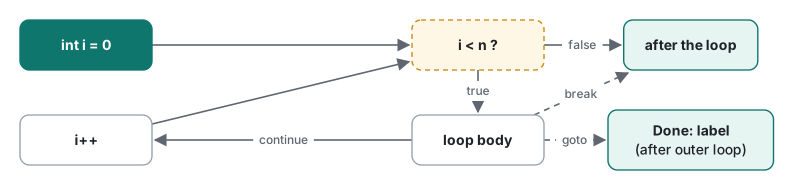
The original text said continue "moves straight to the condition check". In a for loop it runs the iterator (i++) first, then checks the condition. That difference explains a common while bug:
int i = 0, spins = 0;
while (i < 5)
{
    if (++spins > 20) { Console.WriteLine($"stuck at i={i} after {spins - 1} iterations"); break; }
    if (i == 2) continue;   // skips the i++ below, forever
    Console.WriteLine($"i={i}");
    i++;
}
for (int k = 0; k < 5; k++)
{
    if (k == 2) continue;   // in a for loop, k++ still runs
    Console.Write($"k={k} ");
}
i=0
i=1
stuck at i=2 after 20 iterations
k=0 k=1 k=3 k=4
The while version spun at i=2 because continue skipped i++ (the spins counter is only a safety net for the demo). The for version skipped 2 and carried on. When you use continue in a while loop, put the increment above it.
The other classic mistake is break inside a switch inside a loop. That break leaves the switch, not the loop:
string[] cmds = { "a", "quit", "b" };
foreach (string c in cmds)
{
    switch (c)
    {
        case "quit":
            Console.WriteLine("quit -> break");
            break;          // leaves the switch only
        default:
            Console.WriteLine($"cmd {c}");
            break;
    }
}
Console.WriteLine("---");
foreach (string c in cmds)
{
    if (c == "quit") break;   // leaves the loop
    Console.WriteLine($"cmd {c}");
}
cmd a
quit -> break
cmd b
---
cmd a
The first loop went on to process b after quit; the second stopped at quit.
goto and the rules for labels
goto Label; jumps to a label in the same method. The 2021 example had goto and EXIT; split across lines with a blank line in between. C# ignores whitespace, so it compiled as is and printed 탈출! ("Escaped!") after num: 39. Its comment still said "exits because of break", left over from the break example it was copied from.
The compiler enforces a few rules about labels. These are the messages we got:
| Code | Result |
|---|---|
goto Inside; to a label inside a for block, from outside it |
error CS0159: No such label 'Inside' within the scope of the goto statement |
A label End: as the last line of a block, then } |
error CS1525: Invalid expression term '}' (plus CS1002) |
| A label nobody jumps to | warning CS0164: This label has not been referenced |
A statement right after goto |
warning CS0162: Unreachable code detected |
So goto can jump out of blocks but never into one, and a label must be followed by a statement. To put it at the end of a block, use an empty statement: End: ;. These limits make C#'s goto much tamer than the C version, and in practice it is used for two things: leaving several loops at once, and moving to another case in a switch.
Leaving nested loops: goto vs flag vs local function
Three ways to stop both loops as soon as a value is found in a jagged array:
static (int, int) FindGoto(int[][] g, int target)
{
    (int, int) found = (-1, -1);
    for (int i = 0; i < g.Length; i++)
        for (int j = 0; j < g[i].Length; j++)
            if (g[i][j] == target) { found = (i, j); goto Done; }
    Done:
    return found;
}

static (int, int) FindFlag(int[][] g, int target)
{
    (int, int) found = (-1, -1);
    bool stop = false;
    for (int i = 0; i < g.Length && !stop; i++)
        for (int j = 0; j < g[i].Length; j++)
            if (g[i][j] == target) { found = (i, j); stop = true; break; }
    return found;
}

static (int, int) FindLocal(int[][] g, int target)
{
    return Search();

    (int, int) Search()   // local function: one return ends both loops
    {
        for (int i = 0; i < g.Length; i++)
            for (int j = 0; j < g[i].Length; j++)
                if (g[i][j] == target) return (i, j);
        return (-1, -1);
    }
}
On [[3, 8, 1], [4, 7, 2], [9, 5, 6]], all three returned (1, 1) for 7 and (-1, -1) for 42. To compare speed, we put the target in the last cell of a 2,000 × 2,000 jagged array, so every call scans all 4 million cells, and timed 100 calls (Release, .NET 10.0.14, Apple Silicon Mac, after warm-up):
| Method | Process 1 (run 2 / run 3) | Process 2 (run 2 / run 3) |
|---|---|---|
goto Done |
198.0 / 195.2 ms | 192.7 / 191.5 ms |
| bool flag | 201.8 / 197.1 ms | 197.1 / 190.1 ms |
| local function + return | 195.4 / 195.1 ms | 190.4 / 192.5 ms |
The first measured run in each process was about 260 ms for all three alike, apparently before the JIT had finished optimizing. After that the spread was under 2%, so performance is not a reason to choose. The local function captures g and target, but because it is never turned into a delegate the captures live in a struct: 1,000 calls allocated 0 bytes.
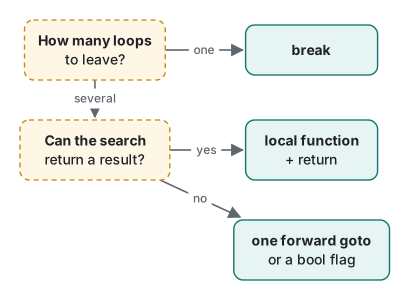
Our rule of thumb: when the loops search for something, a local function (or a separate method) with return reads best and is the easiest to test. When the loops update several locals of the current method and are hard to pull out, one forward goto to a label right after the loops is clearer than a flag. The flag version is our last choice because it is easy to forget the && !stop in the outer condition. Local functions are covered in more detail in C# methods.
goto case and goto default in switch
A C# switch does not fall through implicitly. A case 1: body without break at the end is a compile error:
error CS0163: Control cannot fall through from one case label ('case 1:') to another
To continue into another case, say so explicitly with goto case. Here, each plan switches on its own feature and then everything the plan below it includes:
foreach (string plan in new[] { "pro", "plus", "free", "trial" })
{
    Console.Write($"{plan,-5}: ");
    switch (plan)
    {
        case "pro":
            Console.Write("priority-support ");
            goto case "plus";
        case "plus":
            Console.Write("no-ads ");
            goto case "free";
        case "free":
            Console.Write("basic");
            break;
        default:
            Console.Write("unknown -> ");
            goto case "free";
    }
    Console.WriteLine();
}
pro  : priority-support no-ads basic
plus : no-ads basic
free : basic
trial: unknown -> basic
goto case 5; when there is no case 5: gives error CS0159: No such label 'case 5:' within the scope of the goto statement. Inside a pattern case such as case int n when n > 2:, jumping to a constant case with goto case 0; worked (output: big, then zero-ish). Because goto case only accepts a constant, keep shared handling in a constant case or in default.
Summary
| You want to | Use |
|---|---|
| End one loop when a condition is met | break |
| Skip just this iteration | continue (in while, put the increment above it) |
| End several nested loops at once | local function + return, or a forward goto |
| Run another case in a switch | goto case value; / goto default; |
| Repeat until input runs out | while (true) + a null check + break |
How while, for and foreach themselves behave, including a for-vs-foreach measurement, is in the C# loops article. Whether to catch an exception inside a loop and carry on, or let it end the loop, is covered in C# exception handling.
Tested with .NET SDK 10.0.403 / runtime 10.0.14, C# 14 (the net10.0 default), macOS on an Apple Silicon Mac (M1 Pro).
FAQ
How do I break out of nested loops in C#?
break only leaves the innermost loop. Wrap the loops in a local function or method and return, jump with goto to a label right after the loops, or add a bool flag to the outer condition. Scanning a 2,000 x 2,000 grid 100 times took about 190 to 200 ms with all three on .NET 10, so pick the one that reads best.
How do I fall through to the next case in a C# switch?
C# does not allow implicit fall-through between cases; it reports error CS0163. To run another case, write goto case "value"; or goto default; explicitly. Jumping to a case that does not exist gives error CS0159.
Why does continue cause an infinite loop in my while loop?
If continue comes before the i++ at the bottom of a while loop, it skips the increment and the loop repeats with the same value forever. A for loop runs its iterator after continue, so it does not have this problem. In our test the while version was stuck at i=2, while the for version skipped 2 and printed 0, 1, 3, 4.