C# Extension Methods, partial and Nested Classes
How C# picks an extension method, C# 14 extension blocks and properties compiled on .NET 10, partial methods, properties and constructors, and nested classes.
Revised November 2026. This tutorial first appeared in Korean in 2021. All three of its samples (an extension method, a partial class and a nested class) compiled and produced the same output on .NET 10.0.14 (C# 14) without changes. What needed fixing was the explanation: the original said extension methods "extend the existing class" without mentioning that they do not modify the type and cannot reach its private members, and the list of things that can be
partialhas grown since 2021: methods with access modifiers (C# 9), properties (C# 13), constructors and events (C# 14). We also compiled the new C# 14 extension blocks and report what actually happened.
This article is for developers who want to add a helper to a type they do not own, split generated code from hand-written code, or are unsure whether a class belongs inside another class. All three features are about where a type's code lives. In short: an extension method is chosen only when no instance method fits, and which one is chosen depends on your using directives. partial is mostly about source generators. Nested classes are for helper types that need the outer class's private members. Properties themselves are covered in C# property basics and C# properties in depth.
Extension methods: the 2021 sample on .NET 10
An extension method is a static method in a static class whose first parameter is marked with this. That lets callers write value.Method() as if it were an instance method. The 2021 sample, minus unused using lines:
using Extension;

namespace Extension
{
    public static class ExtensionMethod
    {
        public static int Multiplication(this int var, int a, int b)
        {
            int result = var;
            for (int i = 0; i < b; i++)
                result *= a;
            return result;
        }
    }
}
namespace ConsoleApplication21
{
    class Program
    {
        static void Main(string[] args)
        {
            Console.WriteLine("{0}", 5.Multiplication(2, 3));
        }
    }
}
40
Same result as in 2021. Note that despite the name, the method computes 5 × 2³ = 40: it multiplies var by a, b times. In real code a name such as MultiplyByPower would say what it does. The "Press any key to continue" line in the original output came from Visual Studio's console host and does not appear with dotnet run.
Two facts the 2021 text left out. First, an extension method does not change the type. The compiler rewrites 5.Multiplication(2, 3) into the ordinary static call ExtensionMethod.Multiplication(5, 2, 3), so the method sees only the public surface of int. Second, and for the same reason, it can be called on null:
public static string Truncate(this string? s, int max) =>
    s is null ? "(null)" : s.Length <= max ? s : s[..max] + "…";

Console.WriteLine("Hello, extension".Truncate(5));
string? missing = null;
Console.WriteLine(missing.Truncate(5));                              // no NullReferenceException
Console.WriteLine(StringExtensions.Truncate("static call", 6));      // plain static call
Hello…
(null)
static…
How the compiler picks an extension method
Most extension-method bugs come down to "which method actually ran". These are the rules, as we observed them:
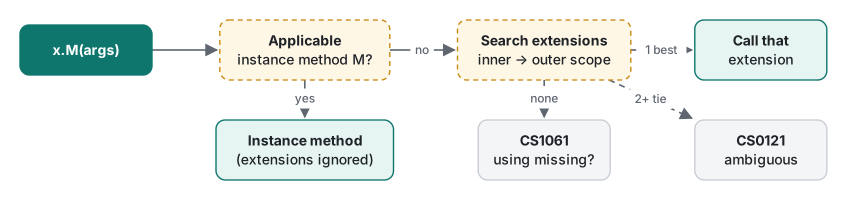
1. Instance methods always win. An extension named ToUpper on string is never called, and the compiler says nothing:
public static string ToUpper(this string s) => "extension ToUpper";
Console.WriteLine("abc".ToUpper());
ABC
The same rule bites after a library upgrade: if the type gains an instance method with your extension's name and a compatible signature, your extension is silently ignored from then on.
2. Inner scopes are searched first. We put a Where(this string) extension both in a namespace imported with using Shop.Text; and in Shop.App, the namespace that contains the call. The enclosing namespace won:
Shop.App (enclosing namespace)
3. Two at the same level is an error; none at all usually means a missing using. With using A; and using B; both importing a Shout(this string), and namespace C not imported:
Program.cs(4,23): error CS0121: The call is ambiguous between the following methods or properties: 'A.AExt.Shout(string)' and 'B.BExt.Shout(string)'
Program.cs(5,21): error CS1061: 'int' does not contain a definition for 'Twice' and no accessible extension method 'Twice' accepting a first argument of type 'int' could be found (are you missing a using directive or an assembly reference?)
The CS1061 message itself suggests the fix: if an extension does not show up in IntelliSense, check the using. CS0121 can be resolved by calling one of them as a static method, AExt.Shout(x).
C# 14 extension blocks: extension properties and static members
C# 14 adds extension blocks. You name the receiver once in the block header, and inside you can declare not only methods but properties, static members and operators. This is the exact code we compiled and ran on the .NET 10 SDK:
int[] scores = [72, 95, 88];
Console.WriteLine(scores.IsEmptyOrNull);          // extension property
Console.WriteLine(scores.Average2());             // extension method in a block
List<string> names = ["a", "b"];
Console.WriteLine(names.SecondOrDefault);         // generic extension property
Console.WriteLine(TimeSpan.FromMinutesSafe(90));  // static extension method on a type
Console.WriteLine(string.Banner);                 // static extension property
Console.WriteLine(new Point(5, 5) - new Point(1, 2));   // extension operator

public record Point(int X, int Y);

public static class SequenceExtensions
{
    extension<T>(IReadOnlyList<T>? source)
    {
        public bool IsEmptyOrNull => source is null || source.Count == 0;
        public T? SecondOrDefault => source is { Count: > 1 } ? source[1] : default;
    }

    extension(int[] values)
    {
        public double Average2() => values.Length == 0 ? 0 : values.Sum() / (double)values.Length;
    }

    extension(TimeSpan)          // receiver without a name: static members only
    {
        public static TimeSpan FromMinutesSafe(int m) => TimeSpan.FromMinutes(Math.Max(0, m));
    }

    extension(string)
    {
        public static string Banner => "== t.laboratory ==";
    }

    extension(Point)
    {
        public static Point operator -(Point a, Point b) => new(a.X - b.X, a.Y - b.Y);
    }
}
False
85
b
01:30:00
== t.laboratory ==
Point { X = 4, Y = 3 }
What we confirmed:
- No settings needed. It compiles on a default net10.0 project (C# 14). With
-p:LangVersion=13you do not get a "feature requires C# 14" message. You get a parse error,error CS1513: } expected, which is confusing if someone opens the code with an older SDK. - It is binary-compatible with classic extensions. In a separate
static class Ext { extension(int[] values) { … } }, the block method could still be called as a static method,Ext.Average2(a)(printed2), and the getter of the extension propertyTotalwas callable as the static methodExt.get_Total(a)(printed6). The compiled shape matches old-style extension methods. - No state. An auto-property or a field inside the block is rejected. Extensions still cannot attach data to an object:
Program.cs(5,20): error CS9282: This member is not allowed in an extension block
Program.cs(6,21): error CS9282: This member is not allowed in an extension block
partial classes, methods, properties and constructors
The 2021 partial-class sample also ran unchanged (it printed Test(), Test2(), Test3()), though naming the class Nested made it easy to confuse with the next section. The parts of a partial type are merged at compile time and must be in the same assembly and namespace.
In 2026, the main reason to use partial is source generators: System.Text.Json, [GeneratedRegex] and the MVVM Toolkit all use "you declare, the generator implements". The sample below imitates that split:
// Order.cs (hand-written)
public partial class Order
{
    public partial string Code { get; set; }        // C# 13: declaring part
    partial void OnShipped();                       // optional hook, never implemented
    public partial Order(int id);                   // C# 14: partial constructor

    public void Ship()
    {
        OnShipped();                                // removed entirely if not implemented
        OnValidated(Code);
        Console.WriteLine($"Shipped #{Id} {Code}");
    }
}

// Order.Generated.cs (pretend a generator wrote this)
public partial class Order
{
    public int Id { get; }
    public partial Order(int id) { Id = id; }
    public partial string Code
    {
        get => field;
        set => field = value.Trim().ToUpperInvariant();
    }
    private partial void OnValidated(string code);
}
public partial class Order
{
    private partial void OnValidated(string code) => Console.WriteLine($"validated {code}");
}
validated AB-12
Shipped #7 AB-12
OnShipped: not in the assembly
The last line is a reflection lookup for OnShipped. A void partial method with no access modifier and no implementation is removed, together with every call to it. A partial method with an access modifier (C# 9) or a partial property (C# 13) must be implemented:
error CS8795: Partial method 'P.M()' must have an implementation part because it has accessibility modifiers.
error CS9248: Partial property 'Settings.Volume' must have an implementation part.
partial on |
Version | Error one version lower |
|---|---|---|
| Classes, structs, interfaces | C# 2 | CS8022 (C# 1) |
void methods, no modifier, implementation optional |
C# 3 | CS8023 (C# 2) |
| Methods with modifiers or return values (implementation required) | C# 9 | CS8400 (C# 8) |
| Properties and indexers | C# 13 | CS8703 (C# 12) |
| Constructors and events | C# 14 | CS9260 / CS8703 (C# 13) |
Nested classes: when to use them
The 2021 nested-class sample printed a : 70 and a : 60 as before, and its explanation holds: a nested type is private by default, and it can access the outer class's private members. Two compiler checks worth adding:
var x = new Outer.Helper();          // nested class with no modifier

public class Outer
{
    class Helper { }
    public int Value = 1;
    public class Inner
    {
        public int Read() => Value;   // there is no implicit outer instance
    }
}
Program.cs(1,19): error CS0122: 'Outer.Helper' is inaccessible due to its protection level
Program.cs(10,30): error CS0120: An object reference is required for the non-static field, method, or property 'Outer.Value'
CS0120 trips up developers coming from Java or Kotlin. A C# nested class behaves like a Java static nested class: no outer instance comes with it. You pass one in explicitly, as the 2021 sample did through its constructor.
Two patterns where nesting earns its place:
public sealed class HttpRequestSpec
{
    private HttpRequestSpec(string url, Dictionary<string, string> h) { … }
    public static Builder CreateBuilder() => new();

    public sealed class Builder          // can call the private constructor
    {
        …
        public HttpRequestSpec Build() => new(url, headers);
    }
}

public sealed class TtlCache<T>(TimeSpan ttl)
{
    private sealed record Entry(T Value, DateTime ExpiresAt);   // invisible outside
    private readonly Dictionary<string, Entry> map = [];
    …
}
https://example.com/api (1 header)
v
The builder is nested so it can call the private constructor; Entry is nested to hide an implementation detail. If other code would have to spell Outer.Inner often, move the type to the top level instead. That is also why the analyzer rule CA1034 flags visible nested types.
Which to use
| Goal | Use |
|---|---|
Add a helper to a type you cannot change (string, IEnumerable<T>) |
Extension method; from C# 14, an extension block |
| Expose a computed value with property syntax | C# 14 extension property (no state) |
Attach a static helper to a type name (TimeSpan.FromMinutesSafe) |
C# 14 static extension member |
| Keep generated code apart from hand-written code | partial type plus partial methods/properties |
| A helper that needs the outer type's private members (builder, enumerator, internal record) | Nested class |
| A type used by name in many places | Top-level type |
LINQ's Where and Select are extension methods on IEnumerable<T>; see LINQ basics for them in action and C# generics for constraints on generic extensions.
Tested with .NET SDK 10.0.403 / runtime 10.0.14, C# 14 (the net10.0 default), macOS on an Apple Silicon Mac.
FAQ
What happens if an extension method has the same name as an instance method?
The instance method always wins and the extension method is never called. The compiler does not warn you. We wrote a ToUpper extension for string; "abc".ToUpper() still ran string.ToUpper() and printed ABC.
Can I write extension properties in C# 14?
Yes. Inside a static class, an extension block such as extension(int[] values) { public int Total => values.Sum(); } can declare extension properties, static extension members and even operators, and it compiled and ran on .NET 10 (C# 14). Auto-properties and fields are not allowed in the block (error CS9282), so extensions still cannot add state.
Does calling an extension method on null throw NullReferenceException?
Not at the call. An extension method is a static method, so null is passed as the first argument. The exception only happens if the method body dereferences it. In our sample, calling Truncate on a null string printed (null).