C# List<T> Internals: Capacity Growth and AsSpan
How C# List<T> grows its array, with real Capacity output on .NET 10, the measured cost of skipping an initial capacity, collection expressions, AsSpan.
Revised November 2026. The Korean original (2021) walked through the generic versions of the legacy collections. Re-compiled on .NET 10.0.14 (C# 14), its
List<T>example failed because of inconsistent variable casing (seven CS0103 errors and one CS0030), and theQueue<T>andStack<T>examples failed on aColsoletypo (CS0103). Its headingDictionary<T>also named the wrong type: it isDictionary<TKey, TValue>, with two type parameters. The "generic version of each legacy class" material now lives in the legacy collections article, and this article focuses on howList<T>works inside.
This article is for developers who use List<T> every day but have never checked what Capacity, new List<T>(n) or CollectionsMarshal actually change. The short version: a List<T> is a wrapper around one array plus a Count. When the array fills up, it allocates an array twice as large and copies everything across. Passing the expected count to the constructor halved the time and cut allocations to under a third in our measurements. What generics are is covered in C# generics; which collection to choose is in Choosing C# Collections.
Why the 2021 examples did not compile
The original List<T> example declared List1 but iterated list1, then declared list2 and called List2.Add(...). C# is case-sensitive, so these are different names:
Program.cs(13,36): error CS0103: The name 'list1' does not exist in the current context
Program.cs(18,13): error CS0103: The name 'List2' does not exist in the current context
… (five more identical errors on lines 19–23)
Program.cs(24,13): error CS0030: Cannot convert type 'string' to 'int'
The last error comes from iterating a List<string> with foreach (int element in list2). With the names fixed and foreach (string element …), the program prints 44, 33, and then the two Korean letters left in the second list, one per line. That CS0030 is generics doing their job: with an ArrayList, the same mistake compiles and throws InvalidCastException at run time.
After replacing Colsole with Console, the Queue<int> example printed 30, 4 and the Stack<int> example 4, 10. The Dictionary<string, string> example compiled as written. The original said a Dictionary "is no different from a Hashtable", but there is one big difference: on a missing key, Hashtable returns null and Dictionary throws KeyNotFoundException. The details are in the legacy collections article.
Capacity grows 0 → 4 → 8 → 16 …
A List<T> tracks two numbers: Count, the number of elements, and Capacity, the length of the internal array. We added 1,100 items and printed Capacity every time it changed:
var list = new List<int>();
Console.WriteLine($"new List<int>(): Count={list.Count} Capacity={list.Capacity}");
int last = -1;
for (int i = 0; i < 1100; i++) {
    list.Add(i);
    if (list.Capacity != last) { Console.WriteLine($"  Add #{list.Count,4}: Capacity={list.Capacity}"); last = list.Capacity; }
}
list.TrimExcess();
Console.WriteLine($"TrimExcess -> Capacity={list.Capacity}");
list.Clear();
Console.WriteLine($"Clear -> Count={list.Count} Capacity={list.Capacity}");
new List<int>(): Count=0 Capacity=0
  Add #   1: Capacity=4
  Add #   5: Capacity=8
  Add #   9: Capacity=16
  Add #  17: Capacity=32
  Add #  33: Capacity=64
  Add #  65: Capacity=128
  Add # 129: Capacity=256
  Add # 257: Capacity=512
  Add # 513: Capacity=1024
  Add #1025: Capacity=2048
TrimExcess -> Capacity=1100
Clear -> Count=0 Capacity=1100
An empty list allocates no array at all (Capacity 0). The first Add creates four slots, and every time the array is full the capacity doubles. Adding 1,100 items allocated ten arrays, and the final one (2,048 slots) is almost half empty. TrimExcess() shrinks the array to fit; Clear() resets Count to zero but keeps the array. That means clearing and reusing a large list allocates nothing — and also that the memory is not handed back.
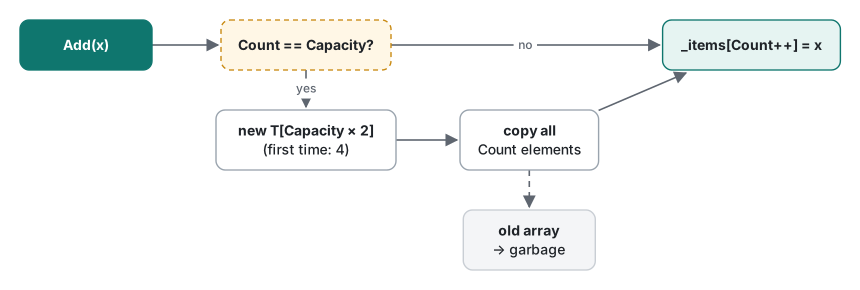
Because capacity doubles, the average cost per Add is constant (amortized O(1)). But at each growth step the whole array is copied and the old one becomes garbage. The measurement section below puts numbers on that.
Collection expressions and capacity
C# 12 collection expressions work with List<T> too. Compiled with LangVersion 11, they are rejected:
Program.cs(1,15): error CS9058: Feature 'collection expressions' is not available in C# 11.0. Please use language version 12.0 or greater.
On .NET 10 (C# 14), when the compiler knows the element count it allocates exactly that:
List<int> ce = [1, 2, 3];
List<int> spread = [..ce, 4, 5];
List<int> empty = [];
var ec = new List<int>(); ec.EnsureCapacity(100);
[1,2,3] Capacity=3; [..ce,4,5] Count=5 Capacity=5
[] Capacity=0
EnsureCapacity(100) -> 100
Compare new List<int> { 1, 2, 3 }, a collection initializer: it is just three Add calls on an empty list, and its Capacity came out as 4. The collection expression gave 3. A spread (..) is sized in one step when the source count is known. For a list that already exists and is about to receive a batch, EnsureCapacity(n) (.NET 6) does the same job.
Measured: with and without an initial capacity
We timed adding 10 million ints and recorded allocations. The third variant uses CollectionsMarshal.SetCount (.NET 8) to set Count in one call and then writes through a span.
static long Fill(int n, bool presize) {
    var l = presize ? new List<int>(n) : new List<int>();
    for (int i = 0; i < n; i++) l.Add(i);
    return l.Count;
}
static long FillSetCount(int n) {
    var l = new List<int>();
    CollectionsMarshal.SetCount(l, n);
    var s = CollectionsMarshal.AsSpan(l);
    for (int i = 0; i < s.Length; i++) s[i] = i;
    return l.Count;
}
.NET 10.0.14, Release build, Apple Silicon Mac, three runs after a warm-up:
| Variant | Run 1 | Run 2 | Run 3 | Allocated | gen2 GCs |
|---|---|---|---|---|---|
new List<int>() + Add |
18.7 ms | 18.2 ms | 17.3 ms | 128.0 MB | 3 |
new List<int>(N) + Add |
8.9 ms | 9.0 ms | 8.4 ms | 38.1 MB | 0 |
SetCount + AsSpan |
5.8 ms | 6.0 ms | 5.7 ms | 38.1 MB | 0 |

38.1 MB is exactly 10 million ints (40,000,000 bytes). The 128.0 MB is the sum of every array along the way — 4, 8, 16 … up to 16,777,216 slots — which works out to roughly 4 bytes × 2 × 16,777,216 ≈ 134 million bytes. Arrays that large go on the Large Object Heap, which is why three gen2 collections occurred.
Ten million items is an extreme case, so we also measured a common size: building a 1,000-item list 100,000 times (the first pass is excluded because tiered JIT compilation skews it).
| Variant | 100,000 lists | Allocated per list |
|---|---|---|
new List<int>() |
113–145 ms | 8,424 B |
new List<int>(1000) |
80–103 ms | 4,056 B |
Even for small lists, allocation dropped by more than half and time by about 30%. If you know the count, pass it. If you do not, do not guess a large number either; pass a real Count or Length when you have one.
CollectionsMarshal.AsSpan: fast, but sharp
CollectionsMarshal.AsSpan(list) (.NET 5) returns a Span<T> over the internal array, up to Count. You can modify elements in place without copying:
var nums = new List<int> { 10, 20, 30 };
Span<int> span = CollectionsMarshal.AsSpan(nums);
span[0] = 99;
Console.WriteLine($"after span[0]=99 -> nums[0]={nums[0]}");
nums.Add(40);   // Capacity 4: same array
nums.Add(50);   // Capacity 4 -> 8: new array
span[1] = -1;
Console.WriteLine($"after realloc, span[1]=-1 -> nums[1]={nums[1]} (span.Length={span.Length})");
after span[0]=99 -> nums[0]=99
after realloc, span[1]=-1 -> nums[1]=20 (span.Length=3)
The second line is the trap. Once Add replaced the array, span points at the abandoned old array: the write never reached the list, and nothing threw. The rule: while you hold a span, do not Add, Remove or Insert on that list. A foreach over a List<T> would catch a modification with InvalidOperationException (we confirmed it), but a span has no such check.
What about speed? We summed 10 million items, averaging 20 passes:
| Loop | Pass 1 | Pass 2 |
|---|---|---|
for (i < l.Count) s += l[i] |
6.32 ms | 6.40 ms |
foreach (var x in list) |
6.56 ms | 6.43 ms |
foreach (var x in AsSpan(list)) |
6.42 ms | 8.05 ms |
No meaningful difference. Running the program again put all three between 6.4 and 7.0 ms. The .NET 10 JIT already optimizes for and foreach over List<T> well, so there is no reason to use AsSpan just to speed up a plain loop. It earns its place when you pass data to an API that takes ReadOnlySpan<T>, when you modify large struct elements by ref, and when, as with SetCount above, you skip the Add step entirely.
Rules of thumb for List
| Situation | Do this |
|---|---|
| You know how many items are coming | new List<T>(count) or EnsureCapacity |
| Starting from fixed values | Collection expression [a, b, c] (exact capacity) |
| Filled once, kept for a long time | TrimExcess() or ToArray() |
| Emptying and reusing a big list | Clear() (keeps the array) |
| Passing to a span-based API | CollectionsMarshal.AsSpan, no Add while you hold it |
| Simple sum or iteration | Plain for/foreach (no measured difference) |
| Count never changes | An array (see C# arrays) |
The difference between arrays and List<T>, and why Array.Resize in a loop is so slow, is measured in the C# arrays article.
Test environment: .NET SDK 10.0.403 / runtime 10.0.14, C# 14 (net10.0 default), macOS on an Apple Silicon Mac.
FAQ
How does List<T>.Capacity grow?
A new List<int>() has Capacity 0. The first Add makes it 4, and after that it doubles each time the array is full: 8, 16, 32 and so on. Printing it while adding 1,100 items on .NET 10 showed changes at the 5th, 9th, 17th … 1,025th Add. Each growth allocates a new array and copies every element.
How much faster is new List<int>(n) with an initial capacity?
For 10 million ints, 17.3 to 18.7 ms and 128.0 MB allocated without a capacity, versus 8.4 to 9.0 ms and 38.1 MB with one. Building a 1,000-item list 100,000 times took 113 to 145 ms versus 80 to 103 ms, with 8,424 versus 4,056 bytes allocated per list (.NET 10, Release, Apple Silicon Mac). When you know the count, passing it is nearly free.
Does CollectionsMarshal.AsSpan make loops faster?
Not for a simple sum on .NET 10: summing 10 million ints took 6.3 to 6.8 ms with for, 6.4 to 7.0 ms with foreach and 6.4 to 8.1 ms with foreach over AsSpan. Its value is editing elements in place and passing them to Span-based APIs without copying. If an Add reallocates the list afterwards, the span still points at the old array.