C# Reflection & Attributes: Invoke Cost, AOT Warnings
Read types and custom attributes via reflection, measure Invoke against direct calls and delegates, and see the IL2026/IL2057 warnings Native AOT raises.
Revised November 2026. This tutorial first appeared in Korean in 2021, written against Visual Studio 2012. Its warning and error listings were pasted from the IDE's error list, included a personal user-folder path and carried no diagnostic codes. We removed them and recompiled every example on .NET 10.0.14 (C# 14); the listings below are real
dotnet buildoutput with codes (CS0618, CS0619, CS0592). We also corrected two explanations (what[Conditional]removes, and what a positional attribute argument may be) and added a cost measurement plus the Native AOT and trimming warnings that every reflection user meets in 2026.
This article is for C# developers who need to inspect types at run time or call methods by name, and for anyone who wants to define their own attributes and read them back to drive validation, mapping or plugin discovery. The summary: reflection is powerful, measurably slow when used naively, and in conflict with trimming and Native AOT. If you call something repeatedly, turn it into a delegate once. If you are writing new code, first ask whether a source generator could do the same work at compile time.
Reflection basics: from a Type to its members
Reflection reads a type's metadata (constructors, methods, fields, properties, attributes) while the program runs, and can create instances or invoke members from that metadata. Everything starts from System.Type.
| Call | Returns | What you get |
|---|---|---|
obj.GetType() / typeof(T) |
Type |
The runtime type object |
GetConstructors() |
ConstructorInfo[] |
Public constructors |
GetMethods() |
MethodInfo[] |
Public methods, inherited ones included |
GetFields() |
FieldInfo[] |
Public fields |
GetProperties() |
PropertyInfo[] |
Public properties |
GetMembers() |
MemberInfo[] |
All of the above |
The 2021 example inspects an Animal class with two public fields, one constructor and two methods. Its output on .NET 10 (the labels are the original Korean ones: constructor, method, field):
Animal animal = new Animal("cat", 4);
Type type = animal.GetType();
foreach (ConstructorInfo c in type.GetConstructors()) Console.WriteLine("\t{0}", c);
foreach (MethodInfo m in type.GetMethods()) Console.Write("\t{0}", m);
foreach (FieldInfo f in type.GetFields()) Console.Write("\t{0}", f);
생성자(Constructor) :  Void .ctor(System.String, Int32)

메소드(Method) :   Void eat()  Void sleep()    System.Type GetType()   System.String ToString()    Boolean Equals(System.Object)   Int32 GetHashCode()
필드(Field) :     Int32 age   System.String name
Compared with 2021, GetType() and ToString() swapped places. That is allowed: Microsoft Learn's documentation for Type.GetMethods states that methods are not returned in any particular order. Never depend on that order. To find one member use GetMethod("eat"); to include non-public members pass BindingFlags.NonPublic | BindingFlags.Instance.
Built-in attributes: Conditional, Obsolete, DllImport
An attribute is metadata attached with [Name(positional, Named = value)]. The 2021 text said positional arguments are "written in double quotes". They are not limited to strings: every attribute argument must be a compile-time constant of an allowed type: bool, char, the integral and floating-point primitives, string, Type, an enum, object, or a one-dimensional array of these. decimal looks like a constant but is rejected:
Program.cs(17,2): error CS0181: Attribute constructor parameter 'value' has type 'decimal', which is not a valid attribute parameter type
Conditional. The 2021 article said [Conditional] decides "whether the method is compiled". In fact the compiler removes the calls; the method itself is always compiled. We ran the same program with and without #define TEST:
#define TEST            // remove this line and run again
using System.Diagnostics;

class Program
{
    [Conditional("TEST")]
    public void TestConditional() => Console.WriteLine("TestConditional!");

    static void Main()
    {
        new Program().TestConditional();
        var mi = typeof(Program).GetMethod(nameof(TestConditional));
        Console.WriteLine($"method still in assembly: {mi is not null}");
    }
}
TestConditional!
method still in assembly: True
(build without #define TEST)
method still in assembly: True
Debug.WriteLine vanishing from Release builds works the same way: it is marked [Conditional("DEBUG")]. Because the whole call is removed, its argument expressions are not evaluated either, so never put side effects inside them.
Obsolete. The original listings were Visual Studio 2012 screenshots of the error list. Here is the real .NET 10 output, including the DiagnosticId and UrlFormat properties of ObsoleteAttribute:
[Obsolete("Use NewMethod() instead.")]
public void OldMethod() { Console.WriteLine("OLD!"); }

[Obsolete("Removed. Use NewMethod().", true)]
public void OlderMethod() { }

[Obsolete("Use NewMethod2.", DiagnosticId = "TLAB001", UrlFormat = "https://example.com/{0}")]
public void OldMethod2() { }
Program.cs(17,9): warning CS0618: 'Program.OldMethod()' is obsolete: 'Use NewMethod() instead.'
Program.cs(19,9): error CS0619: 'Program.OlderMethod()' is obsolete: 'Removed. Use NewMethod().'
Program.cs(20,9): warning TLAB001: 'Program.OldMethod2()' is obsolete: 'Use NewMethod2.' (https://example.com/TLAB001)
Passing true as the second argument turns warning CS0618 into error CS0619. A DiagnosticId replaces CS0618 with your own code, so consumers of your library can silence exactly that deprecation with <NoWarn>TLAB001</NoWarn>.
DllImport. The 2021 example calls MessageBox from User32.dll. Targeting net10.0, it compiles on macOS without a single warning, because a native library is located on the first call, not at compile time. Run on this Mac, that first call fails (output abridged):
OS: macOS 26.6.2
Unhandled exception. System.DllNotFoundException: Unable to load shared library 'User32.dll' or one of its dependencies. …
We could not run it on Windows, so for the message-box behavior we defer to Microsoft Learn. Note that the 2021 signature's int hParent is really a pointer-sized handle (HWND), so nint is the right type. Since .NET 7, Microsoft recommends the source-generated LibraryImport. The following compiles on net10.0; we verified compilation only, and the call is skipped on non-Windows systems:
static partial class Native
{
    [LibraryImport("user32.dll", StringMarshalling = StringMarshalling.Utf16)]
    internal static partial int MessageBoxW(nint hWnd, string text, string caption, uint type);
}
The first build failed, because the generated marshalling code is unsafe:
CSC : error SYSLIB1062: LibraryImportAttribute requires unsafe code. Project must be updated with '<AllowUnsafeBlocks>true</AllowUnsafeBlocks>'.
Custom attributes: define them, then actually read them
Derive from System.Attribute and you have your own attribute. Adding [AttributeUsage(AttributeTargets.Method)] to the 2021 example and then placing the attribute on a class gives (this replaces the 2021 listing that contained a personal path):
Program.cs(1,2): error CS0592: Attribute 'CustomAttribute' is not valid on this declaration type. It is only valid on 'method' declarations.
Combine targets with a bitwise OR, AttributeTargets.Method | AttributeTargets.Class, and it compiles. Enumerating AttributeTargets on .NET 10 prints sixteen names, including GenericParameter, which the 2021 table left out:
Assembly, Module, Class, Struct, Enum, Constructor, Method, Property, Field, Event, Interface, Parameter, Delegate, ReturnValue, GenericParameter, All
The 2021 example attached an attribute and never read it. An attribute does nothing until some code looks for it. Here is a compact validator driven by attributes on properties:
using System.Reflection;

[AttributeUsage(AttributeTargets.Property)]
sealed class NotEmptyAttribute : Attribute;

[AttributeUsage(AttributeTargets.Property)]
sealed class RangeAttribute(int min, int max) : Attribute
{
    public int Min { get; } = min;
    public int Max { get; } = max;
    public string? Message { get; init; }   // named argument
}

sealed class SignupForm
{
    [NotEmpty] public string Email { get; set; } = "";
    [Range(14, 120, Message = "age must be 14-120")] public int Age { get; set; }
}

static class Validator
{
    public static IEnumerable<string> Validate(object obj)
    {
        foreach (PropertyInfo p in obj.GetType().GetProperties())
        {
            object? value = p.GetValue(obj);
            if (p.IsDefined(typeof(NotEmptyAttribute)) && string.IsNullOrEmpty(value as string))
                yield return $"{p.Name}: must not be empty";
            if (p.GetCustomAttribute<RangeAttribute>() is { } r && value is int n && (n < r.Min || n > r.Max))
                yield return $"{p.Name}: {r.Message ?? $"{r.Min}..{r.Max}"} (was {n})";
        }
    }
}
Validating new SignupForm { Email = "", Age = 12 }:
Email: must not be empty
Age: age must be 14-120 (was 12)
We also checked AllowMultiple (default false) and Inherited (default true). Applying a non-multiple attribute twice is error CS0579 (Duplicate 'Tag' attribute). With [Tag("base1"), Tag("base2")] (multiple, inherited) and [SealedMark] (Inherited = false) on a base class, reading from the derived class:
Tags on Child (inherit:true): base1,base2
Tags on Child (inherit:false):
IsDefined(Child, Sealed, inherit:true): False
You must ask with inherit: true to see the base class's attributes, and an attribute declared Inherited = false stays invisible regardless. The 2021 claim that custom attributes "cannot affect compilation" is also outdated: analyzers and source generators read custom attributes at compile time to report diagnostics or generate code. LibraryImport above and [JsonSerializable] below are exactly that.
How slow is Invoke? Measured against direct calls and delegates
We called int Add(int a, int b) (marked NoInlining) 10 million times per case. .NET 10.0.14, Release build, Apple M1 Pro, median of five runs; allocation is the GC.GetAllocatedBytesForCurrentThread() delta divided by the call count. The last case looks the method up on every call, so it ran one million times.
MethodInfo mi = typeof(Calc).GetMethod(nameof(Calc.Add))!;
var invoker = MethodInvoker.Create(mi);                          // .NET 8+
var del = mi.CreateDelegate<Func<Calc, int, int, int>>();        // open-instance delegate

s += calc.Add(i, 1);                          // direct
s += del(calc, i, 1);                         // CreateDelegate
s += (int)invoker.Invoke(calc, i, 1)!;        // MethodInvoker
s += (int)mi.Invoke(calc, [i, 1])!;           // MethodInfo.Invoke
| Approach | Median per call | Min–max | Allocated per call |
|---|---|---|---|
| Direct call | 1.13 ns | 1.09–1.15 | 0 B |
Delegate from CreateDelegate |
1.60 ns | 1.56–1.70 | 0 B |
MethodInvoker.Invoke |
17.00 ns | 16.37–25.06 | 72 B |
MethodInfo.Invoke |
32.73 ns | 32.01–33.82 | 112 B |
GetMethod + Invoke every call |
43.72 ns | 39.66–69.31 | 112 B |
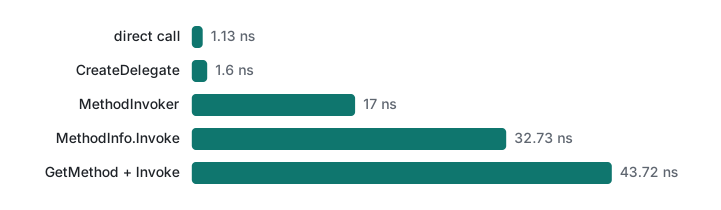
MethodInfo.Invoke was about 29 times slower than a direct call and allocated 112 bytes per call for the argument array and the boxed ints. MethodInvoker takes arguments without an array and halved that. (Building the same file for net7.0 fails with error CS0103 on MethodInvoker; net8.0 succeeds.) The real win is CreateDelegate: build it once and you are within half a nanosecond of a direct call. Thirty nanoseconds sounds like nothing, but serializers and mappers make thousands of such calls per request. For a plugin you look up once and keep, plain Invoke is fine.
The 2026 caveat: trimming, Native AOT and source generators
With Native AOT and trimming now common in production since .NET 8, reflection has a new problem. The trimmer keeps only the types and members it can see statically and removes the rest; a type you only know by a string may be gone. Setting <IsAotCompatible>true</IsAotCompatible> in the project turns on the AOT analyzers during a normal build:
string name = args.Length > 0 ? args[0] : Console.ReadLine() ?? "";
Type? t = Type.GetType(name);
Console.WriteLine(JsonSerializer.Serialize(new Point(1, 2)));
Program.cs(5,11): warning IL2057: Unrecognized value passed to the parameter 'typeName' of method 'System.Type.GetType(String)'. It's not possible to guarantee the availability of the target type.
Program.cs(10,19): warning IL2026: Using member 'System.Text.Json.JsonSerializer.Serialize<TValue>(TValue, JsonSerializerOptions)' which has 'RequiresUnreferencedCodeAttribute' can break functionality when trimming application code. …
Program.cs(10,19): warning IL3050: Using member 'System.Text.Json.JsonSerializer.Serialize<TValue>(TValue, JsonSerializerOptions)' which has 'RequiresDynamicCodeAttribute' can break functionality when AOT compiling. …
We then ignored the warnings, published a real native executable with dotnet publish -p:PublishAot=true (about 2.1 MB) and ran it:
- A class
LegacyPlugin, referenced only by name:Type.GetTypereturnedLegacyPluginunder the JIT (dotnet run -- LegacyPlugin) butnullin the AOT executable. - Reflection-based
JsonSerializer.Serialize: the AOT executable terminated withInvalidOperationException: Reflection-based serialization has been disabled for this application.
The fix is to let the trimmer see what you need. Pin the type with typeof and declare the required member kinds with [DynamicallyAccessedMembers], or replace reflection with a source generator:
static string? CallHello(
    [DynamicallyAccessedMembers(DynamicallyAccessedMemberTypes.PublicMethods |
                                DynamicallyAccessedMemberTypes.PublicParameterlessConstructor)] Type type)
    => type.GetMethod("Hello")?.Invoke(Activator.CreateInstance(type), null) as string;

Console.WriteLine(CallHello(typeof(Plugin)));                                         // no warning
Console.WriteLine(JsonSerializer.Serialize(new Point(1, 2), AppJson.Default.Point)); // no warning

[JsonSerializable(typeof(Point))] partial class AppJson : JsonSerializerContext;
Both lines built without IL warnings and printed hello from Plugin and {"X":1,"Y":2} from the AOT executable. The only warning left was IL2057 for the lookup by string, which is inherent: if you truly must find types by name, either give up on AOT for that app or register the candidate types up front.
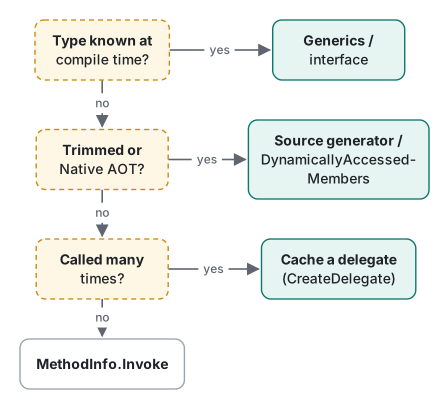
Reflection is the tool for what can only be known at run time. When the type is known at compile time, use generics or an interface; for repeated calls, cache a delegate; for AOT targets, prefer a source generator. If delegates are new to you, see Func and Action delegates; for constraints that often replace reflection, see C# generics.
Tested with .NET SDK 10.0.403 / runtime 10.0.14, C# 14, macOS on Apple M1 Pro. Native AOT published for osx-arm64. The Windows-only DllImport and LibraryImport calls were compiled but not run on Windows.
FAQ
How much slower is MethodInfo.Invoke than a direct call?
In our test MethodInfo.Invoke cost about 32.7 ns and 112 bytes of allocation per call, roughly 29 times a direct call (1.13 ns). MethodInvoker from .NET 8 took 17.0 ns, and a delegate created once with CreateDelegate took 1.60 ns (.NET 10, Release, Apple M1 Pro, 10 million calls). If you call the same method repeatedly, convert it to a delegate once.
Does [Conditional] remove the method from the build?
No. The method is always compiled and stays in the assembly; what disappears are the calls to it when the symbol is not defined. With #define TEST removed, typeof(Program).GetMethod("TestConditional") still returned a non-null MethodInfo.
What happens to reflection under Native AOT?
The build reports warnings such as IL2057, IL2026 and IL3050, and at run time types removed by the trimmer cannot be found. A class referenced only by a string was found by Type.GetType under the JIT but returned null in the AOT executable. Pinning the type with typeof plus [DynamicallyAccessedMembers], or switching to a source generator, removes the warnings.