C# Registry on .NET 10: CA1416, RegistryView, Pitfalls
Windows registry access from C# on .NET 10: RegistryKey basics, the real CA1416 warning and its IsWindows() fix, 32/64-bit RegistryView, and when to use a file.
Revised November 2026. This tutorial first appeared in Korean in 2021. We re-checked it against .NET 10. Registry code is Windows-only, so the samples were compiled with .NET 10 for Windows; not run on this machine (an Apple Silicon Mac). The only program output shown below comes from runs we actually did on macOS: the platform check, the exception you get without one, and the cross-platform fallback. Windows behavior is described from the Microsoft Learn pages named in the text. Two statements in the 2021 text were wrong — that integers are stored as REG_SZ, and the list of
RegistryValueKindmembers — and are corrected here.
This article is for developers who need to read or write the Windows registry from C#, and for anyone who moved older registry code to .NET 10 and got a wall of CA1416 warnings. The short version: the RegistryKey API has barely changed since 2021, but today you should close every key with using, keep your data under HKCU\Software\<Company>\<App>, and tell the compiler that the code is Windows-only. And if your app is the only reader of its settings, a settings file is usually the better choice.
RegistryKey basics: create, open, write, read
The registry types live in the Microsoft.Win32 namespace and ship with .NET 10; no extra package is needed. These are the members you will use most:
| Member | What it does |
|---|---|
CreateSubKey |
Creates a subkey, or opens it for writing if it exists |
OpenSubKey(name) / OpenSubKey(name, true) |
Opens read-only / writable; returns null if missing |
DeleteSubKey / DeleteSubKeyTree |
Deletes a key / deletes it with all children |
GetSubKeyNames, GetValueNames |
Lists child keys / value names |
SetValue, GetValue, GetValueKind, DeleteValue |
Write, read, inspect the type of, and delete a value |
The 2021 sample created a key called c# rkey directly under HKEY_CURRENT_USER. That works, but the top level of HKCU belongs to Windows and other software. By convention, application data goes under HKCU\Software\<Company>\<App>. Here is the 2026 version:
using Microsoft.Win32;
using System.Runtime.Versioning;

[SupportedOSPlatform("windows")]
static class RegistryDemo
{
    const string AppKey = @"Software\TLabSample";

    public static void Run()
    {
        using (RegistryKey key = Registry.CurrentUser.CreateSubKey(AppKey))
        {
            key.SetValue("Greeting", "hello");                 // string -> REG_SZ
            key.SetValue("Count", 1234);                       // int    -> REG_DWORD
            key.SetValue("Big", 1234L);                        // long   -> REG_SZ (!)
            key.SetValue("Big64", 1234L, RegistryValueKind.QWord);
            foreach (string name in key.GetValueNames())
                Console.WriteLine($"{name}: {key.GetValueKind(name)} = {key.GetValue(name)}");
        }

        using (RegistryKey? key = Registry.CurrentUser.OpenSubKey(AppKey))   // read-only
        {
            int count = key?.GetValue("Count") is int n ? n : 0;
            string greeting = key?.GetValue("Greeting") as string ?? "(none)";
            Console.WriteLine($"Count={count}, Greeting={greeting}");
        }

        Registry.CurrentUser.DeleteSubKeyTree(AppKey, throwOnMissingSubKey: false);
    }
}
This compiled with zero warnings for both net10.0-windows and plain net10.0. Compared with 2021:
- A
RegistryKeyholds an operating-system handle, so close it withusing. ChainingCreateSubKey("a").CreateSubKey("b")as the 2021 sample did leaves the intermediate key open; pass the whole path@"a\b"instead. OpenSubKeyreturnsnullwhen the key does not exist, so the read side uses?.and a type pattern (is int n) with a default.- For cleanup,
DeleteSubKeyTree(..., throwOnMissingSubKey: false)is the forgiving choice. The Microsoft Learn page forRegistryKey.DeleteSubKeydocuments that it throwsInvalidOperationExceptionif the key still has children andArgumentExceptionif the key does not exist.
The 2021 code on .NET 10
We pasted the 2021 C# snippets unchanged into a WinForms project (net10.0-windows, nullable enabled as the template sets it) and built it with dotnet build -p:EnableWindowsTargeting=true. No errors, but seven nullable warnings:
Program.cs(23,32): warning CS8600: Converting null literal or possible null value to non-nullable type.
Program.cs(23,32): warning CS8602: Dereference of a possibly null reference.
Program.cs(26,32): warning CS8600: Converting null literal or possible null value to non-nullable type.
Program.cs(38,32): warning CS8600: Converting null literal or possible null value to non-nullable type.
Program.cs(39,29): warning CS8602: Dereference of a possibly null reference.
Program.cs(42,32): warning CS8600: Converting null literal or possible null value to non-nullable type.
Program.cs(43,13): warning CS8602: Dereference of a possibly null reference.
Line 23 is Registry.CurrentUser.OpenSubKey("c# rkey").OpenSubKey("testsubkey") and line 39 is MessageBox.Show(rkey.GetValue("test").ToString()). The compiler is right: on a machine where the key or value does not exist yet, both return null, so the 2021 code could crash with a NullReferenceException on first run. The 2026 version above handles both cases and has no warnings.
The 2021 text also needed two corrections:
- "Whether you pass an integer or a string, it is stored as REG_SZ" was wrong. The Microsoft Learn page for
RegistryKey.SetValuesays the overload without a kind stores anintasREG_DWORDand all other numeric types,longincluded, as strings. That is whyBigabove ends up asREG_SZandBig64, with an explicitQWord, asREG_QWORD. - The
RegistryValueKindtable. The original listed seven members and describedUnknownasREG_RESOURCE_LIST. Printing the enum on .NET 10 gives eight:
RegistryValueKind: Unknown=0, String=1, ExpandString=2, Binary=3, DWord=4, MultiString=7, QWord=11, None=-1
Unknown means "an unsupported registry data type", and there is also None (no data type). One more detail: the 2021 sample called DeleteSubKey(@"c# rkey\qwd") on a key the code never created; on a clean machine that throws the ArgumentException mentioned above.
CA1416: "This call site is reachable on all platforms"
Put registry code in a plain net10.0 console project and the build succeeds, with warnings. This is the real output for an unguarded Registry.CurrentUser.CreateSubKey(...) plus SetValue:
Program.cs(10,5): warning CA1416: This call site is reachable on all platforms. 'RegistryKey.SetValue(string?, object)' is only supported on: 'windows'.
Program.cs(5,5): warning CA1416: This call site is reachable on all platforms. 'RegistryValueKind' is only supported on: 'windows'.
Program.cs(9,29): warning CA1416: This call site is reachable on all platforms. 'Registry.CurrentUser' is only supported on: 'windows'.
Program.cs(9,29): warning CA1416: This call site is reachable on all platforms. 'RegistryKey.CreateSubKey(string)' is only supported on: 'windows'.
We then ignored the warnings and ran the program on macOS:
System.NullReferenceException: Object reference not set to an instance of an object.
Not a PlatformNotSupportedException, as you might expect. A second probe showed why: off Windows, Registry.CurrentUser itself is null, while opening a base key explicitly does throw the clear exception.
Registry.CurrentUser is null: True
OpenBaseKey: PlatformNotSupportedException: Registry is not supported on this platform.
There are three ways to make CA1416 go away legitimately:
- Target
net10.0-windows. WinForms and WPF apps already do, which is why they never see this warning. - Guard the call with
if (OperatingSystem.IsWindows()). The analyzer understands the check. - Mark Windows-only code with
[SupportedOSPlatform("windows")], asRegistryDemodoes, and guard the call site.
For a library that runs everywhere, combine 2 and 3. The entry point we used:
if (OperatingSystem.IsWindows())
{
    RegistryDemo.Run();
}
else
{
    // Same data, cross-platform: a JSON file in the per-user app data folder
    string dir = Path.Combine(Environment.GetFolderPath(Environment.SpecialFolder.ApplicationData), "TLabSample");
    Directory.CreateDirectory(dir);
    string file = Path.Combine(dir, "settings.json");
    File.WriteAllText(file, JsonSerializer.Serialize(new Settings("hello", 1234)));
    Settings s = JsonSerializer.Deserialize<Settings>(File.ReadAllText(file))!;
    Console.WriteLine($"Not Windows -> {Path.GetFileName(dir)}/settings.json: {File.ReadAllText(file)}  Count={s.Count}");
}

record Settings(string Greeting, int Count);
Output on macOS, with zero CA1416 warnings in the build:
Not Windows -> TLabSample/settings.json: {"Greeting":"hello","Count":1234} Count=1234
32-bit vs 64-bit: RegistryView
On 64-bit Windows, a 32-bit (x86) process that opens HKLM\SOFTWARE is silently sent to HKLM\SOFTWARE\WOW6432Node. This is described on the Microsoft Learn pages "Registry Redirector" and "Registry Keys Affected by WOW64", and it explains most "my 32-bit tool can't see the value the 64-bit installer wrote" reports.
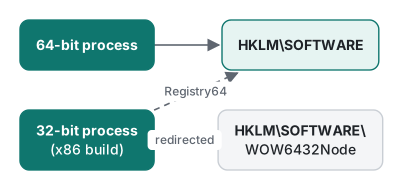
To choose a side regardless of the process bitness, open the base key with an explicit RegistryView:
// See the 64-bit HKLM even from a 32-bit process
using RegistryKey hklm = RegistryKey.OpenBaseKey(RegistryHive.LocalMachine, RegistryView.Registry64);
using RegistryKey? cv = hklm.OpenSubKey(@"SOFTWARE\Microsoft\Windows NT\CurrentVersion");
Console.WriteLine(cv?.GetValue("ProductName"));
RegistryView.Default means "whatever this process is". An AnyCPU .NET 10 app runs as 64-bit on 64-bit Windows, so you rarely notice; it matters for apps built with <PlatformTarget>x86</PlatformTarget> and for 32-bit plug-in hosts. Like the rest of the Windows code here, this snippet was compiled, not run.
In 2026, do you still need the registry?
The 2021 tutorial assumed that "saving settings" meant "the registry". Today the decision looks like this:
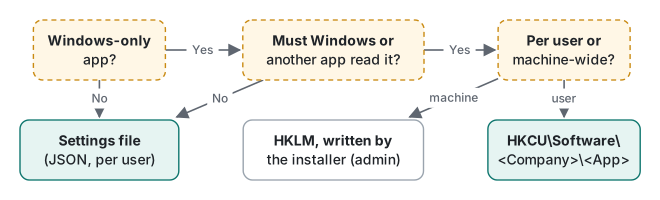
- Settings only your app reads: a file under the user profile, such as
%APPDATA%\<App>\settings.json. The same code runs on macOS and Linux (see the output above), the file is easy to back up, diff and inspect, and support can ask a user to send it. Server apps haveappsettings.jsonandMicrosoft.Extensions.Configuration. - Values that Windows or another program reads: startup entries under
HKCU\Software\Microsoft\Windows\CurrentVersion\Run, file associations, keys agreed with another app. Here the registry is the only option. - Machine-wide settings: writing to
HKLMneeds administrator rights, and an app that tries at run time gets anUnauthorizedAccessException. The usual pattern is that the installer writes and the app only reads. - MSIX-packaged apps: Microsoft Learn's MSIX documentation explains that registry writes from a packaged app are virtualized into a per-package location. Check this first if another program is supposed to read the value.
What changed since the 2021 version
| 2021 text | 2026 |
|---|---|
Key created directly at HKCU\c# rkey |
Under HKCU\Software\<Company>\<App> |
| Integers and strings both stored as REG_SZ | int → REG_DWORD, long and other numbers → REG_SZ, QWord kind → REG_QWORD |
7 RegistryValueKind members, Unknown = REG_RESOURCE_LIST |
8 members including None; Unknown = unsupported type |
| Keys never closed, no null checks | using + ?., zero nullable warnings |
| No mention of platforms | net10.0-windows or OperatingSystem.IsWindows() (CA1416) |
| Seven Registry Editor screenshots | Removed (see below) |
We removed the seven Registry Editor screenshots from the 2021 post. They contained no personal data, but they showed the top-level HKCU key we now advise against, and since this revision was not run on Windows we could not re-shoot them. The two diagrams above replace them.
How far to go with try/catch around registry access is covered in exception handling. To open a settings window from a WinForms app, see modal and modeless forms.
Environment: .NET SDK 10.0.403 / runtime 10.0.14, C# 14, Microsoft.WindowsDesktop.App.Ref 10.0.14, macOS on an Apple Silicon Mac. Windows-only code was compiled with dotnet build -p:EnableWindowsTargeting=true and not run.
FAQ
Does SetValue store an int as a string (REG_SZ)?
No. Our 2021 version of this tutorial said so, and it was wrong. According to the Microsoft Learn page for RegistryKey.SetValue, the overload without a RegistryValueKind stores a 32-bit int as REG_DWORD and every other numeric type, including long, as a string (REG_SZ). To store a 64-bit value as REG_QWORD, call SetValue(name, value, RegistryValueKind.QWord).
Why do I get CA1416 when I use the registry in a net10.0 project?
The registry APIs are marked as supported only on Windows, so when the target framework is plain net10.0 the platform compatibility analyzer reports CA1416. Target net10.0-windows, wrap the calls in if (OperatingSystem.IsWindows()), or mark the method or class with [SupportedOSPlatform("windows")]. When we ignored the warning and ran on macOS, Registry.CurrentUser was null and the program died with a NullReferenceException.
Why can't my 32-bit program find a value under HKLM\SOFTWARE?
On 64-bit Windows, a 32-bit process that opens HKLM\SOFTWARE is redirected to HKLM\SOFTWARE\WOW6432Node (Microsoft Learn, 'Registry Redirector'). Open the base key with RegistryKey.OpenBaseKey(RegistryHive.LocalMachine, RegistryView.Registry64) to read the 64-bit side from a 32-bit process.